

Hello wpForo Team,
I hope this message finds you well.
I recently came across the new Automated Topic Generation feature,
and I'm genuinely impressed by the direction you're taking with AI-powered forum management.
I'd like to humbly suggest a potential enhancement regarding the Frequency and Topics Per Run settings. Currently, it appears that topics can be scheduled by day, but I was wondering
Would it be possible to also allow users to specify the exact time at which the topic generation runs?
I'm asking because the feature is still in beta,
and I haven't been able to apply and test it directly on my live site yet, so I wanted to reach out before diving in.
If time-based scheduling could be implemented, it would be wonderful to have:
-
Specific time slots for when each topic generation run is triggered (e.g., 9:00 AM, 3:00 PM)
-
Custom intervals between topics when multiple topics are generated per run (e.g., generate one topic every 2 hours rather than all at once), so the content appears more organic and natural to forum members
This level of granularity would make the feature significantly more powerful for communities that want to maintain a consistent, natural-looking posting rhythm throughout the day.
Thank you so much for this fantastic update — Automated Topic Generation is exactly the kind of innovation that makes wpForo stand out, and I truly appreciate all the hard work your team puts into continuously improving the platform. Looking forward to seeing this feature grow!
P.S. My community is configured to allow anonymous users to post. However, I was wondering if there is already a feature that allows administrators to view the IP address of anonymous post authors for moderation purposes — or if this is something I may have simply overlooked in the settings. If such functionality doesn't exist yet, it would be a very valuable addition for community managers who need to handle spam or abuse from anonymous users. Any guidance on this would be greatly appreciated!


Hi @helloman ,
Thank you for your kind words and detailed suggestions!
Regarding exact time scheduling, the AI Task scheduling actually already offers more granularity than daily. You can set the frequency to every 1 hour, every 3 hours, or every 6 hours in addition to daily, so you can spread topic generation throughout the day.
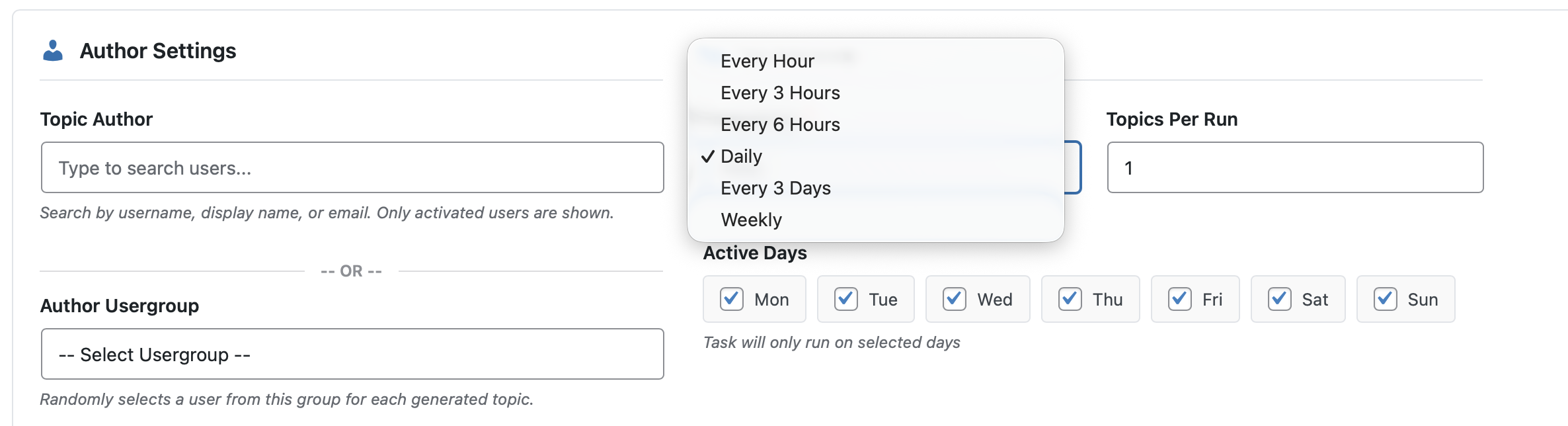
However, specifying an exact clock time (e.g., "run at 9:00 AM") is not feasible due to how WordPress works internally. WordPress core does not provide a real-time cron system, WP-Cron is triggered by site visits, meaning scheduled tasks only execute when someone visits your site, which makes precise timing inherently unreliable. On top of that, there are multiple timezone layers involved: the WordPress site timezone, each user's profile timezone, and the server's own timezone, these can all differ and introduce inaccuracies in when tasks actually fire.
Even with a server-level cron job triggering WP-Cron, the execution depends on server load and queue processing, so guaranteeing an exact time like "9:00 AM" is not something WordPress can reliably promise. That said, using the 1-hour interval effectively achieves a natural posting rhythm throughout the day, which is close to what you're looking for.
Regarding anonymous user IP addresses, wpForo includes comprehensive spam and flood protection in Settings > Spam Protection admin page. The Flood Protection system tracks posting velocity per user and optionally per IP address, you can enable "IP-based Flood Protection" and set a maximum number of posts per IP per hour. When limits are exceeded, wpForo can block the post, unapprove it, or temporarily ban the user for a configurable duration (1 minute to 1 day).
Additionally, there are new-user restrictions like limiting post count, requiring moderation approval, and restricting attachments and links until users reach a minimum post threshold. However, wpForo does not currently store or display the IP address of individual post authors in the admin area, this is a good suggestion that we'll consider for a future update.