
AI Search
Classic Search
 Search Phrase:
 Search Type:
Advanced search options
 Search in Forums:
 Search in date period:

 Sort Search Results by:

Filter by custom fields

Topic prefix

AI Assistant
Notifications
Clear all

[Solved] Add topic and Reply box loading

6 Posts
3 Users
0 Reactions
4,172 Views
Posts: 3
Topic starter
Translate
English
Spanish
French
German
Italian
Portuguese
Russian
Chinese
Japanese
Korean
Arabic
Hindi
Dutch
Polish
Turkish
Vietnamese
Thai
Swedish
Danish
Finnish
Norwegian
Czech
Hungarian
Romanian
Greek
Hebrew
Indonesian
Malay
Ukrainian
Bulgarian
Croatian
Slovak
Slovenian
Serbian
Lithuanian
Latvian
Estonian
(@sohaib11)
Active Member
Joined: 6 years ago
[#12859]

Hello,

I upgraded the wpForo  plugin to 1.7.2 and  have encountered two issues,

1. I was able to click the "add topic" button and add new topic but ever since the update, i'm unable to click add topic to add new topic.

2. After the update, the reply box is just keeps loading but no box to type text in.


I have attached 2 screenshot of the issue i'm encountering please advise thank you so much!


my website: https://unity.nexuselite.net/


add topic

5 Replies
Posts: 3
Topic starter
Translate
English
Spanish
French
German
Italian
Portuguese
Russian
Chinese
Japanese
Korean
Arabic
Hindi
Dutch
Polish
Turkish
Vietnamese
Thai
Swedish
Danish
Finnish
Norwegian
Czech
Hungarian
Romanian
Greek
Hebrew
Indonesian
Malay
Ukrainian
Bulgarian
Croatian
Slovak
Slovenian
Serbian
Lithuanian
Latvian
Estonian
(@sohaib11)
Active Member
Joined: 6 years ago

second image is attached here

 Reply box

1 Reply
Sofy
 Sofy
Admin
(@sofy)
Joined: 8 years ago

Support Team
Posts: 5774
Translate
English
Spanish
French
German
Italian
Portuguese
Russian
Chinese
Japanese
Korean
Arabic
Hindi
Dutch
Polish
Turkish
Vietnamese
Thai
Swedish
Danish
Finnish
Norwegian
Czech
Hungarian
Romanian
Greek
Hebrew
Indonesian
Malay
Ukrainian
Bulgarian
Croatian
Slovak
Slovenian
Serbian
Lithuanian
Latvian
Estonian

@sohaib11,

Please register some new testing user and send the users login details to info[at]gvectors.com email address to allow us to check the issue. 


Sofy
Posts: 5774
 Sofy
Admin
Translate
English
Spanish
French
German
Italian
Portuguese
Russian
Chinese
Japanese
Korean
Arabic
Hindi
Dutch
Polish
Turkish
Vietnamese
Thai
Swedish
Danish
Finnish
Norwegian
Czech
Hungarian
Romanian
Greek
Hebrew
Indonesian
Malay
Ukrainian
Bulgarian
Croatian
Slovak
Slovenian
Serbian
Lithuanian
Latvian
Estonian
(@sofy)
Support Team
Joined: 8 years ago

@sohaib11

Please register some new testing user and send the users login details to info[at]gvectors.com email address to allow us to check the issue. 

No necessary anymore. We were able to register to your forum. Now we're going to check the issue. Please wait a bit. We'll update the topic asap. 


Robert
Posts: 10716
Admin
Translate
English
Spanish
French
German
Italian
Portuguese
Russian
Chinese
Japanese
Korean
Arabic
Hindi
Dutch
Polish
Turkish
Vietnamese
Thai
Swedish
Danish
Finnish
Norwegian
Czech
Hungarian
Romanian
Greek
Hebrew
Indonesian
Malay
Ukrainian
Bulgarian
Croatian
Slovak
Slovenian
Serbian
Lithuanian
Latvian
Estonian
(@robert)
Support Team
Joined: 2 months ago

Hi @sohaib11,

Where is your footer template tags? Why you have removed WordPress footer functions and section? This is the place where wpForo and all other plugins load JS files and functions. You've crashed your w by removing the footer function and section of your WordPress theme. Please revert it back to fix all issues.

Your WordPress theme footer php file must contain <?php wp_footer(); ?> function to allow all plugins load JS files and scripts.
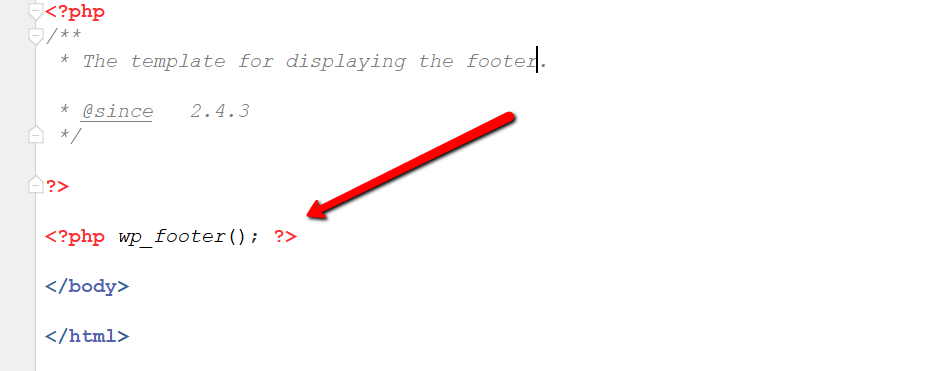
Similar issue and discussion:

https://wpforo.com/community/how-to-and-troubleshooting-2/does-not-work-tinymce/


1 Reply
(@sohaib11)
Joined: 6 years ago

Active Member
Posts: 3
Translate
English
Spanish
French
German
Italian
Portuguese
Russian
Chinese
Japanese
Korean
Arabic
Hindi
Dutch
Polish
Turkish
Vietnamese
Thai
Swedish
Danish
Finnish
Norwegian
Czech
Hungarian
Romanian
Greek
Hebrew
Indonesian
Malay
Ukrainian
Bulgarian
Croatian
Slovak
Slovenian
Serbian
Lithuanian
Latvian
Estonian

@robert Thank you so much i found the issue! For some reason the problem is with the theme i'm using.


Share:
