
Notifications
Clear all

How to hide the footer stats from guest?

11 Posts
3 Users
0 Reactions
884 Views
Posts: 9
Topic starter
(@theq6699)
Active Member
Joined: 7 months ago

How to hide the footer stats from guest? I run a private forum for wordpress developers. please see image as it shows on any guest preview.


10 Replies
Posts: 9
Topic starter
(@theq6699)
Active Member
Joined: 7 months ago

I'm current using a custom css to hide the footer. 

body:not(.logged-in) #wpforo #wpforo-wrap #wpforo-footer {
display: none !important;
}

Reply
1 Reply
Sofy
 Sofy
Admin
(@sofy)
Joined: 8 years ago

Support Team
Posts: 5716

@theq6699 

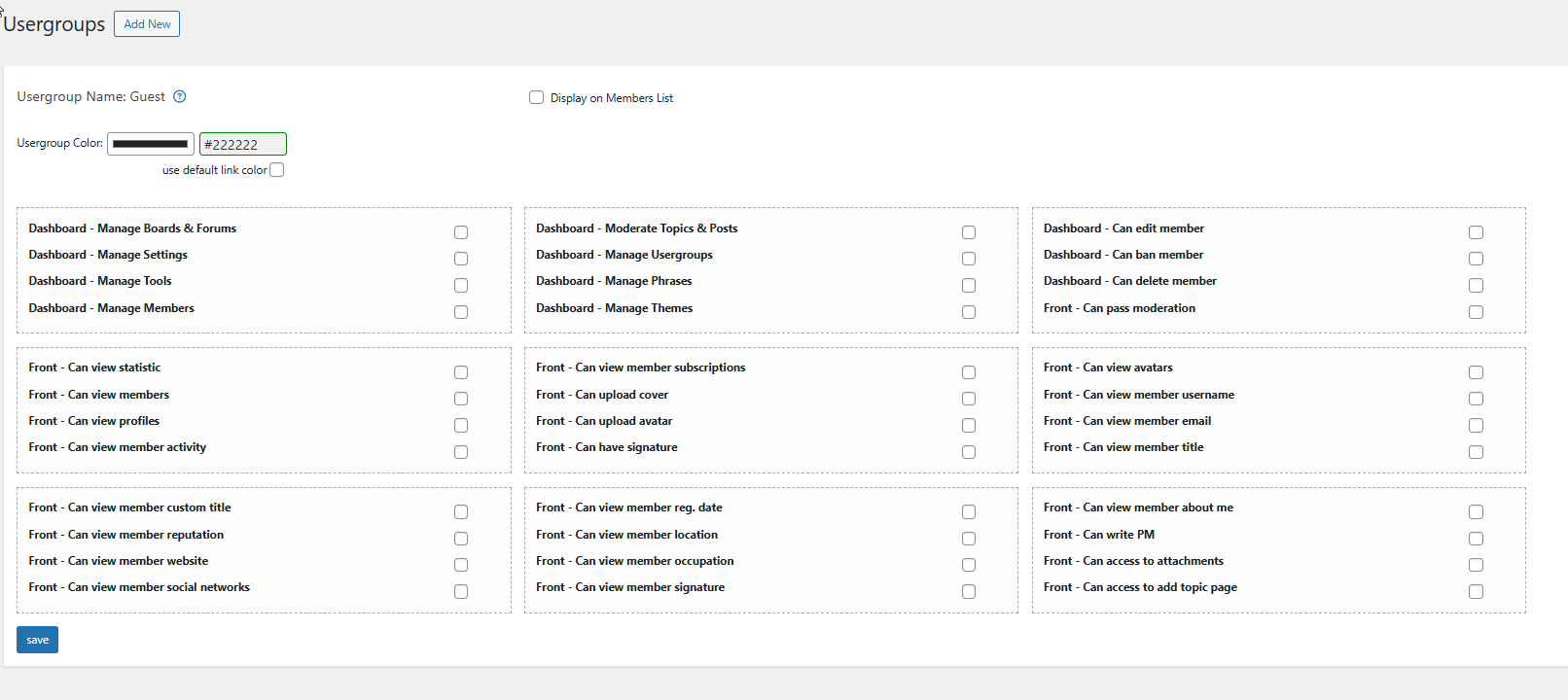
You can hide the whole statistic section for guests. You'll just need to navigate to Dashboard > wpForo > Usergroup admin page, edit the usergroup and uncheck the "Can view statistic" Can/Permission.


Reply
Posts: 9
Topic starter
(@theq6699)
Active Member
Joined: 7 months ago

Guest has nothing selected in the userrights and still can see the stats, but for now I just used css to hide it. Till I have time to debug it. 

Reply
1 Reply
Sofy
 Sofy
Admin
(@sofy)
Joined: 8 years ago

Support Team
Posts: 5716

@theq6699 

I’ll keep this topic open. Please let us know if you have any questions during the debugging process.


Reply
Posts: 9
Topic starter
(@theq6699)
Active Member
Joined: 7 months ago

Sofy,

I don't think there is a plugin conflict, but for now I will just use the css trick.

Thanks,

Q


Reply
Posts: 3
(@andrey-2)
Active Member
Joined: 3 weeks ago

First of all, thank you to the creators for such a great forum plugin!

I'm having the same problem. I need to hide the line that shows the most recently registered user from guests. Even though I have absolutely all options disabled for the Guests group, just like theq6699. This allows guests to see the new user's profile link. I need to hide this line in the forum footer for guests. How can I do this, and why doesn't disabling the option in the guest permissions settings work?


Reply
4 Replies
Sofy
 Sofy
Admin
(@sofy)
Joined: 8 years ago

Support Team
Posts: 5716

Thank you, @andrey-2,

Please open your own support topic and provide your forum URL so we can check the issue as well.

Also, don’t forget to include a screenshot showing the part you want to hide.


Reply
(@theq6699)
Joined: 7 months ago

Active Member
Posts: 9

@andrey-2 I'm using Kadence theme and I just ended up hiding the column that I used for wpfoto for guest and created a column that only shows for guest that says you need to register inorder to see the form.  This was my quick solutuions beside the css fx I did.


Reply
(@andrey-2)
Joined: 3 weeks ago

Active Member
Posts: 3

@theq6699 Thank you for your attention and participation. But using CSS styles is a bad solution, as it only visually hides the information. However, it remains accessible. Guest permissions settings should work correctly. And if all options are disabled for guests, including viewing this data, as in your screenshot, then they shouldn't see any of this. This means these options aren't working for some reason, and this is a bug that the developers need to fix.


Reply
Sofy
 Sofy
Admin
(@sofy)
Joined: 8 years ago

Support Team
Posts: 5716

@andrey-2 

Please follow my answer here: https://wpforo.com/community/how-to-and-troubleshooting-2/how-to-hide-the-footer-stats-from-guest/#post-137393


Reply