See the image of the attachment.
I want the register page to appear after clicking on a new user ad topic button.
How do I do that?
Please help someone.
thank You


To start with, exclude wpForo from W3 Total Cache, or even better remove this huge monster from your site and use some other caching (also exclude wpForo).
how i can do that?


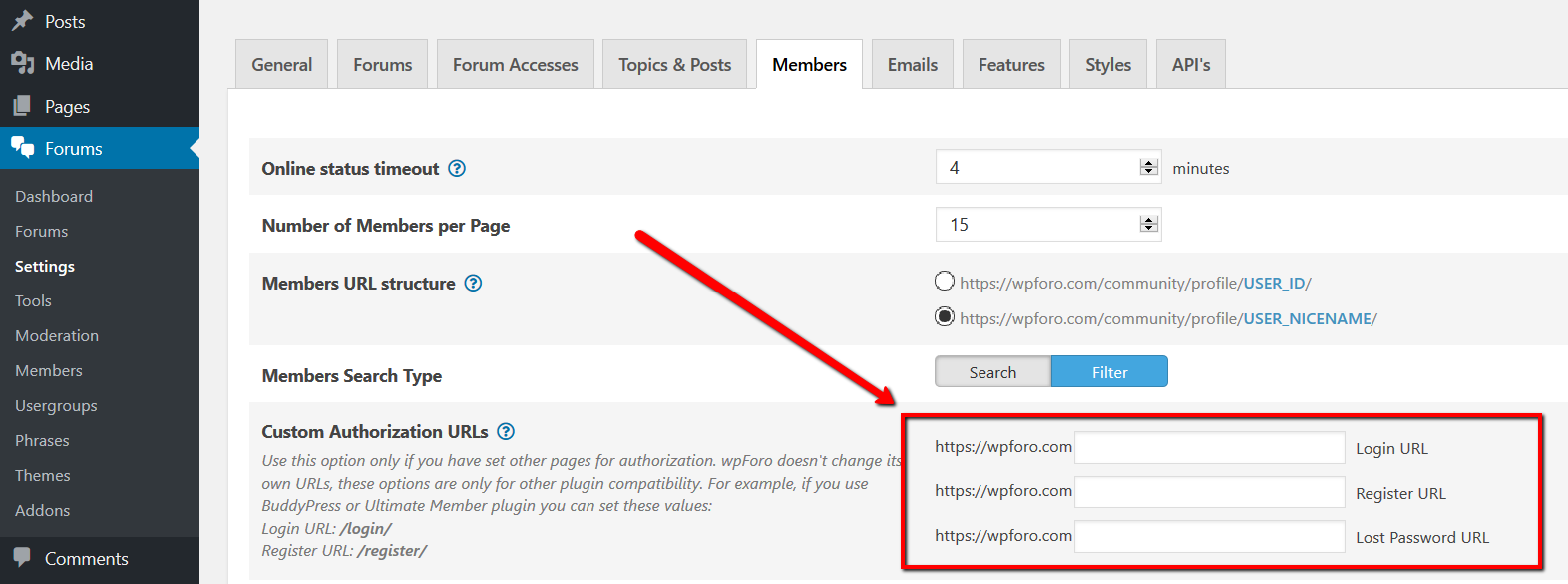
The problem is in your configuration. You've changed the forum login page URL to /login/ in Dashboard > Forums > Settings > Members admin page. Could you please explain to me why have you done it if you don't even have a /login/ page? That option doesn't change wpForo login page URL, that options is created to change wpForo login page to your custom login page provided by other plugins like BuddyPress or UM. Even if you create that page it'll not work. wpForo has only one login page, and its URL cannot be changed: https://www.outdoortrader.net/community/?foro=signin
So just go to Dashboard > Forums > Settings > Members admin page and remove all inserted data in Custom Authorization URLs field, just leave these empty, then delete all kind of caches, after that the [Add topic] button will automatically refer to the original wpForo login page: