

I’m using wpForo 3.x (AI Edition) and I upgraded to the Business Plan. In AI Settings the service shows as connected and active:
Status: Connected (Business Plan)
Tenant ID: (available)
API Key: (available)
Credits: 8,844 / 9,260 remaining
Message: “All features of business plan are unlocked!”
However, even after the upgrade I don’t see any real benefits on the frontend. Specifically:
Issue
AI Topic Summarization is enabled in AI Features
Minimum replies to show button = 0 (so the button should always be visible)
AI Assistant display = enabled
Limits are not exceeded (fresh tests)
But on the topic page I either don’t see the “Summarize Topic” button / AI Assistant UI, or clicking does nothing (no output).
What I tried
Cleared caches (wpForo + site cache)
Tested in incognito / different browser
Confirmed Business plan is connected and credits are available
Questions
Is there any additional step required to make AI Features appear on the frontend in wpForo 3.x (templates/shortcodes/widgets)?
Could this be caused by caching/minification (LiteSpeed/Autoptimize/Cloudflare etc.) and are there recommended excludes for wpForo 3.x AI scripts?
Does AI Summarization require AI Content Indexing to be fully completed for the specific topic/thread?
Thanks in advance for any guidance.

Hi @krz85m ,
Please make sure you use either the 2026 or 2022 wpForo theme in wpForo > Themes admin page. The classic theme is very outdated and deprecated since 2022 year. In any case w'll add AI support to the classic theme in the 3.0.0.9 beta version within next 24 hours.
In case you want to say thank you !)
We'd really appreciate and be thankful if you leave a good review on plugin page. This is the best way to say thank you to this project and support team.
@robert Thank you for your reply.
@krz85m ,
Please find the "Default AI Response Language" setting in wpForo > Settings > AI Features setting page and set the default language you want.
Also, each user can set his/her own language on front-end [AI Assistant] widget > [Preferences] tab:
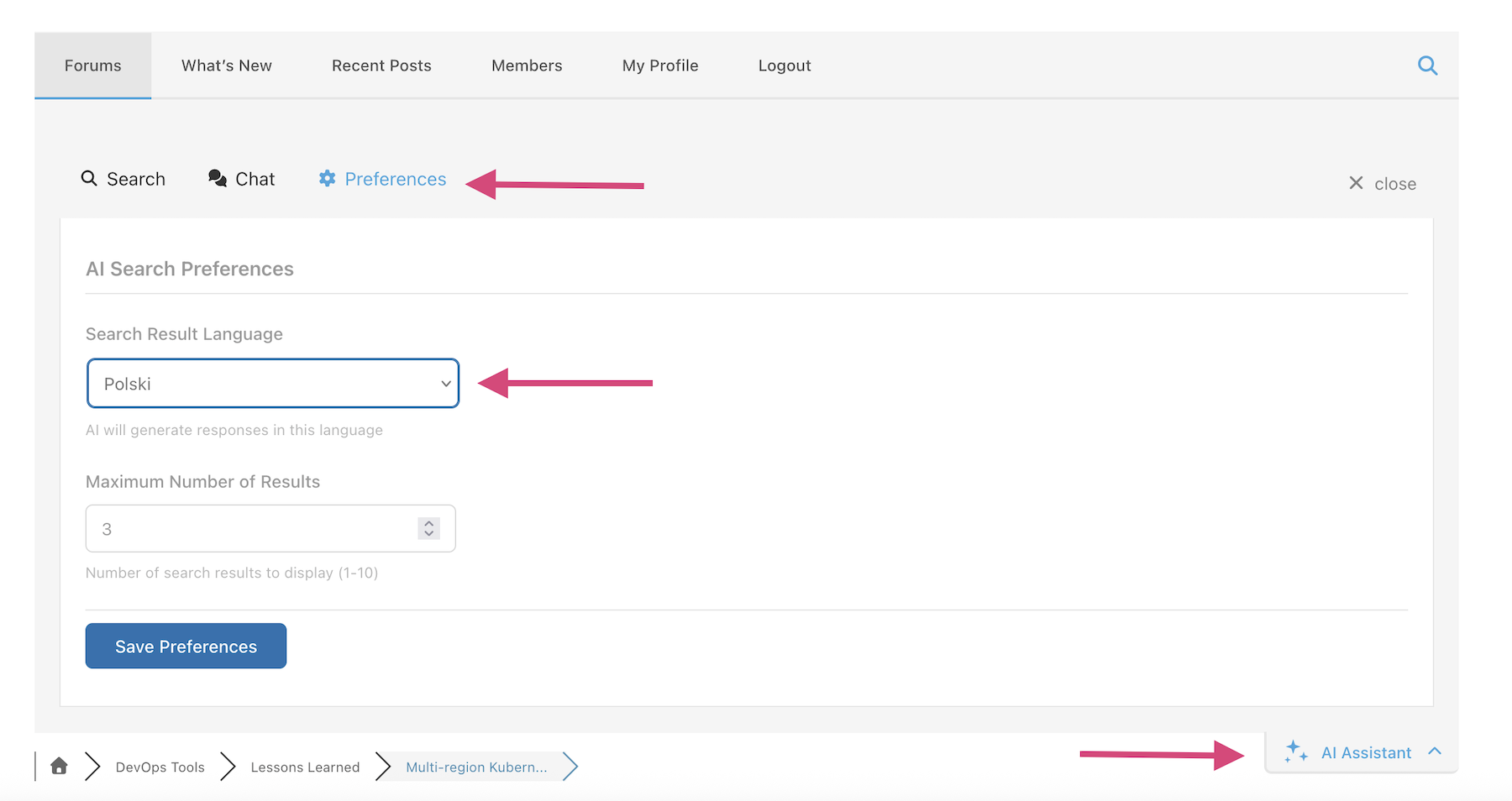
In case you want to say thank you !)
We'd really appreciate and be thankful if you leave a good review on plugin page. This is the best way to say thank you to this project and support team.
Thank you for your reply — switching to the 2026/2022 wpForo theme helped and the AI features are now visible.
However, I’m still seeing a few issues:
-
Sometimes the AI shows: “Network error. Please check your connection and try again.”
-
AI Summary is still generated in English, even after changing the language settings to Polish.
-
AI Search sometimes fails with: “Request failed”.
Could you please advise:
-
how to force AI Summary (and other AI outputs) to use Polish / board language, and
-
what could be causing the Network error / Request failed messages (any known issue, required server settings, blocked requests, or logs I should check)?
If you tell me what information you need (AI Logs entries, browser console errors, server logs, etc.), I can provide it.
Thanks again,
Krzysztof
Hi @krz85m,
This could be plugin conflict or hosting service security configuration issue. In any case it should be deeply reviewed. Please open an AI support ticket here: https://v3.wpforo.com/support/add-topic/
In case you want to say thank you !)
We'd really appreciate and be thankful if you leave a good review on plugin page. This is the best way to say thank you to this project and support team.
