
AI Search
Classic Search
 Search Phrase:
 Search Type:
Advanced search options
 Search in Forums:
 Search in date period:

 Sort Search Results by:

Filter by custom fields

Topic prefix

AI Assistant
Notifications
Clear all

[Solved] How to display post ID number

6 Posts
2 Users
1 Reactions
2,775 Views
JorgeW
Posts: 107
Topic starter
Translate
English
Spanish
French
German
Italian
Portuguese
Russian
Chinese
Japanese
Korean
Arabic
Hindi
Dutch
Polish
Turkish
Vietnamese
Thai
Swedish
Danish
Finnish
Norwegian
Czech
Hungarian
Romanian
Greek
Hebrew
Indonesian
Malay
Ukrainian
Bulgarian
Croatian
Slovak
Slovenian
Serbian
Lithuanian
Latvian
Estonian
(@jorgew)
Estimable Member
Joined: 7 years ago
[#8290]

Hi @robert,

I would like to display (near by the link icon maybe) the post ID number of each and every post in my forums (the number that is included in the URL within the link icon).

Is this possible??

It would allow me to make explicit the Post Number that identifies each post in the forums. If I'm correct, this number is incremental and unique. ID numbers from deleted posts never get used again. So this number becomes a perfect reference ID for any post (topic, reply, comment, question, answer) and we could use it precisely as a dependable, quick, and short reference to a post, without the need to write nothing else, for example in an email: "Please do remember that we discussed this issue in post #123 and we decided bla bla bla…"

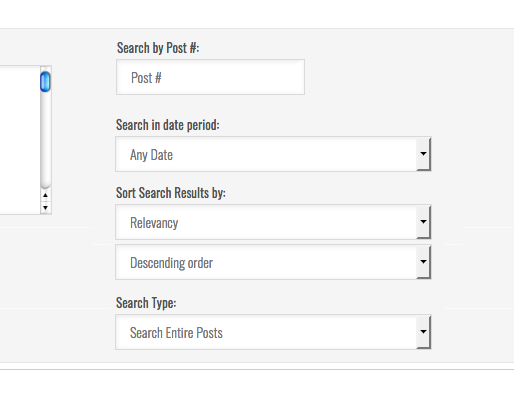
At the same time, it could become "searchable" (be part of the search dialog):

Go To Post #:  [  123   ]

Making it easier, quickier and more precise to get "right to the substance" of any forum.

Thanks.

-----

PS: After posting this topic, I can check via the link icon that it is the post #25519

This is the number I'm interested to be able to display.


5 Replies
Robert
Posts: 10716
Admin
Translate
English
Spanish
French
German
Italian
Portuguese
Russian
Chinese
Japanese
Korean
Arabic
Hindi
Dutch
Polish
Turkish
Vietnamese
Thai
Swedish
Danish
Finnish
Norwegian
Czech
Hungarian
Romanian
Greek
Hebrew
Indonesian
Malay
Ukrainian
Bulgarian
Croatian
Slovak
Slovenian
Serbian
Lithuanian
Latvian
Estonian
(@robert)
Support Team
Joined: 2 months ago

Hi @jorgew,

I'm sorry but there is no an easy way to do this. You should use template file customization instruction to customize the post.php file of the forum layout you use.Here is the documentation: https://wpforo.com/docs/root/forum-themes/theme-customization/

You should insert PHP code to display post ID:

<?php echo intval($post['postid']); ?>


1 Reply
JorgeW
(@jorgew)
Joined: 7 years ago

Estimable Member
Posts: 107
Translate
English
Spanish
French
German
Italian
Portuguese
Russian
Chinese
Japanese
Korean
Arabic
Hindi
Dutch
Polish
Turkish
Vietnamese
Thai
Swedish
Danish
Finnish
Norwegian
Czech
Hungarian
Romanian
Greek
Hebrew
Indonesian
Malay
Ukrainian
Bulgarian
Croatian
Slovak
Slovenian
Serbian
Lithuanian
Latvian
Estonian

Thanks for you reply @robert, I will try and come back with news (good news I hope)


JorgeW
Posts: 107
Topic starter
Translate
English
Spanish
French
German
Italian
Portuguese
Russian
Chinese
Japanese
Korean
Arabic
Hindi
Dutch
Polish
Turkish
Vietnamese
Thai
Swedish
Danish
Finnish
Norwegian
Czech
Hungarian
Romanian
Greek
Hebrew
Indonesian
Malay
Ukrainian
Bulgarian
Croatian
Slovak
Slovenian
Serbian
Lithuanian
Latvian
Estonian
(@jorgew)
Estimable Member
Joined: 7 years ago

Hi @robert,

It works just as I wanted, take a look.

There is only one problem, it seems that 'postid' is not the variable name for comment ID in Q+A layout (classic theme). It will, for example, display "0" when the URL indicates that it is post 287 (seen at the bottom left)
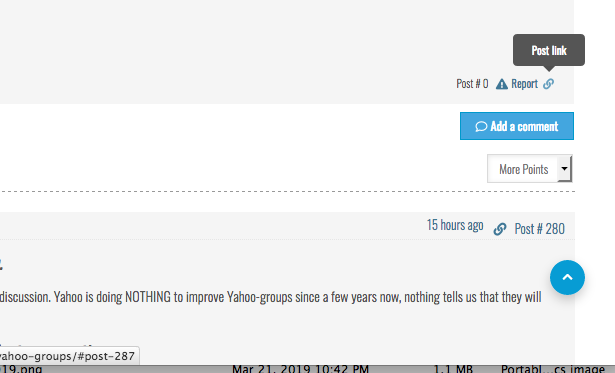
Can you help me with this issue?


Robert
Posts: 10716
Admin
Translate
English
Spanish
French
German
Italian
Portuguese
Russian
Chinese
Japanese
Korean
Arabic
Hindi
Dutch
Polish
Turkish
Vietnamese
Thai
Swedish
Danish
Finnish
Norwegian
Czech
Hungarian
Romanian
Greek
Hebrew
Indonesian
Malay
Ukrainian
Bulgarian
Croatian
Slovak
Slovenian
Serbian
Lithuanian
Latvian
Estonian
(@robert)
Support Team
Joined: 2 months ago

Comments are located in classic/layouts/3/comment.php file, you should use this variable:

<?php echo intval($comment['postid']) ?>

JorgeW
Posts: 107
Topic starter
Translate
English
Spanish
French
German
Italian
Portuguese
Russian
Chinese
Japanese
Korean
Arabic
Hindi
Dutch
Polish
Turkish
Vietnamese
Thai
Swedish
Danish
Finnish
Norwegian
Czech
Hungarian
Romanian
Greek
Hebrew
Indonesian
Malay
Ukrainian
Bulgarian
Croatian
Slovak
Slovenian
Serbian
Lithuanian
Latvian
Estonian
(@jorgew)
Estimable Member
Joined: 7 years ago

Thanks, fixed it!

One last thing, could it be made searchable?

Something like this?

Share: