

AI Search
Classic Search
 Search Phrase:
 Search Type:
Advanced search options
 Search in Forums:
 Search in date period:

 Sort Search Results by:

Filter by custom fields

Topic prefix

AI Assistant
Notifications
Clear all

[Solved] Unable to change to the next page of a topic...

5 Posts
3 Users
1 Reactions
4,176 Views
Sybar
Posts: 18
Topic starter
Translate
English
Spanish
French
German
Italian
Portuguese
Russian
Chinese
Japanese
Korean
Arabic
Hindi
Dutch
Polish
Turkish
Vietnamese
Thai
Swedish
Danish
Finnish
Norwegian
Czech
Hungarian
Romanian
Greek
Hebrew
Indonesian
Malay
Ukrainian
Bulgarian
Croatian
Slovak
Slovenian
Serbian
Lithuanian
Latvian
Estonian
(@sybar)
Eminent Member
Joined: 10 years ago
[#248]

Hi Guys,

As in subject, clicking on 'next' in a bid to switch to the next page of a topic or choosing a different page from the drop-down menu only refreshes the first page.

The only way to go to the last page is by clicking on topic title in the Last Topic/Replies widget.

Cheers


4 Replies
Posts: 996
Moderator
Translate
English
Spanish
French
German
Italian
Portuguese
Russian
Chinese
Japanese
Korean
Arabic
Hindi
Dutch
Polish
Turkish
Vietnamese
Thai
Swedish
Danish
Finnish
Norwegian
Czech
Hungarian
Romanian
Greek
Hebrew
Indonesian
Malay
Ukrainian
Bulgarian
Croatian
Slovak
Slovenian
Serbian
Lithuanian
Latvian
Estonian
(@martin)
Support Team
Joined: 10 years ago

Strange issue...

It seems it conflicts with other pagination functions. We could check it if you send admin login details to support[at]gvectors.com email address.


Sybar
Posts: 18
Topic starter
Translate
English
Spanish
French
German
Italian
Portuguese
Russian
Chinese
Japanese
Korean
Arabic
Hindi
Dutch
Polish
Turkish
Vietnamese
Thai
Swedish
Danish
Finnish
Norwegian
Czech
Hungarian
Romanian
Greek
Hebrew
Indonesian
Malay
Ukrainian
Bulgarian
Croatian
Slovak
Slovenian
Serbian
Lithuanian
Latvian
Estonian
(@sybar)
Eminent Member
Joined: 10 years ago

If I understand correctly this chap also has a similar/the same problem.

https://wpforo.com/community/how-to-and-troubleshooting-2/unable-to-change-page-on-forum/

I'll send login details in a minute.

Cheers


Robert
Posts: 10727
Admin
Translate
English
Spanish
French
German
Italian
Portuguese
Russian
Chinese
Japanese
Korean
Arabic
Hindi
Dutch
Polish
Turkish
Vietnamese
Thai
Swedish
Danish
Finnish
Norwegian
Czech
Hungarian
Romanian
Greek
Hebrew
Indonesian
Malay
Ukrainian
Bulgarian
Croatian
Slovak
Slovenian
Serbian
Lithuanian
Latvian
Estonian
(@robert)
Support Team
Joined: 2 months ago

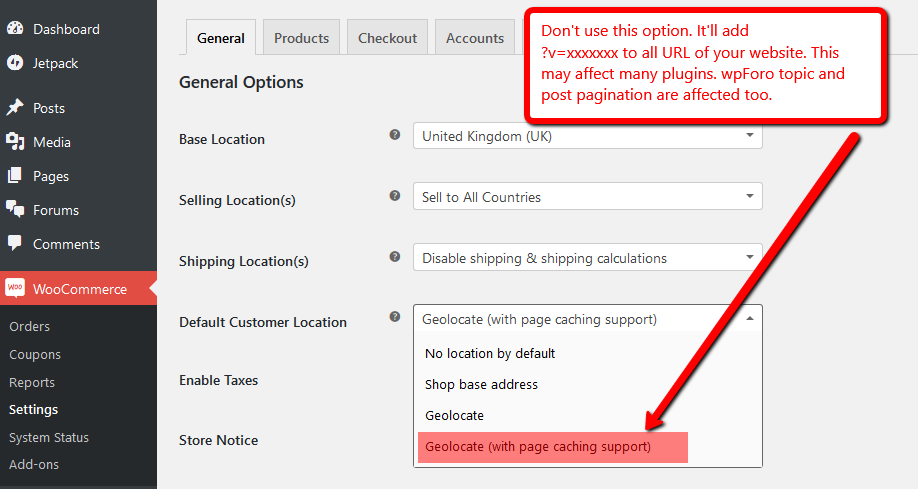
Thank you for admin login details. Problem is fixed. You have enabled Geolocate (with page caching support) in WooCommerce Settings. This adds ?v=xxxxxxxx variable in all URLs and crashes wpForo pagination links. Those were like this:

http:// www . dwarven-manufacture . com/community/suggestions/monsters-raids-strength/?v=25ec916d56b8/paged/2

Here is the screenshot, we changed it to w/o cache option:
More information about this problem is here:

https://wordpress.org/support/topic/vxxxxxxxxxxxx-added-to-all-urls#post-7351921
https://wordpress.org/support/topic/woocommerce-adding-weird-string-to-all-urls-vxxxxxxxxxxxx


Sybar
Posts: 18
Topic starter
Translate
English
Spanish
French
German
Italian
Portuguese
Russian
Chinese
Japanese
Korean
Arabic
Hindi
Dutch
Polish
Turkish
Vietnamese
Thai
Swedish
Danish
Finnish
Norwegian
Czech
Hungarian
Romanian
Greek
Hebrew
Indonesian
Malay
Ukrainian
Bulgarian
Croatian
Slovak
Slovenian
Serbian
Lithuanian
Latvian
Estonian
(@sybar)
Eminent Member
Joined: 10 years ago

What a great support! Thanks guys 🙂


Share: