

AI Search
Classic Search
 Search Phrase:
 Search Type:
Advanced search options
 Search in Forums:
 Search in date period:

 Sort Search Results by:

Filter by custom fields

Topic prefix

AI Assistant
Notifications
Clear all

[Solved] Uploading and Embedding images

78 Posts
20 Users
19 Reactions
95.4 K Views
Robert
Posts: 10716
Admin
Translate
English
Spanish
French
German
Italian
Portuguese
Russian
Chinese
Japanese
Korean
Arabic
Hindi
Dutch
Polish
Turkish
Vietnamese
Thai
Swedish
Danish
Finnish
Norwegian
Czech
Hungarian
Romanian
Greek
Hebrew
Indonesian
Malay
Ukrainian
Bulgarian
Croatian
Slovak
Slovenian
Serbian
Lithuanian
Latvian
Estonian
(@robert)
Support Team
Joined: 2 months ago

All is ok, this code has been added in your functions.php without any problem. I think the native WordPress editor has some bugs, it doesn't save changes. We installed WP Editor plugin and replaced the editor. After this the code has been saved. So there is not any problem with code, all issues are related to editors.


Robert
Posts: 10716
Admin
Translate
English
Spanish
French
German
Italian
Portuguese
Russian
Chinese
Japanese
Korean
Arabic
Hindi
Dutch
Polish
Turkish
Vietnamese
Thai
Swedish
Danish
Finnish
Norwegian
Czech
Hungarian
Romanian
Greek
Hebrew
Indonesian
Malay
Ukrainian
Bulgarian
Croatian
Slovak
Slovenian
Serbian
Lithuanian
Latvian
Estonian
(@robert)
Support Team
Joined: 2 months ago
Posted by: nando4

@Robert, is there any way I can prevent wpforo automatically putting IMG tags around images (.png, .jpg)?

The reason is I'm using Blueimp lightbox which will firstly show the image in the post and add the images to a gallery. With the added IMG tag, the image is shown in the post but does not get added to the gallery.

It's definitely being done by within wpforo since TinyMCE editting a Wordpress post does not do this. I have the Embeds addon but have oEmbed disabled.

I currently have to hit CTRL-Z (undo) to remove the auto-IMG tag insert. While I know this, it's not so intuitive for the users.

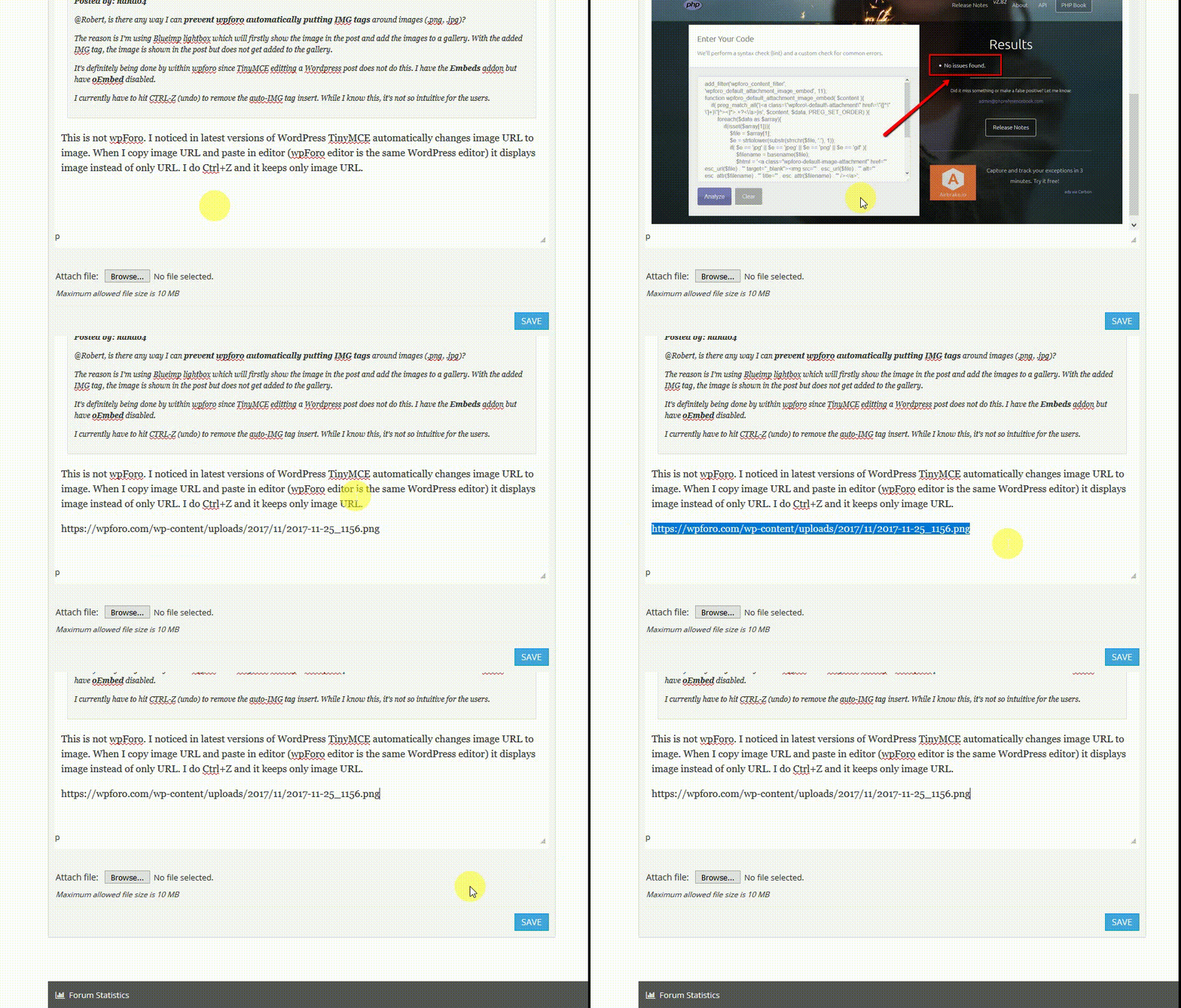
This is not wpForo. I noticed in recent versions of WordPress TinyMCE automatically chances image URL to image. When I copy image URL and paste in editor it replaces URL to image (img html) immediately. I have to do Ctrl+Z to change it to original image URL. here is a gif example:

Posts: 119
Translate
English
Spanish
French
German
Italian
Portuguese
Russian
Chinese
Japanese
Korean
Arabic
Hindi
Dutch
Polish
Turkish
Vietnamese
Thai
Swedish
Danish
Finnish
Norwegian
Czech
Hungarian
Romanian
Greek
Hebrew
Indonesian
Malay
Ukrainian
Bulgarian
Croatian
Slovak
Slovenian
Serbian
Lithuanian
Latvian
Estonian
(@nando4)
Estimable Member
Joined: 9 years ago

@Robert, have you have any workaround to this TinyMCE auto-IMG tag insertion? It's mucking up presentation of user submitted images so they are not clickable to show a bigger image.


Robert
Posts: 10716
Admin
Translate
English
Spanish
French
German
Italian
Portuguese
Russian
Chinese
Japanese
Korean
Arabic
Hindi
Dutch
Polish
Turkish
Vietnamese
Thai
Swedish
Danish
Finnish
Norwegian
Czech
Hungarian
Romanian
Greek
Hebrew
Indonesian
Malay
Ukrainian
Bulgarian
Croatian
Slovak
Slovenian
Serbian
Lithuanian
Latvian
Estonian
(@robert)
Support Team
Joined: 2 months ago

I'm sorry but not. The only workaround is doing Ctrl+Z once the image URL is pasted in editor.


Posts: 1
 NAX
Translate
English
Spanish
French
German
Italian
Portuguese
Russian
Chinese
Japanese
Korean
Arabic
Hindi
Dutch
Polish
Turkish
Vietnamese
Thai
Swedish
Danish
Finnish
Norwegian
Czech
Hungarian
Romanian
Greek
Hebrew
Indonesian
Malay
Ukrainian
Bulgarian
Croatian
Slovak
Slovenian
Serbian
Lithuanian
Latvian
Estonian
(@nax)
New Member
Joined: 8 years ago

Hi there.

Also looking for a function to bulk-upload images and preferably be able to add image text to each of them. I have a forum where screenshots is a big deal, and uploading images must be as easy as on facebook.  

3751 1299914434ede8c9f903c5

Page 10 / 14
Share: