
AI Assistant
Treatment Education...
 
Notifications
Clear all

[Closed] Treatment Education Network Forum

9 Posts
3 Users
5 Reactions
4,194 Views
(@ewscos)
Posts: 38
Trusted Member
Topic starter
Translate
English
Spanish
French
German
Italian
Portuguese
Russian
Chinese
Japanese
Korean
Arabic
Hindi
Dutch
Polish
Turkish
Vietnamese
Thai
Swedish
Danish
Finnish
Norwegian
Czech
Hungarian
Romanian
Greek
Hebrew
Indonesian
Malay
Ukrainian
Bulgarian
Croatian
Slovak
Slovenian
Serbian
Lithuanian
Latvian
Estonian
 
[#3935]

Hello,

This is the Forum I've been working on to make it like the rest of the site.  We previously had a red theme but it was too loud, so we went with a blue theme.  No sidebar, but I put the online and recent topic widgets in the footer.

I also styled the topic icons to match the menu.  The site is at http://ontheten.org/community/   I just used Firebug to identify the classes and ID's of what we wanted changed.

Thanks for looking Any suggestions are much appreciated! Regards, Ed Sanders

 
Posted : 03/02/2017 5:15 am
Robert reacted
 MMM
(@mmm)
Posts: 5
Active Member
Translate
English
Spanish
French
German
Italian
Portuguese
Russian
Chinese
Japanese
Korean
Arabic
Hindi
Dutch
Polish
Turkish
Vietnamese
Thai
Swedish
Danish
Finnish
Norwegian
Czech
Hungarian
Romanian
Greek
Hebrew
Indonesian
Malay
Ukrainian
Bulgarian
Croatian
Slovak
Slovenian
Serbian
Lithuanian
Latvian
Estonian
 

Nice work! How do you get the icons at the front of each forum?



Posted : 04/02/2017 10:44 am
ewscos reacted
Robert
(@robert)
Posts: 10708
Support Team Admin
Translate
English
Spanish
French
German
Italian
Portuguese
Russian
Chinese
Japanese
Korean
Arabic
Hindi
Dutch
Polish
Turkish
Vietnamese
Thai
Swedish
Danish
Finnish
Norwegian
Czech
Hungarian
Romanian
Greek
Hebrew
Indonesian
Malay
Ukrainian
Bulgarian
Croatian
Slovak
Slovenian
Serbian
Lithuanian
Latvian
Estonian
 

Thank you ewscos!


Posted : 04/02/2017 7:08 pm
ewscos reacted
(@ewscos)
Posts: 38
Trusted Member
Topic starter
Translate
English
Spanish
French
German
Italian
Portuguese
Russian
Chinese
Japanese
Korean
Arabic
Hindi
Dutch
Polish
Turkish
Vietnamese
Thai
Swedish
Danish
Finnish
Norwegian
Czech
Hungarian
Romanian
Greek
Hebrew
Indonesian
Malay
Ukrainian
Bulgarian
Croatian
Slovak
Slovenian
Serbian
Lithuanian
Latvian
Estonian
 

Those are just font awesome icons you set them on the forum settings page.  I just styled them to match the menu color like this:

#wpforo #wpforo-wrap  #wpforo-stat-body .wpf-stat-item i, .fa-comments::before, .fa-rotate-180::before, .fa-briefcase::before, .fa-male::before, .fa-fire-extinguisher::before, .fa-cube::before, .fa-universal-access::before, .fa-file-o::before, .fa-file-text-o::before, .fa-binoculars::before {

color: navy;

}

Hope it helps you! 


Posted : 04/02/2017 9:05 pm
Robert
(@robert)
Posts: 10708
Support Team Admin
Translate
English
Spanish
French
German
Italian
Portuguese
Russian
Chinese
Japanese
Korean
Arabic
Hindi
Dutch
Polish
Turkish
Vietnamese
Thai
Swedish
Danish
Finnish
Norwegian
Czech
Hungarian
Romanian
Greek
Hebrew
Indonesian
Malay
Ukrainian
Bulgarian
Croatian
Slovak
Slovenian
Serbian
Lithuanian
Latvian
Estonian
 
Posted by: MMM

Nice work! How do you get the icons at the front of each forum?

You can manage forum icons in Edit Forum admin page. Custom Forum Icons (font-awesome):


Posted : 05/02/2017 12:17 pm
ewscos reacted
 MMM
(@mmm)
Posts: 5
Active Member
Translate
English
Spanish
French
German
Italian
Portuguese
Russian
Chinese
Japanese
Korean
Arabic
Hindi
Dutch
Polish
Turkish
Vietnamese
Thai
Swedish
Danish
Finnish
Norwegian
Czech
Hungarian
Romanian
Greek
Hebrew
Indonesian
Malay
Ukrainian
Bulgarian
Croatian
Slovak
Slovenian
Serbian
Lithuanian
Latvian
Estonian
 

I found that immediatly after asking because its so simple I thought it should be harder I guess. BUT, when I changed them they end up blank. Is there a library I need to load?


Posted : 06/02/2017 9:31 am
ewscos reacted
(@ewscos)
Posts: 38
Trusted Member
Topic starter
Translate
English
Spanish
French
German
Italian
Portuguese
Russian
Chinese
Japanese
Korean
Arabic
Hindi
Dutch
Polish
Turkish
Vietnamese
Thai
Swedish
Danish
Finnish
Norwegian
Czech
Hungarian
Romanian
Greek
Hebrew
Indonesian
Malay
Ukrainian
Bulgarian
Croatian
Slovak
Slovenian
Serbian
Lithuanian
Latvian
Estonian
 

I got blank ones when I chose Icons that are in the 4.7 release, wpforo is using an earlier release I believe, you have to just choose icons from the established set, not any of the new ones...hope it helps you.


Posted : 06/02/2017 9:50 am
(@ewscos)
Posts: 38
Trusted Member
Topic starter
Translate
English
Spanish
French
German
Italian
Portuguese
Russian
Chinese
Japanese
Korean
Arabic
Hindi
Dutch
Polish
Turkish
Vietnamese
Thai
Swedish
Danish
Finnish
Norwegian
Czech
Hungarian
Romanian
Greek
Hebrew
Indonesian
Malay
Ukrainian
Bulgarian
Croatian
Slovak
Slovenian
Serbian
Lithuanian
Latvian
Estonian
 

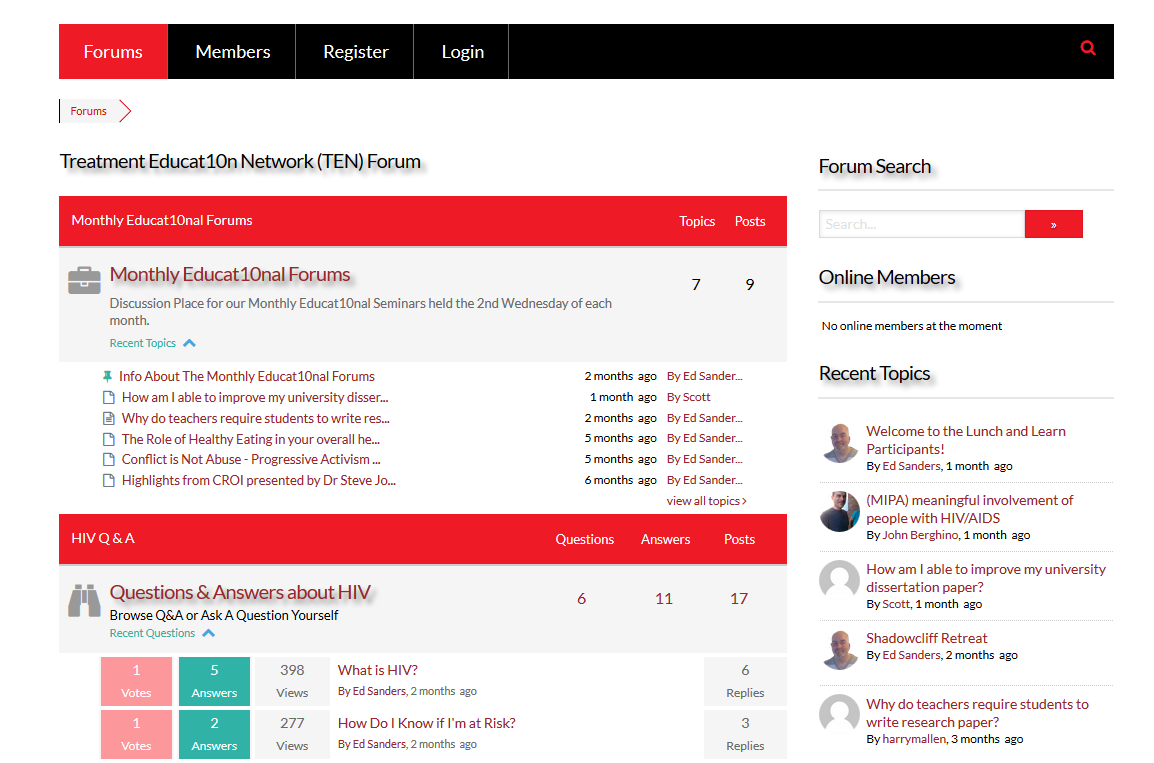
Update, this site is now using the X theme with a red style set, wpforo integration is seamless.

screencapture ontheten org community 1501345999197

 
Posted : 29/07/2017 8:35 pm
Robert
(@robert)
Posts: 10708
Support Team Admin
Translate
English
Spanish
French
German
Italian
Portuguese
Russian
Chinese
Japanese
Korean
Arabic
Hindi
Dutch
Polish
Turkish
Vietnamese
Thai
Swedish
Danish
Finnish
Norwegian
Czech
Hungarian
Romanian
Greek
Hebrew
Indonesian
Malay
Ukrainian
Bulgarian
Croatian
Slovak
Slovenian
Serbian
Lithuanian
Latvian
Estonian
 

Thank you ewscos

This looks much better...


Posted : 30/07/2017 9:58 am
Share: