AI Search
Classic Search
 Search Phrase:
 Search Type:
Advanced search options
 Search in Forums:
 Search in date period:

 Sort Search Results by:

AI Assistant
Notifications
Clear all

Problem with AIO WP Migration

5 Posts
2 Users
1 Reactions
242 Views
Posts: 4
 Alan
Topic starter
Translate
English
Spanish
French
German
Italian
Portuguese
Russian
Chinese
Japanese
Korean
Arabic
Hindi
Dutch
Polish
Turkish
Vietnamese
Thai
Swedish
Danish
Finnish
Norwegian
Czech
Hungarian
Romanian
Greek
Hebrew
Indonesian
Malay
Ukrainian
Bulgarian
Croatian
Slovak
Slovenian
Serbian
Lithuanian
Latvian
Estonian
(@alan)
Active Member
Joined: 3 weeks ago
[#73117]

With reference to this topic and bug, I have a solution.

https://wpforo.com/community/how-to-and-troubleshooting-2/25971/

After seeing the same problem and being unable to restore wpforo to a new server, I have communicated with Servmask.

This appears to be a wpforo problem, not a all in one wp migration plugin problem. 

Wpforo is changing the original database tables.  They are all stored and imported correctly by AIOWPM.

Wpforo developers please resolve issue. It is imperative that the forums can be backed up and migrated correctly.

The solution:

  • On the new server I deleted all the wpforo database tables
  • I re-ran the AIOWPM import - all tables then appeared correctly in the db.
  • This proves AIOWPM correctly stored and imports the database.
  • The forum still wasnt working at this point.
  • In Wordpress>wpforo>Tools>Database Tables, errors were indicated
  • Ran the repair option here and everything started working OK

4 Replies
Posts: 4
 Alan
Topic starter
Translate
English
Spanish
French
German
Italian
Portuguese
Russian
Chinese
Japanese
Korean
Arabic
Hindi
Dutch
Polish
Turkish
Vietnamese
Thai
Swedish
Danish
Finnish
Norwegian
Czech
Hungarian
Romanian
Greek
Hebrew
Indonesian
Malay
Ukrainian
Bulgarian
Croatian
Slovak
Slovenian
Serbian
Lithuanian
Latvian
Estonian
(@alan)
Active Member
Joined: 3 weeks ago

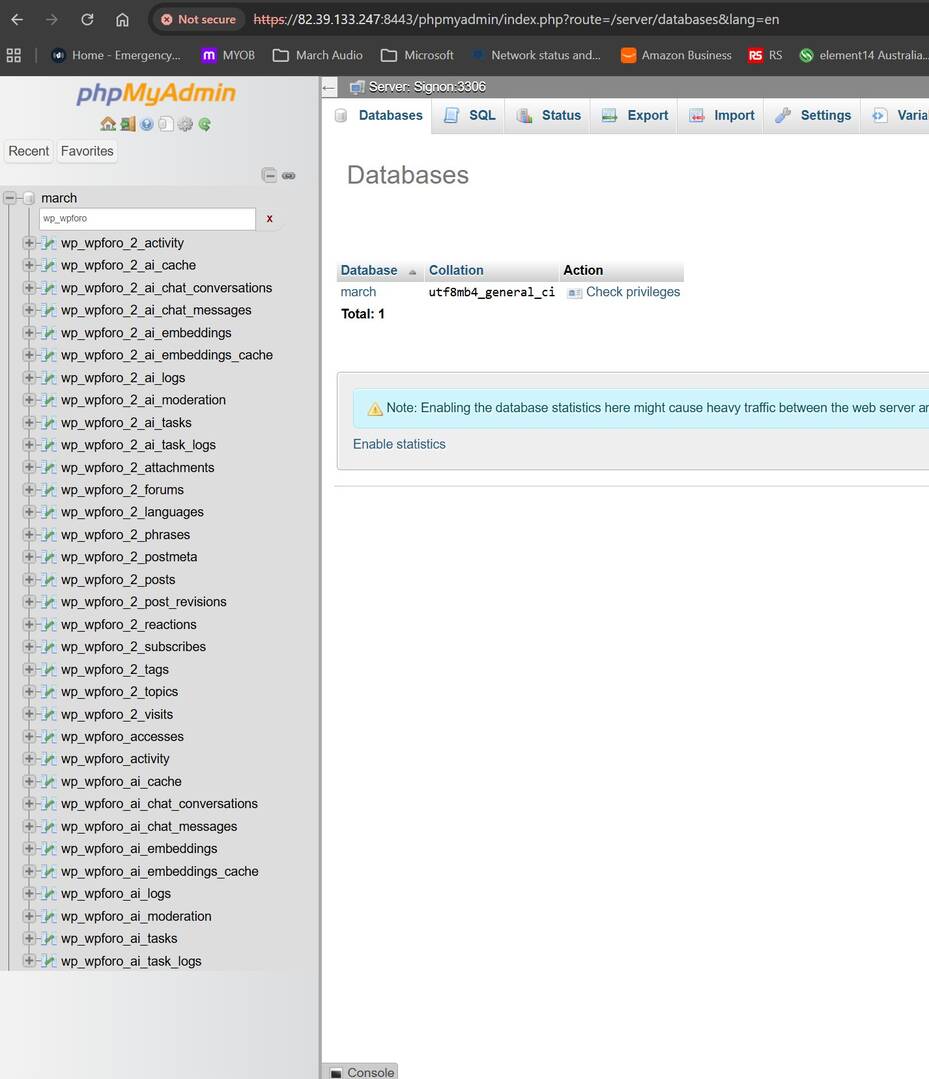
For reference this is how wpforo changed the database tables;

Original as exported by AIOWPM
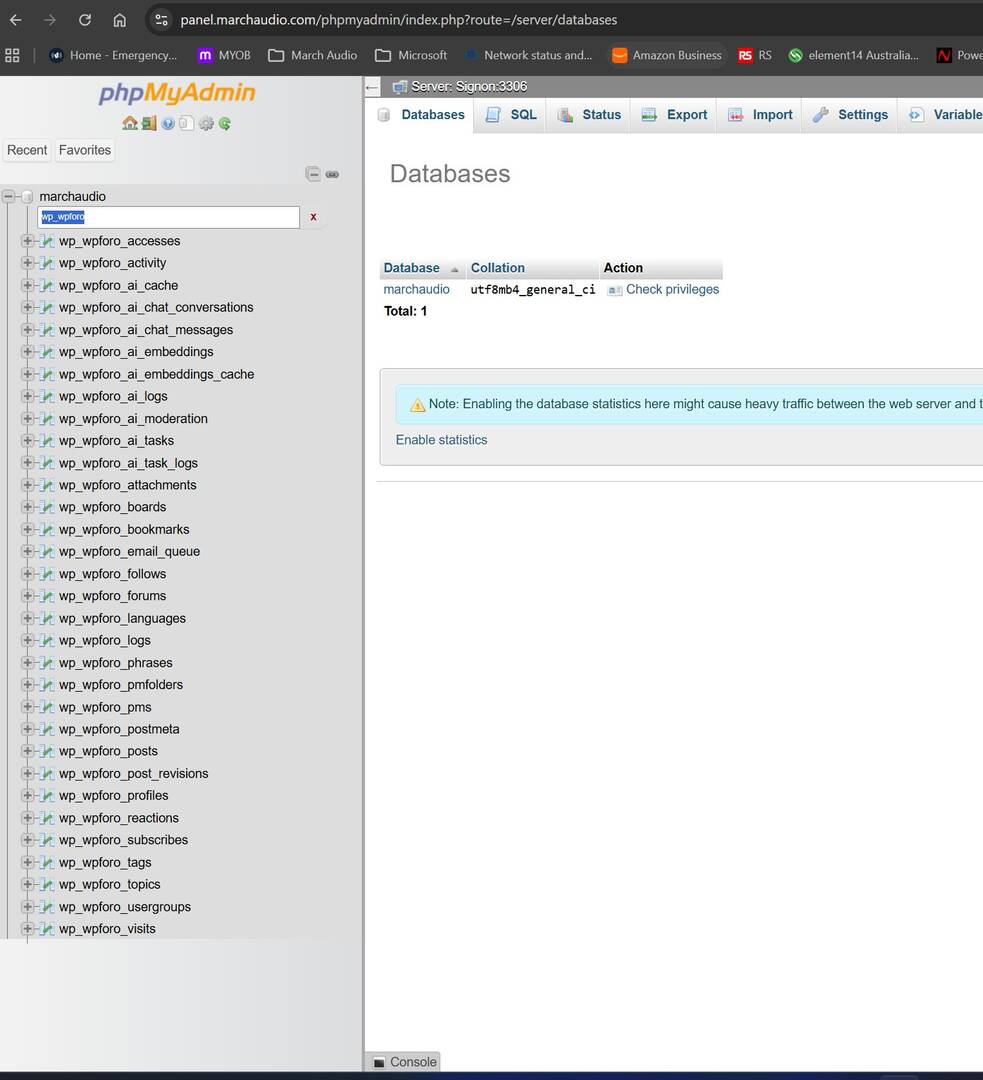
wpforo db original


After wpforo modified tables

wpforo db imported

Reply
Posts: 4
 Alan
Topic starter
Translate
English
Spanish
French
German
Italian
Portuguese
Russian
Chinese
Japanese
Korean
Arabic
Hindi
Dutch
Polish
Turkish
Vietnamese
Thai
Swedish
Danish
Finnish
Norwegian
Czech
Hungarian
Romanian
Greek
Hebrew
Indonesian
Malay
Ukrainian
Bulgarian
Croatian
Slovak
Slovenian
Serbian
Lithuanian
Latvian
Estonian
(@alan)
Active Member
Joined: 3 weeks ago

Guys, turn the photo resolution up, it's illegible.


Reply
1 Reply
Sofy
 Sofy
Admin
(@sofy)
Joined: 9 years ago

Support Team
Posts: 5850
Translate
English
Spanish
French
German
Italian
Portuguese
Russian
Chinese
Japanese
Korean
Arabic
Hindi
Dutch
Polish
Turkish
Vietnamese
Thai
Swedish
Danish
Finnish
Norwegian
Czech
Hungarian
Romanian
Greek
Hebrew
Indonesian
Malay
Ukrainian
Bulgarian
Croatian
Slovak
Slovenian
Serbian
Lithuanian
Latvian
Estonian

Hi @alan 

wpForo supports a multiboard system, so its database tables are structured with the board ID. For example, a table may be named wp_wpforo_2_posts, where 2 is the board ID.

By default, when you install wpForo and don't use the multiboard system, the default board ID is 0. Even if you don't create any additional boards, the default board is still required.

It seems that during the migration from one server to another, the board ID was somehow changed from 0 to 1. As a result, the board ID stored in the database is no longer correct.

Please go to wpForo > Tools > Database Tables and click the [Repair] button. This should correct the database table structure and resolve the issue.

In short, it looks like the migration tool did not properly preserve the 0 board ID and somehow changed the value during the migration.


Reply
Posts: 4
 Alan
Topic starter
Translate
English
Spanish
French
German
Italian
Portuguese
Russian
Chinese
Japanese
Korean
Arabic
Hindi
Dutch
Polish
Turkish
Vietnamese
Thai
Swedish
Danish
Finnish
Norwegian
Czech
Hungarian
Romanian
Greek
Hebrew
Indonesian
Malay
Ukrainian
Bulgarian
Croatian
Slovak
Slovenian
Serbian
Lithuanian
Latvian
Estonian
(@alan)
Active Member
Joined: 3 weeks ago

It is not the migration tool changing the dB as it imports correctly from the same file after you delete the tables.  The changes therefore must be done by WPforo

Also the repair function was tried after the initial migration and it did not work.  

Servmask All in one WP Migration is one of the most common and popular migration tools out there.  I have used it for many years and it's always worked perfectly with all plugins.

May I respectfully suggest you get a copy and do some testing.


Reply
Share: