
AI Search
Classic Search
 Search Phrase:
 Search Type:
Advanced search options
 Search in Forums:
 Search in date period:

 Sort Search Results by:

AI Assistant
Notifications
Clear all

[Closed] Embedding Forum & Threads Without Menu/Forum Statistics Etc.

4 Posts
2 Users
0 Reactions
3,250 Views
Posts: 17
Topic starter
Translate
English
Spanish
French
German
Italian
Portuguese
Russian
Chinese
Japanese
Korean
Arabic
Hindi
Dutch
Polish
Turkish
Vietnamese
Thai
Swedish
Danish
Finnish
Norwegian
Czech
Hungarian
Romanian
Greek
Hebrew
Indonesian
Malay
Ukrainian
Bulgarian
Croatian
Slovak
Slovenian
Serbian
Lithuanian
Latvian
Estonian
(@seanbe793)
Eminent Member
Joined: 9 years ago
[#3809]

Hi,

First of, allow me to express my gratitude for the time and effort you have put in to the WPForo plugin; it's seamless, user friendly and checks all the boxes of what a standard forum should be. I should be purchasing one of the add-ons for my website soon as well.

Regarding my query, I'm aware that by using the [wpforo item="forum" id="X"] shortcode, I can embed a forum and its constituent topics on any page. The problem with this however is that using this shortcode also imports the forum menu, statistics etc. (see attached image) -- all I'd like is for the topics of a specific sub-forum to be displayed in the sidebar as this forum displays 'Recent Topics' on its sidebar here.

Is there a way to display 'Recent Topics' of a particular forum/subforum without getting all the statistics and other data along with it?

Thanks once again.

2017 01 06

3 Replies
Posts: 17
Topic starter
Translate
English
Spanish
French
German
Italian
Portuguese
Russian
Chinese
Japanese
Korean
Arabic
Hindi
Dutch
Polish
Turkish
Vietnamese
Thai
Swedish
Danish
Finnish
Norwegian
Czech
Hungarian
Romanian
Greek
Hebrew
Indonesian
Malay
Ukrainian
Bulgarian
Croatian
Slovak
Slovenian
Serbian
Lithuanian
Latvian
Estonian
(@seanbe793)
Eminent Member
Joined: 9 years ago

Additionally, while embedding forums -- is it possible to do so by excluding the forum sidebars?


Thanks.


Robert
Posts: 10746
Admin
Translate
English
Spanish
French
German
Italian
Portuguese
Russian
Chinese
Japanese
Korean
Arabic
Hindi
Dutch
Polish
Turkish
Vietnamese
Thai
Swedish
Danish
Finnish
Norwegian
Czech
Hungarian
Romanian
Greek
Hebrew
Indonesian
Malay
Ukrainian
Bulgarian
Croatian
Slovak
Slovenian
Serbian
Lithuanian
Latvian
Estonian
(@robert)
Support Team
Joined: 3 months ago

You can disable some components for all forum pages using wpForo Settings > Features admin page options, but this will disable the main forum page components as well:
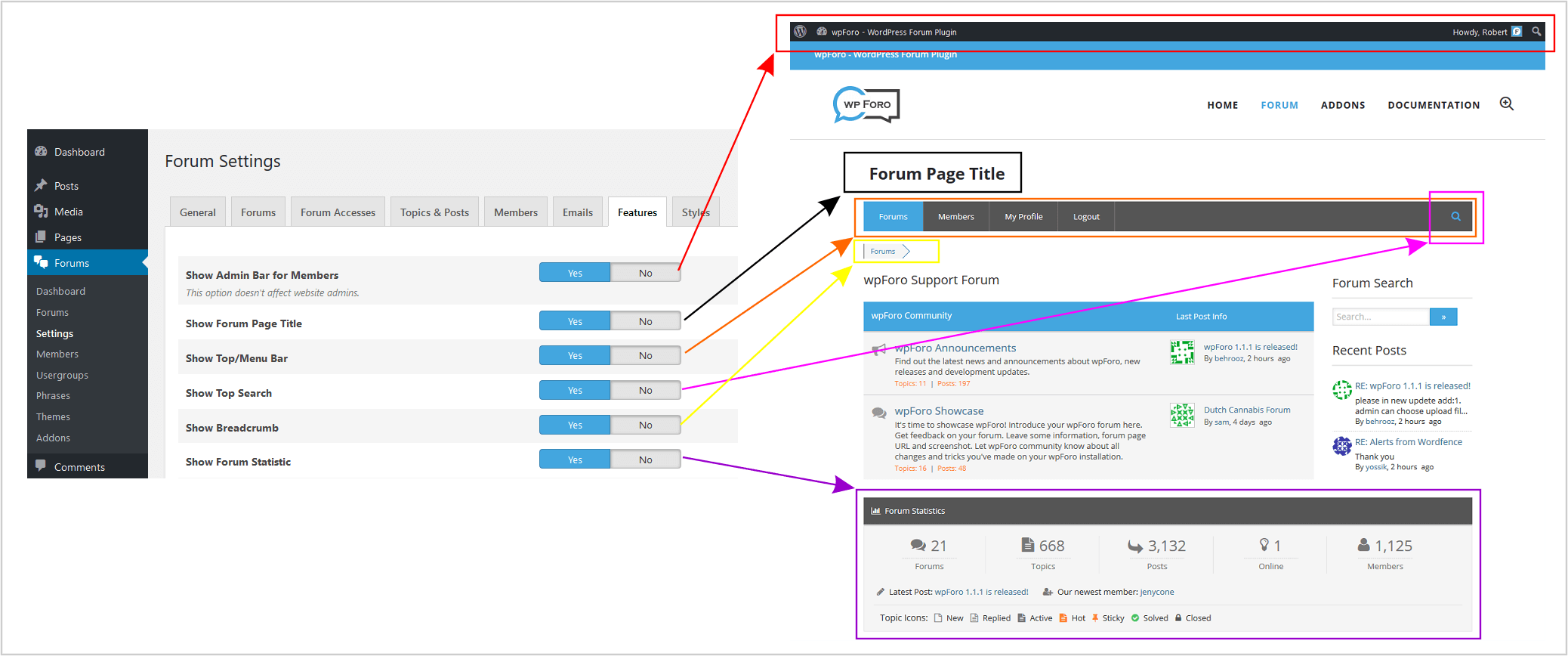
For individual control you only can use CSS, there is no other option. Change the X to page ID and put it in active theme style.css or in Forums > Settings > Styles > Custom CSS Code textarea. Then save, delete all caches and do Ctrl+F5 on forum page:

body.page-id-X #wpforo #wpforo-wrap #wpforo-menu{display:none!important;}
body.page-id-X #wpforo #wpforo-wrap .wpf-breadcrumb{display:none}
body.page-id-X #wpforo #wpforo-wrap #wpforo-footer{display:none}

Posts: 17
Topic starter
Translate
English
Spanish
French
German
Italian
Portuguese
Russian
Chinese
Japanese
Korean
Arabic
Hindi
Dutch
Polish
Turkish
Vietnamese
Thai
Swedish
Danish
Finnish
Norwegian
Czech
Hungarian
Romanian
Greek
Hebrew
Indonesian
Malay
Ukrainian
Bulgarian
Croatian
Slovak
Slovenian
Serbian
Lithuanian
Latvian
Estonian
(@seanbe793)
Eminent Member
Joined: 9 years ago

Understood, thanks for getting back!


Share: