Notifications
Clear all

Limited Support

Our support team is currently on holiday from December 25, 2025 to January 7, 2026, and replies may be delayed during this period.

We appreciate your patience and understanding while our team is away. Thank you for being part of the wpForo community!

Merry Christmas and Happy Holidays! 🎄

wpForo 1.x.x [Solved] How do I lock a category

5 Posts
2 Users
0 Reactions
1,754 Views
Posts: 76
Topic starter
(@hypematrix)
Estimable Member
Joined: 5 years ago

Hello,

I've just set up Blog Cross Posting for the Motoring News section but I would like to lock this category so users can't post new topics in the news sections.

I would like it so only the blogs posts are on there but users can still comment on the topics.

Is this possible?

Thanks


Topic Tags
4 Replies
Posts: 76
Topic starter
(@hypematrix)
Estimable Member
Joined: 5 years ago

Some how I need to remove this put on the News Topics


Posts: 76
Topic starter
(@hypematrix)
Estimable Member
Joined: 5 years ago

I didn't explain that very well, I just need to find away of removing the Add Topic button on all the "Motoring News" and "Event" pages but still allow users to comment on the topics.


2 Replies
Robert
Admin
(@robert)
Joined: 10 years ago

Support Team
Posts: 10591

@motorhype ,

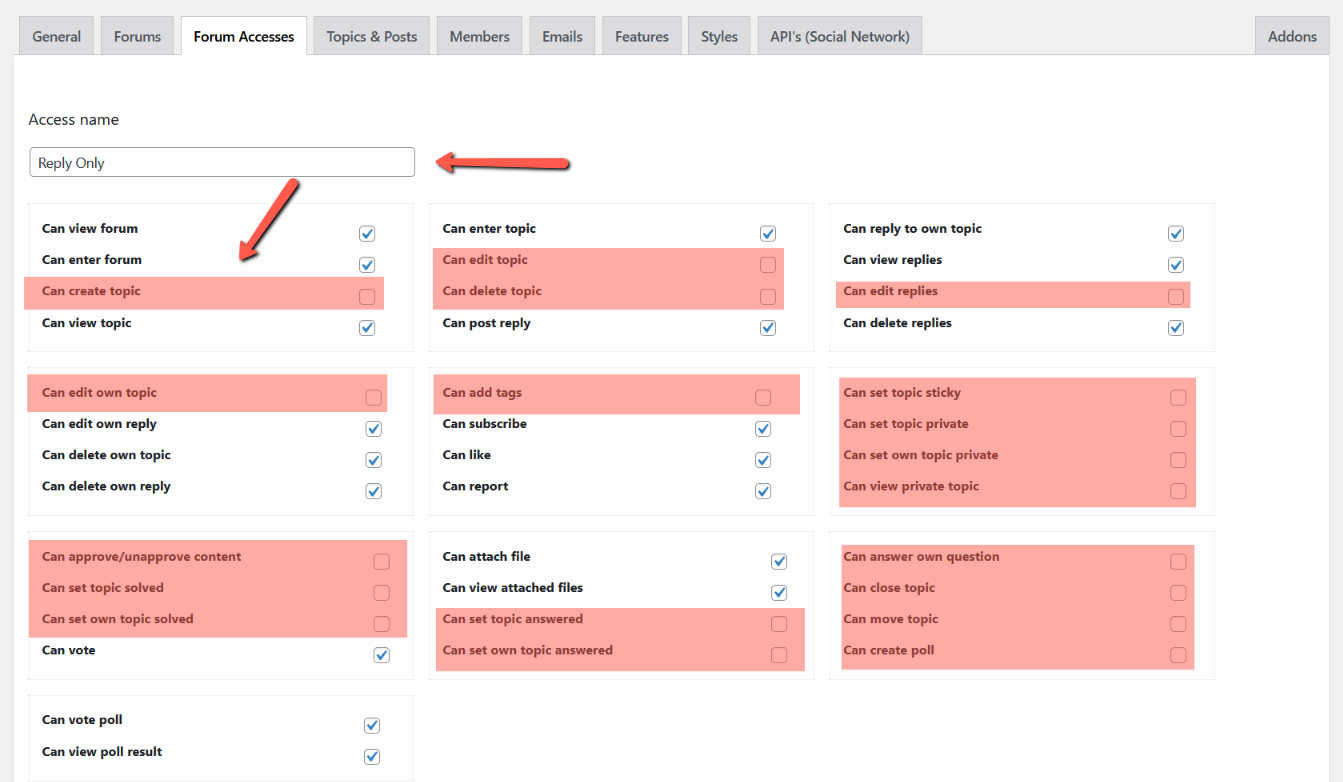
You should create a new Forum Access, e.g. called "Reply Only".

1. Go to Dashboard > Forums > Settings > Forum Access Tab and create the new "Reply Only" access with the disabled "Can create Topic" permission:


2. Then edit the category (Motoring News) and the forum (Competitions) one by one and set the "Reply Only" forum access to the regular "Registered" usergroup:


(@hypematrix)
Joined: 5 years ago

Estimable Member
Posts: 76

@robert 

Thank you 🙂