
AI Search
Classic Search
 Search Phrase:
 Search Type:
Advanced search options
 Search in Forums:
 Search in date period:

 Sort Search Results by:

Filter by custom fields

Topic prefix

AI Assistant
Notifications
Clear all

[Closed] how to removed recently view by users?

6 Posts
5 Users
0 Reactions
2,224 Views
Posts: 7
Topic starter
Translate
English
Spanish
French
German
Italian
Portuguese
Russian
Chinese
Japanese
Korean
Arabic
Hindi
Dutch
Polish
Turkish
Vietnamese
Thai
Swedish
Danish
Finnish
Norwegian
Czech
Hungarian
Romanian
Greek
Hebrew
Indonesian
Malay
Ukrainian
Bulgarian
Croatian
Slovak
Slovenian
Serbian
Lithuanian
Latvian
Estonian
(@nothere)
Active Member
Joined: 6 years ago
[#10815]

how to remove recently view by users? I don't care particular about which user has seen the topic, for the purposes of this website, it is not necessary.

Recently viewed by users: admin 23 mins ago, okay 23 mins ago.


https://www.holyspiritforum.com/community/main-forum/question/


Topic Tags
5 Replies
Sofy
Posts: 5774
 Sofy
Admin
Translate
English
Spanish
French
German
Italian
Portuguese
Russian
Chinese
Japanese
Korean
Arabic
Hindi
Dutch
Polish
Turkish
Vietnamese
Thai
Swedish
Danish
Finnish
Norwegian
Czech
Hungarian
Romanian
Greek
Hebrew
Indonesian
Malay
Ukrainian
Bulgarian
Croatian
Slovak
Slovenian
Serbian
Lithuanian
Latvian
Estonian
(@sofy)
Support Team
Joined: 8 years ago

Hi @nothere,

On Forum and Topic list you can see (x viewing) info next to titles. Also in a topic footer section you can see current topic viewers and recent viewers with an exact viewed date of each user. All these information are controlled by five options:

  1. Track Forum and Topic Current Viewers (Forums > Settings > Features Tab)
  2. Display Forum Current Viewers (Forums > Settings > Forums Tab)
  3. Display Topic Current Viewers (Forums > Settings > Topics & Posts Tab)
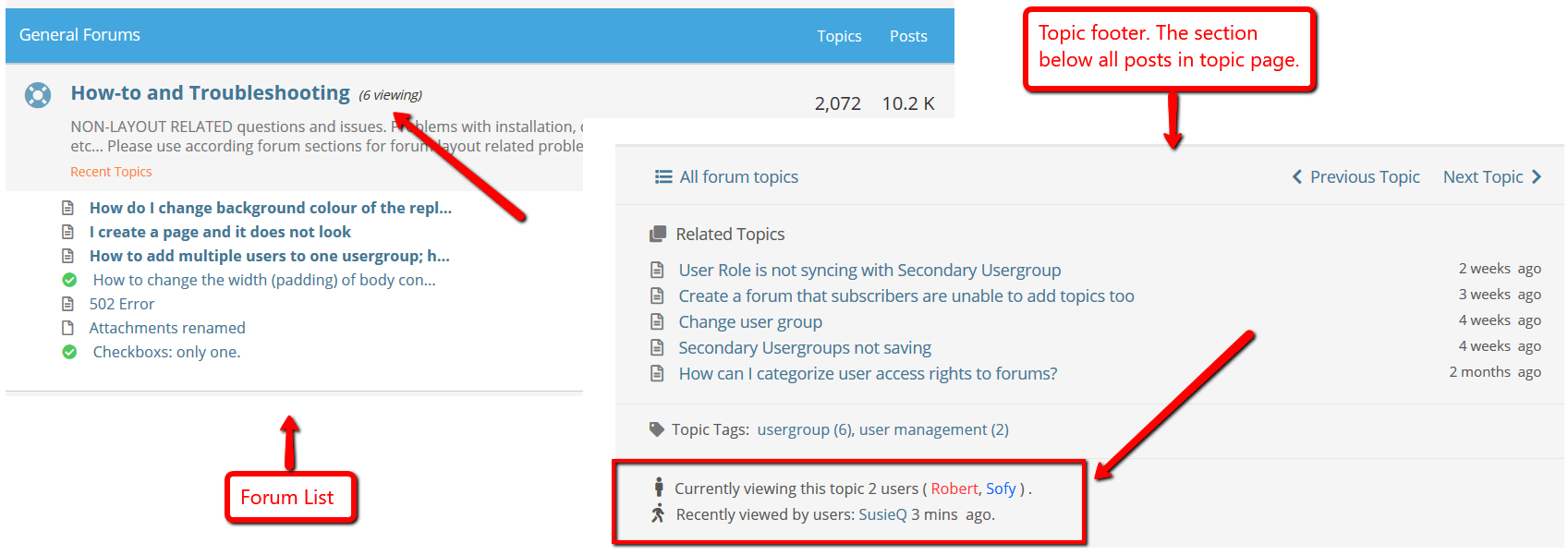
  4. Display Topic Recent Viewers (Forums > Settings > Topics & Posts Tab)
  5. Display Admins with Topic Viewers (Forums > Settings > Topics & Posts Tab)


Posts: 92
Translate
English
Spanish
French
German
Italian
Portuguese
Russian
Chinese
Japanese
Korean
Arabic
Hindi
Dutch
Polish
Turkish
Vietnamese
Thai
Swedish
Danish
Finnish
Norwegian
Czech
Hungarian
Romanian
Greek
Hebrew
Indonesian
Malay
Ukrainian
Bulgarian
Croatian
Slovak
Slovenian
Serbian
Lithuanian
Latvian
Estonian
(@jasontoth)
Estimable Member
Joined: 5 years ago

Thank you for this, but my users asked if this could be also adjusted on how long it shows. Right now it is set for 1 hour, but how can I change this time amount it shows for? Say I only want to set it for 30 minutes? Thanks.


1 Reply
Robert
Admin
(@robert)
Joined: 2 months ago

Support Team
Posts: 10716
Translate
English
Spanish
French
German
Italian
Portuguese
Russian
Chinese
Japanese
Korean
Arabic
Hindi
Dutch
Polish
Turkish
Vietnamese
Thai
Swedish
Danish
Finnish
Norwegian
Czech
Hungarian
Romanian
Greek
Hebrew
Indonesian
Malay
Ukrainian
Bulgarian
Croatian
Slovak
Slovenian
Serbian
Lithuanian
Latvian
Estonian

@jasontoth,

You can use this hook code in the functions.php file of your current active WordPress theme:

add_filter('wpforo_keep_visitors_data', function ($seconds){
return 1800; //30 minutes
});

Posts: 1
Translate
English
Spanish
French
German
Italian
Portuguese
Russian
Chinese
Japanese
Korean
Arabic
Hindi
Dutch
Polish
Turkish
Vietnamese
Thai
Swedish
Danish
Finnish
Norwegian
Czech
Hungarian
Romanian
Greek
Hebrew
Indonesian
Malay
Ukrainian
Bulgarian
Croatian
Slovak
Slovenian
Serbian
Lithuanian
Latvian
Estonian
(@jones553)
New Member
Joined: 5 years ago

I don't see where to restrict the visibility for "Recently Viewed" Opportunities in Classic OR Lightning as there is no Edit option next to that list view. Is there another way to edit


1 Reply
Robert
Admin
(@robert)
Joined: 2 months ago

Support Team
Posts: 10716
Translate
English
Spanish
French
German
Italian
Portuguese
Russian
Chinese
Japanese
Korean
Arabic
Hindi
Dutch
Polish
Turkish
Vietnamese
Thai
Swedish
Danish
Finnish
Norwegian
Czech
Hungarian
Romanian
Greek
Hebrew
Indonesian
Malay
Ukrainian
Bulgarian
Croatian
Slovak
Slovenian
Serbian
Lithuanian
Latvian
Estonian

@jones553,

You can disable "Track Forum and Topic Current Viewers" option in Dashboard > Forums > Settings > Features Tab:

Or disable it by CSS code. Insert this CSS code in Dashboard > Forums > Settings > Styles > Custom CSS Code textarea, save it, delete all caches, go to forum front-end and press Ctrl+F5:

#wpforo #wpforo-wrap .wpf-topic-visitors {
     display: none;
}

Share: