
AI Search
Classic Search
 Search Phrase:
 Search Type:
Advanced search options
 Search in Forums:
 Search in date period:

 Sort Search Results by:

Filter by custom fields

Topic prefix

AI Assistant
Notifications
Clear all

[Closed] New topic date is a day ahead

5 Posts
3 Users
0 Reactions
2,248 Views
Posts: 2
Topic starter
Translate
English
Spanish
French
German
Italian
Portuguese
Russian
Chinese
Japanese
Korean
Arabic
Hindi
Dutch
Polish
Turkish
Vietnamese
Thai
Swedish
Danish
Finnish
Norwegian
Czech
Hungarian
Romanian
Greek
Hebrew
Indonesian
Malay
Ukrainian
Bulgarian
Croatian
Slovak
Slovenian
Serbian
Lithuanian
Latvian
Estonian
(@cadengrant)
New Member
Joined: 9 years ago
[#4855]

I'm working on a forum for a client, and when I add a new topic it sets the date to the server date instead of the date according to WordPress.

Is there a way to change this to use WordPress's date?


4 Replies
Posts: 2
Translate
English
Spanish
French
German
Italian
Portuguese
Russian
Chinese
Japanese
Korean
Arabic
Hindi
Dutch
Polish
Turkish
Vietnamese
Thai
Swedish
Danish
Finnish
Norwegian
Czech
Hungarian
Romanian
Greek
Hebrew
Indonesian
Malay
Ukrainian
Bulgarian
Croatian
Slovak
Slovenian
Serbian
Lithuanian
Latvian
Estonian
(@arthurgjensen)
New Member
Joined: 9 years ago

I am experiencing the same issue. New posts are indicating that they were posted 8 hours in the future.


Robert
Posts: 10716
Admin
Translate
English
Spanish
French
German
Italian
Portuguese
Russian
Chinese
Japanese
Korean
Arabic
Hindi
Dutch
Polish
Turkish
Vietnamese
Thai
Swedish
Danish
Finnish
Norwegian
Czech
Hungarian
Romanian
Greek
Hebrew
Indonesian
Malay
Ukrainian
Bulgarian
Croatian
Slovak
Slovenian
Serbian
Lithuanian
Latvian
Estonian
(@robert)
Support Team
Joined: 2 months ago

wpForo is a user individual platform, this is not a blog post for a single timezon. You should go to My Profile > Account page and set your timezon to get correct date:
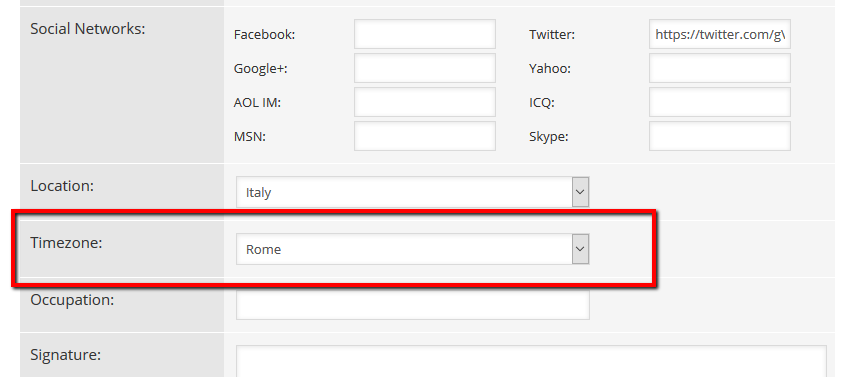
Also make sure the Wordpress time zone is also correct in Dashboard > Settings > General admin page.


Posts: 2
Topic starter
Translate
English
Spanish
French
German
Italian
Portuguese
Russian
Chinese
Japanese
Korean
Arabic
Hindi
Dutch
Polish
Turkish
Vietnamese
Thai
Swedish
Danish
Finnish
Norwegian
Czech
Hungarian
Romanian
Greek
Hebrew
Indonesian
Malay
Ukrainian
Bulgarian
Croatian
Slovak
Slovenian
Serbian
Lithuanian
Latvian
Estonian
(@cadengrant)
New Member
Joined: 9 years ago

So a posts creation date is based on the authors timezone? If so, is there a way to change this to just make it go by WordPress time? I have a custom query that displays all topics by the day, so all topics need to have the date according to the one set in WordPress.


Robert
Posts: 10716
Admin
Translate
English
Spanish
French
German
Italian
Portuguese
Russian
Chinese
Japanese
Korean
Arabic
Hindi
Dutch
Polish
Turkish
Vietnamese
Thai
Swedish
Danish
Finnish
Norwegian
Czech
Hungarian
Romanian
Greek
Hebrew
Indonesian
Malay
Ukrainian
Bulgarian
Croatian
Slovak
Slovenian
Serbian
Lithuanian
Latvian
Estonian
(@robert)
Support Team
Joined: 2 months ago
Posted by: cadengrant

So a posts creation date is based on the authors timezone?

No, it's not based on author timezone, it's based on member/viewer/reader timezone. Each topic and post will creation time will be displayed based on current member time-zone. So each member can correctly understated the creation time. Author time-zone doesn't matter.

Example:

Author created Topic on 6:00pm (UTC 0)

Member 1 is from Italy (UTC +1), he sees topic create time: 7:00pm

Member 2 is from Moscow (UTC +3), he sees topic create time: 9:00pm

If Author is from Dubai (UTC +4), he sees its own topic time: 10:00pm

In other words, times are being dynamically changed for all members separately based on their timezon.


Share: