
[Solved] Register and pay to see a thread

Posted by: @robertAlso, please leave a direct link to that thread.
<?php
if( WPF()->perm->forum_can('vf') && WPF()->perm->forum_can('enf') ):

	if( $forum = WPF()->current_object['forum'] ) : ?>
		<div class="wpf-subforum-sep" style="height:20px;"></div>
		<div class="wpf-head-bar">
			<div class="wpf-head-bar-left">
				<?php wpforo_forum_title($forum, '<h1 id="wpforo-title">', '</h1>') ?>
				<?php wpforo_forum_description($forum, '<div id="wpforo-description">', '</div>') ?>
				<div class="wpf-action-link">
					<?php WPF()->tpl->forum_subscribe_link() ?>
					<?php wpforo_feed_link('forum'); ?>
				</div>
			</div>
			<div class="wpf-head-bar-right">
				<?php wpforo_template_add_topic_button() ?>
			</div>
			<div class="wpf-clear"></div>
		</div>

		<?php if( WPF()->perm->forum_can('ct') ) WPF()->tpl->topic_form($forum);

		if( $topics = WPF()->current_object['topics'] ) {
			wpforo_template_pagenavi('wpf-navi-topic-top');
			include( wpftpl('layouts/' . $forum['cat_layout'] . '/topic.php') );
			wpforo_template_pagenavi('wpf-navi-topic-bottom');
			do_action( 'wpforo_topic_list_footer' );
		}else{ ?>
			<p class="wpf-p-error">
				<?php wpforo_phrase('No topics were found here') ?>
			</p>
			<?php
		}
	endif;

else : ?>
	<p class="wpf-p-error">
       <?php if(is_user_logged_in()): ?>
           <?php echo apply_filters('wpforo_no_forum_access_message_for_users', wpforo_phrase("Your user level does not have appropriate permission to view the content", false)); ?>
       <?php else: ?>
           <p><?php echo apply_filters('wpforo_no_forum_access_message_for_guests', wpforo_phrase("You do not have permission to view the content", false) . '<br>'. wpforo_get_login_or_register_notice_text()); ?></p>
           <?php $ForumID = (int)wpfval(WPF()->current_object, 'forum', 'forumid'); ?>
           <?php if( $ForumID === 11 ): ?>
               <p>[Buy Now] button for forum ID #11</p>
           <?php elseif( $ForumID === 8 ): ?>
               <p>[Buy Now] button for forum ID #8</p>
           <?php elseif( $ForumID === 10 ): ?>
               <p>[Buy Now] button for forum ID #10</p>
           <?php endif; ?>
       <?php endif; ?>
</p>
<?php endif;
The above code is inside the topic.php
I am also attaching the screenshot in the sequence for you to understand... I am creating the website in a subdomain called... hlpworld.olvdigitalsolutions.com and will move the developed site to hlpworld.com
Also, please leave a direct link to that thread.
How do i do it... Are you asking the url for the page? if so, I have below...
https://hlpworld.olvdigitalsolutions.com/forum/
Click on the Color Thereaphy , will take you to the below link... the forum thread
You've done the wrong configuration. You should not close access to the forum, you should close access to threads. If you want to close access to forums why you've asked me to provide code for the thread access restriction? So just do a final decision, where you want to show the [Buy Button]? Either when user try to enter a forum or when user try to enter a thread?
In case you want to say thank you !)
We'd really appreciate and be thankful if you leave a good review on plugin page. This is the best way to say thank you to this project and support team.

Sorry Robert...
I think I got confused in properly explaining.. .Sorry for the inconvinence...
I will write down what I needed, I will attach an image for you to understand properly...
I Have the structure below in the forum..
1 .... Gurukul
1a.... Color theraphy
1b.... Gurukul title 2
Here I want the guest to see the forum thread, 1a, 1b ... but if they 1a or 1b thread they will go inside and make the registration and make a payment and after the payment and the registration is done, they will be able to see 1a, 1b threads.
Hope I made you understand what I needed to implement here...
Please guide me if I have made any mistakes in the text, I am very new to the forum and I am learning what forum is and its terms used...
I am attaching the screenshot for your immediate reference.
Regards,
Vijey


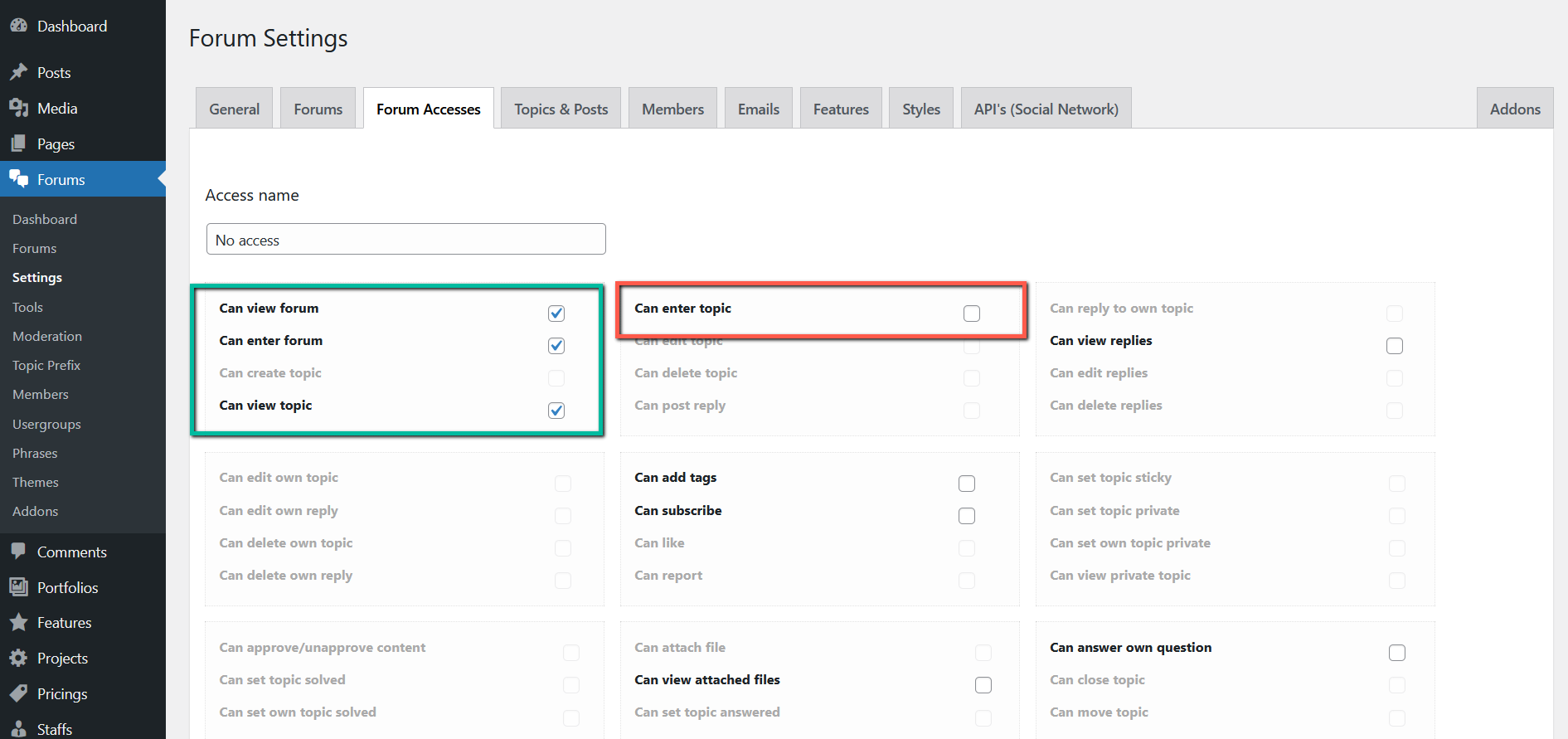
Ok, the changes are correct. You should some changes in forum accesses. Navigate to Dashboard > Forums > Settings > Forum Accesses Tab, edit the No Access forum access and check (enable) these permissions:
- Can enter forum
- Can view forum
- Can view topics
And keep unchecked (disabled) this permission:
- Can enter topic
I assume you use the No Access forum access to restrict usergroup permissions. If you don't use the No Access then edit the forum access you use and do the same configuration.
In case you want to say thank you !)
We'd really appreciate and be thankful if you leave a good review on plugin page. This is the best way to say thank you to this project and support team.
Thanks a lot, I made the configurations as you said.
I created new rule called unregistered...
But now I need to have the payment link in order to register and pay...
How do i do it....
I am attaching the images for your reference...
Ok, that's good.
The [Buy] button should already be there, change all triple === to double == in the (if) statements. Then let me know where is the changed topic.php located? Just provide the absolute path to the file. Are you sure the topic.php is located in the current active WordPress theme folder? Do you have child theme?
In case you want to say thank you !)
We'd really appreciate and be thankful if you leave a good review on plugin page. This is the best way to say thank you to this project and support team.
I don't have a child theme.
I will change the === to == and give you the reply.
Yes, the topic.php is located in the main root folder of wordpress, as per the previous image attachment.
Just provide the absolute path to the file. Are you sure :
What is the above question about, I am unable to follow the above question. Please advice.
Posted by: @vijeyraghavanYes, the topic.php is located in the main root folder of wordpress, as per the previous image attachment.
In the main root? I've asked you to create the /wpforo/ folder in the active WordPress theme folder, I've never asked you to put it on the root folder.
The active WordPress theme folder is located in the /wp-content/themes/current-active-theme/, so please move the /wpforo/ folder to /wp-content/themes/current-active-theme/ directory. Make sure you only have topic.php in the /wpforo/ folder.
So the topic.php should be located in: /wp-content/themes/current-active-theme/wpforo/ folder.
In case you want to say thank you !)
We'd really appreciate and be thankful if you leave a good review on plugin page. This is the best way to say thank you to this project and support team.
Thanks Robert, I implemented as per your steps, but the payment button is not appearing as desired, need your help...
I am yet to see the buy button in the page...
I am ok to send the username and the password for the ftp for you to check... Please advice.
The link to the forum is below,
https://hlpworld.olvdigitalsolutions.com/forum/
Screenshots please. I'm not sure if you did it correctly.
Also, please edit the forum and change the slug to something shorted, this is too long: gurukul-2-2-2-2-2-2-2-2-gurukul-2-2-2-2-2-2-2-2-gurukul-2-2-2-gurukul-2-2-2-gurukul-2-2-2-gurukul-2-2-2-gurukul-2-2-2-gurukul-2-2-2-about-gurukul-2
In case you want to say thank you !)
We'd really appreciate and be thankful if you leave a good review on plugin page. This is the best way to say thank you to this project and support team.
I am attaching the screenshot in the zip format for you to validate
The path of the plugin with topic.php is below
public_html/hlpworld/wp-content/themes/Divi/wpforo/wpf-themes/classic
This is the path for the plugin
public_html/hlpworld/wp-content/plugins/wpforo
This is the url below....
https://hlpworld.olvdigitalsolutions.com/forum/color-thereaphy/abcd/
Note: I need to have a payment button / link. When person register
If you need the username and password for the wordpess admin, I will share .... but guide me how to share...
Thanks a lot,
Posted by: @vijeyraghavanpublic_html/hlpworld/wp-content/themes/Divi/wpforo/wpf-themes/classic
I don't understand why it's so hard to put the topic.php file in a correct directory?
I've asked you to create /wpforo/ folder in the active WordPress theme folder and put the topic.php in that folder why have you created /wpf-themes/ and /classic/ folders in the active theme folder??
The modified topic.php file should be directly in /wpforo/ folder:
public_html/hlpworld/wp-content/themes/Divi/wpforo/

In case you want to say thank you !)
We'd really appreciate and be thankful if you leave a good review on plugin page. This is the best way to say thank you to this project and support team.
Hi Robert,
I have updated the code, and i am unable to fix the issue of payment button.
I am attaching the screenshot for your reference.
As guided, I have moved the folder to the below location
public_html/hlpworld/wp-content/themes/Divi/wpforo
Regards,
Vijey
You should not move the folder, you should move the topic.php file. So the topic.php file should be in public_html/hlpworld/wp-content/themes/Divi/wpforo/ directory. Please leave a screenshot to the topic.php file in the file system, so I could see the path. There should not be /classic/ folder.
In case you want to say thank you !)
We'd really appreciate and be thankful if you leave a good review on plugin page. This is the best way to say thank you to this project and support team.
The file topic.php is inside the path you mentioned .... I have not changed or moved anywhere.
The path where the post.php located below is
public_html/hlpworld/wp-content/themes/Divi/wpforo/topic.php
I also like to share the ftp details for you to check.
Please advice.
Regards,
Vijey
Please edit the top category and the forum of the topic and make sure they have correct Forum Access for the usergroup you're chinking.
Then make sure this is done correctly: https://wpforo.com/community/postid/51815/
Then delete all caches if you have a cache plugin.
In case you want to say thank you !)
We'd really appreciate and be thankful if you leave a good review on plugin page. This is the best way to say thank you to this project and support team.

I have changed the permissions correctly. I have also added the screenshot for your reference.
The file named : forum-permission-default-1.jpg is the default settings which is present when creating the forum.
The file named : forum-permission-default-2.jpg is the forum topic i created when saving the forum title.
I also changed the sub topic of the forum to no access
Regards,
Vijey
Ok, then please send admin login details to support[at]gvectors.com email address. We'll check and find the reason why it doesn't work.
In case you want to say thank you !)
We'd really appreciate and be thankful if you leave a good review on plugin page. This is the best way to say thank you to this project and support team.
Sure,
Thanks a lot, I will send the details in the email.
Regards,
Vijey
The solution was correct when you enter a forum, but it was not correct when you enter to a topic. We've changed the template file. The topic.php has been deleted and the post.php has been copied from wp-content/plugins/wpforo/wpf-themes/classic/post.php and added to the Divi /wpforo/ folder. The changes are made in the post.php file:
<div class="wpf-p-error">
       <?php if(is_user_logged_in()): ?>

           <?php echo apply_filters('wpforo_no_topic_access_message_for_users', wpforo_phrase("Your user level does not have appropriate permission to view the content", false)); ?>

       <?php else: ?>

           <?php echo apply_filters('wpforo_no_topic_access_message_for_guests', wpforo_phrase("You do not have permission to view the content", false) . '<br>'. wpforo_get_login_or_register_notice_text()); ?>

           <?php $ForumID = (int)wpfval(WPF()->current_object, 'forum', 'forumid'); ?>
           <?php if( $ForumID == 22 ): ?>
               <div style="text-align:center">[Buy Now] button for forum ID #22</div>
           <?php elseif( $ForumID == 10 ): ?>
               <!-- <div style="text-align:center">[Buy Now] button for forum ID #10</div> -->
           <?php elseif( $ForumID == 8 ): ?>
               <!-- <div style="text-align:center">[Buy Now] button for forum ID #8</div> -->
       <?php endif; ?>

       <?php endif; ?>
</div>
Now, when a guest goes to the topic he/she see this message:
https://hlpworld.olvdigitalsolutions.com/forum/about-swarna-prashana/benefits-of-swarfna-prashna/

In case you want to say thank you !)
We'd really appreciate and be thankful if you leave a good review on plugin page. This is the best way to say thank you to this project and support team.
Thanks a lot for the help Robert.
I also like to know, In the text, [Buy Now] button for forum ID #22... Can i replace it with the payment button?
In case you want to say thank you !)
We'd really appreciate and be thankful if you leave a good review on plugin page. This is the best way to say thank you to this project and support team.
- 19 Forums
- 14.3 K Topics
- 71.7 K Posts
- 143 Online
- 6,473 Members