
AI Search
Classic Search
 Search Phrase:
 Search Type:
Advanced search options
 Search in Forums:
 Search in date period:

 Sort Search Results by:

AI Assistant
Notifications
Clear all

[Closed] This code did not work, unfortunately. Please advise.

5 Posts
2 Users
0 Reactions
1,201 Views
Posts: 127
Topic starter
Translate
English
Spanish
French
German
Italian
Portuguese
Russian
Chinese
Japanese
Korean
Arabic
Hindi
Dutch
Polish
Turkish
Vietnamese
Thai
Swedish
Danish
Finnish
Norwegian
Czech
Hungarian
Romanian
Greek
Hebrew
Indonesian
Malay
Ukrainian
Bulgarian
Croatian
Slovak
Slovenian
Serbian
Lithuanian
Latvian
Estonian
(@mplusplus)
Reputable Member
Joined: 6 years ago
[#14868]

Hi there

I pasted this code in my theme's JS file https://wpforo.com/community/postid/46646/ as directed.
And still the Tags field is not mandatory. 

Are there any changes needed, or should this be added in a different file, please?

Thank you.


4 Replies
Alvina
Posts: 1857
Moderator
Translate
English
Spanish
French
German
Italian
Portuguese
Russian
Chinese
Japanese
Korean
Arabic
Hindi
Dutch
Polish
Turkish
Vietnamese
Thai
Swedish
Danish
Finnish
Norwegian
Czech
Hungarian
Romanian
Greek
Hebrew
Indonesian
Malay
Ukrainian
Bulgarian
Croatian
Slovak
Slovenian
Serbian
Lithuanian
Latvian
Estonian
(@alvina)
Member
Joined: 7 years ago

@mplusplus,

Please try to add code using the methods described in this tutorial: https://www.wpbeginner.com/wp-tutorials/how-to-easily-add-javascript-in-wordpress-pages-or-posts/

1 Reply
(@mplusplus)
Joined: 6 years ago

Reputable Member
Posts: 127
Translate
English
Spanish
French
German
Italian
Portuguese
Russian
Chinese
Japanese
Korean
Arabic
Hindi
Dutch
Polish
Turkish
Vietnamese
Thai
Swedish
Danish
Finnish
Norwegian
Czech
Hungarian
Romanian
Greek
Hebrew
Indonesian
Malay
Ukrainian
Bulgarian
Croatian
Slovak
Slovenian
Serbian
Lithuanian
Latvian
Estonian

@alvina Any update on this, please?

To make Tags a required field:
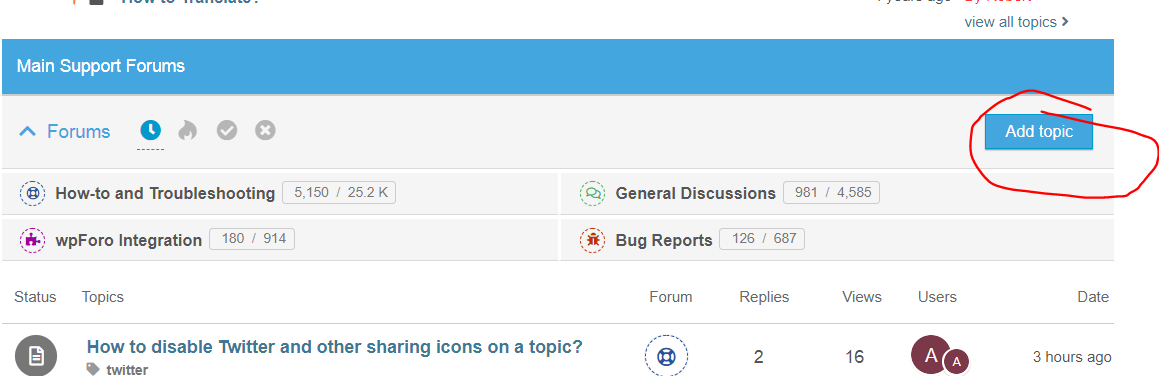
The mentioned code works ONLY when I add a post using /add-topic/ page. However, it does not work if we click on Add Topic button from within a forum. (Screenshot)

Thanks.


Posts: 127
Topic starter
Translate
English
Spanish
French
German
Italian
Portuguese
Russian
Chinese
Japanese
Korean
Arabic
Hindi
Dutch
Polish
Turkish
Vietnamese
Thai
Swedish
Danish
Finnish
Norwegian
Czech
Hungarian
Romanian
Greek
Hebrew
Indonesian
Malay
Ukrainian
Bulgarian
Croatian
Slovak
Slovenian
Serbian
Lithuanian
Latvian
Estonian
(@mplusplus)
Reputable Member
Joined: 6 years ago

So, it works if I go directly to the Add Topic page with a full URL (e.g. /forums/add-topic/68/).

However, if I click the Add Topic button from within the forum interface (to have the add topic form fly out) then this code does not work. E.g. see attached screenshot.

Any help will be appreciated.

Thanks a lot.
 add topic

1 Reply
Alvina
Moderator
(@alvina)
Joined: 7 years ago

Member
Posts: 1857
Translate
English
Spanish
French
German
Italian
Portuguese
Russian
Chinese
Japanese
Korean
Arabic
Hindi
Dutch
Polish
Turkish
Vietnamese
Thai
Swedish
Danish
Finnish
Norwegian
Czech
Hungarian
Romanian
Greek
Hebrew
Indonesian
Malay
Ukrainian
Bulgarian
Croatian
Slovak
Slovenian
Serbian
Lithuanian
Latvian
Estonian

@mplusplus,

There is no such issue on our test websites, the code work's fine.

Probably there is a cache issue(the file you add the JS code is not loaded, so you do not see the change). So please delete all caches, if you have a CDN purge the CDN. And do Ctrl+F5 on the forum front.

If you have a cache plugin, please exclude wpForo Forum page from your cache plugin!

Almost all cache plugins should have an option to exclude pages from the caching process. You should exclude your forum home page from your cache plugin. This is very important.

More info here: https://wpforo.com/community/faq/wpforo-and-cache-plugins/

Also please leave your forum URL.


Share: