
AI Search
Classic Search
 Search Phrase:
 Search Type:
Advanced search options
 Search in Forums:
 Search in date period:

 Sort Search Results by:

AI Assistant
Notifications
Clear all

[Closed] wpforo and WP Customer Area?

13 Posts
2 Users
0 Reactions
5,200 Views
Robert
Posts: 10752
Admin
Translate
English
Spanish
French
German
Italian
Portuguese
Russian
Chinese
Japanese
Korean
Arabic
Hindi
Dutch
Polish
Turkish
Vietnamese
Thai
Swedish
Danish
Finnish
Norwegian
Czech
Hungarian
Romanian
Greek
Hebrew
Indonesian
Malay
Ukrainian
Bulgarian
Croatian
Slovak
Slovenian
Serbian
Lithuanian
Latvian
Estonian
(@robert)
Support Team
Joined: 3 months ago

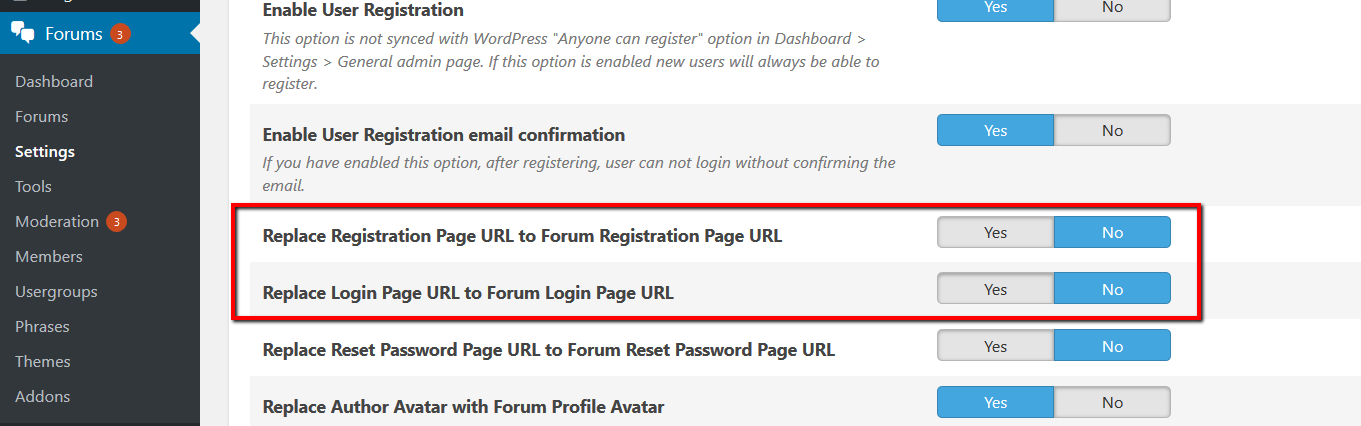
The problem is that I'm not familiar with "WP Customer Area" and I don't have any clue for this. The only thing I can recommend is disabling replacement of all login pages to wpForo login page in Dashboard > Forums > Settings > Features admin page:

Robert
Posts: 10752
Admin
Translate
English
Spanish
French
German
Italian
Portuguese
Russian
Chinese
Japanese
Korean
Arabic
Hindi
Dutch
Polish
Turkish
Vietnamese
Thai
Swedish
Danish
Finnish
Norwegian
Czech
Hungarian
Romanian
Greek
Hebrew
Indonesian
Malay
Ukrainian
Bulgarian
Croatian
Slovak
Slovenian
Serbian
Lithuanian
Latvian
Estonian
(@robert)
Support Team
Joined: 3 months ago

And please explain what means the word "connexion", I don't know such word in English.


1 Reply
BenWebDev
(@benwebdev)
Joined: 9 years ago

Eminent Member
Posts: 14
Translate
English
Spanish
French
German
Italian
Portuguese
Russian
Chinese
Japanese
Korean
Arabic
Hindi
Dutch
Polish
Turkish
Vietnamese
Thai
Swedish
Danish
Finnish
Norwegian
Czech
Hungarian
Romanian
Greek
Hebrew
Indonesian
Malay
Ukrainian
Bulgarian
Croatian
Slovak
Slovenian
Serbian
Lithuanian
Latvian
Estonian

Well, my bad on the term "Connexion" it's the french syntax, and it means "Connection" (or "login" if you prefer) in english (not that far from the english term by the way...)

Anyway, did you read all the answers I've posted, because your last answer seems to turn in circle now as I've already written:
"My WpForo is already configured on 'No' for the 2 options 'Replace Registration page URL' and 'Replace Login Page URL' and works well on the website I'm working on when the 'WP Customer Area' plug is desactivated. And the 'WP Customer Area' plug works well too when WpForo is desactivated..."


Robert
Posts: 10752
Admin
Translate
English
Spanish
French
German
Italian
Portuguese
Russian
Chinese
Japanese
Korean
Arabic
Hindi
Dutch
Polish
Turkish
Vietnamese
Thai
Swedish
Danish
Finnish
Norwegian
Czech
Hungarian
Romanian
Greek
Hebrew
Indonesian
Malay
Ukrainian
Bulgarian
Croatian
Slovak
Slovenian
Serbian
Lithuanian
Latvian
Estonian
(@robert)
Support Team
Joined: 3 months ago

This is not a small plugin to install and test. It should be configured exactly as on your website.  Just let me  know when you can provide website URL and admin access. This is the only way I could try to help you. You can send admin login details to support[at]gvectors.com. Also pleases send example URLs or other info which can help us find the problem.


1 Reply
BenWebDev
(@benwebdev)
Joined: 9 years ago

Eminent Member
Posts: 14
Translate
English
Spanish
French
German
Italian
Portuguese
Russian
Chinese
Japanese
Korean
Arabic
Hindi
Dutch
Polish
Turkish
Vietnamese
Thai
Swedish
Danish
Finnish
Norwegian
Czech
Hungarian
Romanian
Greek
Hebrew
Indonesian
Malay
Ukrainian
Bulgarian
Croatian
Slovak
Slovenian
Serbian
Lithuanian
Latvian
Estonian

Ok, so for now it's not possible, and the term and condition of the Site I'm working on will not allow me to give you any admin access...

You're right "Wp Customer Area" is not a small plugin, that being so, the configuration I use is just the default configuration...
I've just edited the WpForo special URLs custom authorisation on member tab to match the special login URL for Wp Customer Area plugin...


Page 2 / 2
Share:
