
AI Search
Classic Search
 Search Phrase:
 Search Type:
Advanced search options
 Search in Forums:
 Search in date period:

 Sort Search Results by:

AI Assistant
wpForo Menus got di...
 
Notifications
Clear all

[Closed] wpForo Menus got disappeared

7 Posts
2 Users
1 Reactions
20.2 K Views
(@rubynaaz)
Active Member
Joined: 9 years ago
Posts: 8
Topic starter
Translate
English
Spanish
French
German
Italian
Portuguese
Russian
Chinese
Japanese
Korean
Arabic
Hindi
Dutch
Polish
Turkish
Vietnamese
Thai
Swedish
Danish
Finnish
Norwegian
Czech
Hungarian
Romanian
Greek
Hebrew
Indonesian
Malay
Ukrainian
Bulgarian
Croatian
Slovak
Slovenian
Serbian
Lithuanian
Latvian
Estonian
  [#3970]

wp foro menu bar got disappeared........... if it is like that ! then no one will come & login to our company forum community page, and also i'm unable to change the password for admin in wp foro, nor i can see the registerred people to wp foro in our company forum community. please help me out..

Settings -  members i'm unable to see many option to change passwords, registered people or members.

Please find the attached screen short our company wpforo forum menu bar looks like

any body please help me.

if i uninstalled wpforo 7 again if i reinstall will i lose my forum data ?



Topic Tags
Robert
(@robert)
Support Team Admin
Joined: 2 months ago
Posts: 10736
Translate
English
Spanish
French
German
Italian
Portuguese
Russian
Chinese
Japanese
Korean
Arabic
Hindi
Dutch
Polish
Turkish
Vietnamese
Thai
Swedish
Danish
Finnish
Norwegian
Czech
Hungarian
Romanian
Greek
Hebrew
Indonesian
Malay
Ukrainian
Bulgarian
Croatian
Slovak
Slovenian
Serbian
Lithuanian
Latvian
Estonian
 

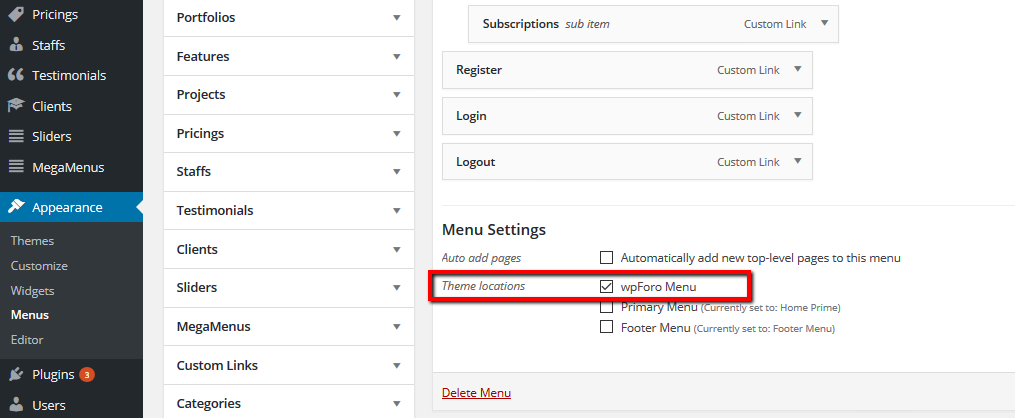
You've changed the active theme and wpForo menu was disconnected to the menu location. Please navigate in Dashboard to Appearance > Menus admin page. Select the wpForo Navigation, then check/enable it for  wpForo Menu location.

Also please read wpForo Menu Doc:

https://wpforo.com/docs/root/getting-started/forum-menu/


In case you want to say thank you !)
We'd really appreciate and be thankful if you leave a good review on plugin page. This is the best way to say thank you to this project and support team.


(@rubynaaz)
Active Member
Joined: 9 years ago
Posts: 8
Topic starter
Translate
English
Spanish
French
German
Italian
Portuguese
Russian
Chinese
Japanese
Korean
Arabic
Hindi
Dutch
Polish
Turkish
Vietnamese
Thai
Swedish
Danish
Finnish
Norwegian
Czech
Hungarian
Romanian
Greek
Hebrew
Indonesian
Malay
Ukrainian
Bulgarian
Croatian
Slovak
Slovenian
Serbian
Lithuanian
Latvian
Estonian
 

Please have a look our appearance menu options look like this.

Please find the screen short below.

Please reply to this


Robert
(@robert)
Support Team Admin
Joined: 2 months ago
Posts: 10736
Translate
English
Spanish
French
German
Italian
Portuguese
Russian
Chinese
Japanese
Korean
Arabic
Hindi
Dutch
Polish
Turkish
Vietnamese
Thai
Swedish
Danish
Finnish
Norwegian
Czech
Hungarian
Romanian
Greek
Hebrew
Indonesian
Malay
Ukrainian
Bulgarian
Croatian
Slovak
Slovenian
Serbian
Lithuanian
Latvian
Estonian
 

I don't see why you show this. I've already answered on your question. Just select the wpForo Navigation in drop-down, then click on [select] button, then scroll down and check/enable the wpForo Menu checkbox.

In case you want to say thank you !)
We'd really appreciate and be thankful if you leave a good review on plugin page. This is the best way to say thank you to this project and support team.


(@rubynaaz)
Active Member
Joined: 9 years ago
Posts: 8
Topic starter
Translate
English
Spanish
French
German
Italian
Portuguese
Russian
Chinese
Japanese
Korean
Arabic
Hindi
Dutch
Polish
Turkish
Vietnamese
Thai
Swedish
Danish
Finnish
Norwegian
Czech
Hungarian
Romanian
Greek
Hebrew
Indonesian
Malay
Ukrainian
Bulgarian
Croatian
Slovak
Slovenian
Serbian
Lithuanian
Latvian
Estonian
 

see its simple i cannot tick to wp foro menu, if i click to wpforo in menu settings, on our website wpforo option will get  reflect like;  submission, register, login & logout will appear instead of product options, that we don't want, i tried all this, earlier forum - wpforo menu bar was working, since from last friday its not coming. completely blank. earlier also in wordpress - appearance - menu settings was - remain same (primary menu) in future also it be remain same, 


Please give us some alternate option we cannot tick wpforo menu.


(@rubynaaz)
Active Member
Joined: 9 years ago
Posts: 8
Topic starter
Translate
English
Spanish
French
German
Italian
Portuguese
Russian
Chinese
Japanese
Korean
Arabic
Hindi
Dutch
Polish
Turkish
Vietnamese
Thai
Swedish
Danish
Finnish
Norwegian
Czech
Hungarian
Romanian
Greek
Hebrew
Indonesian
Malay
Ukrainian
Bulgarian
Croatian
Slovak
Slovenian
Serbian
Lithuanian
Latvian
Estonian
 

I cannot change our website menu to wpforo. primary menu is for our website options,

wpforo is also a apart of primary menu in our website.

if i tick to <wpforo menu> instead of <primary menu> in appearance - menu- menu settings, then (wpforo forum option will be reflecting on our website) that we dont want, 

please suggest us some alternate option ( in wpforo how menu bar start reflect with this options - submission, register, login & logout

help us


Robert
(@robert)
Support Team Admin
Joined: 2 months ago
Posts: 10736
Translate
English
Spanish
French
German
Italian
Portuguese
Russian
Chinese
Japanese
Korean
Arabic
Hindi
Dutch
Polish
Turkish
Vietnamese
Thai
Swedish
Danish
Finnish
Norwegian
Czech
Hungarian
Romanian
Greek
Hebrew
Indonesian
Malay
Ukrainian
Bulgarian
Croatian
Slovak
Slovenian
Serbian
Lithuanian
Latvian
Estonian
 

I don't ask you change primary menu. If you select wpForo Navigation it doesn't mean you change it, you just go to this menu setting page, then enable it for wpForo Menu location. This manipulation doesn't have any relation to your primary menu.


In case you want to say thank you !)
We'd really appreciate and be thankful if you leave a good review on plugin page. This is the best way to say thank you to this project and support team.


rubynaaz reacted
Share: