

AI Search
Classic Search
 Search Phrase:
 Search Type:
Advanced search options
 Search in Forums:
 Search in date period:

 Sort Search Results by:

AI Assistant
Forums don't show u...
 
Notifications
Clear all

[Closed] Forums don't show up on the main page.

30 Posts
10 Users
4 Reactions
37.6 K Views
Robert
(@robert)
Support Team Admin
Joined: 2 months ago
Posts: 10716
Topic starter
Translate
English
Spanish
French
German
Italian
Portuguese
Russian
Chinese
Japanese
Korean
Arabic
Hindi
Dutch
Polish
Turkish
Vietnamese
Thai
Swedish
Danish
Finnish
Norwegian
Czech
Hungarian
Romanian
Greek
Hebrew
Indonesian
Malay
Ukrainian
Bulgarian
Croatian
Slovak
Slovenian
Serbian
Lithuanian
Latvian
Estonian
  [#38]

This is know incorrect configuration issue. Please check these points:

  1. Make sure the forum page URL is identical with Forum Base URL. The forum base URL is located in Settings > General Tab > Forum Base URL option. For example, if the forum page URL is www.example.com/community but the Forum Base URL is set www.example.com/index.php/community you'll not see any forum on front end, this is the most popular reason of this issue. Both should be www.example.com/community .
  2. Please note, if you create a Forum Category (Blue boxes in forum management admin page) without Forums you'll not see any forum on front-end. Forum Categories are just for grouping forums and setting forum layouts. You can't have forums without Forum Category. All forums of Forum category inherits Category layout and are being displayed under the Category. Please the attached screenshot:

  3. Make sure your usergroup is forum access has appropriate permission to "View Foums".
  4. If you use SSL / HTTPS protocol please make sure you use Beta-5 or higher version.
  5. Permalinks must have trailing slash. Problem comes if your permalink structure doesn't have trailing slashes, for example:
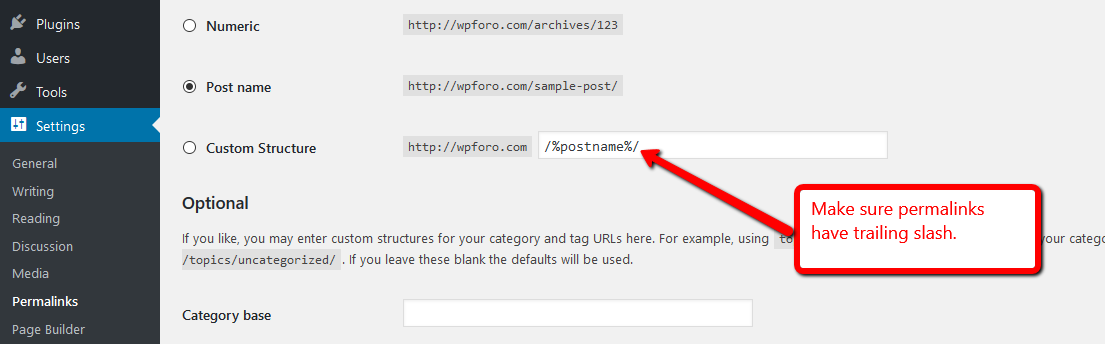
     
    Please make sure it exists.


DanNita reacted
(@gbengalex)
New Member
Joined: 10 years ago
Posts: 4
Translate
English
Spanish
French
German
Italian
Portuguese
Russian
Chinese
Japanese
Korean
Arabic
Hindi
Dutch
Polish
Turkish
Vietnamese
Thai
Swedish
Danish
Finnish
Norwegian
Czech
Hungarian
Romanian
Greek
Hebrew
Indonesian
Malay
Ukrainian
Bulgarian
Croatian
Slovak
Slovenian
Serbian
Lithuanian
Latvian
Estonian
 

Forum does not show on the front end at domain/community even though I created both category and forum in admin.  Attached screenshot is what i see.  Also there is no way to create a topic under a forum, even as admin, even though I have all access privileges.

forum scr


Robert
(@robert)
Support Team Admin
Joined: 2 months ago
Posts: 10716
Topic starter
Translate
English
Spanish
French
German
Italian
Portuguese
Russian
Chinese
Japanese
Korean
Arabic
Hindi
Dutch
Polish
Turkish
Vietnamese
Thai
Swedish
Danish
Finnish
Norwegian
Czech
Hungarian
Romanian
Greek
Hebrew
Indonesian
Malay
Ukrainian
Bulgarian
Croatian
Slovak
Slovenian
Serbian
Lithuanian
Latvian
Estonian
 
Posted by: gbengalex

Forum does not show in the front end at domain/community even though I created both category and forum in admin.  Attached screenshot is what i see.  Also there is no way to create a topic under a forum, even as admin, even though I have all access privileges.

Please read the 5 cases explained on the first post of this topic, above. I just updated the last two cases, #4 and #5. Make sure you've deleted all caches after each change.


(@gbengalex)
New Member
Joined: 10 years ago
Posts: 4
Translate
English
Spanish
French
German
Italian
Portuguese
Russian
Chinese
Japanese
Korean
Arabic
Hindi
Dutch
Polish
Turkish
Vietnamese
Thai
Swedish
Danish
Finnish
Norwegian
Czech
Hungarian
Romanian
Greek
Hebrew
Indonesian
Malay
Ukrainian
Bulgarian
Croatian
Slovak
Slovenian
Serbian
Lithuanian
Latvian
Estonian
 

None of those issues applies to me.  I am seeing the forum page but NO Forum list and NO WAY to post a topic.  I can send you my admin login so you can check the settings.  And for example the forum is showing here but no list:   http://www.afrotainmenttv.com/community/ OR  http://www.afrotainmenttv.com/community/main-category/


(@gbengalex)
New Member
Joined: 10 years ago
Posts: 4
Translate
English
Spanish
French
German
Italian
Portuguese
Russian
Chinese
Japanese
Korean
Arabic
Hindi
Dutch
Polish
Turkish
Vietnamese
Thai
Swedish
Danish
Finnish
Norwegian
Czech
Hungarian
Romanian
Greek
Hebrew
Indonesian
Malay
Ukrainian
Bulgarian
Croatian
Slovak
Slovenian
Serbian
Lithuanian
Latvian
Estonian
 

This is very very frustrating.  I am the admin and there is no obvious way to add a topic either as admin or user.  You need to do a better job of simplifying tour documentation for simple items like this.  AGAIN< I have successfully created category (blue) and forum (white) in admin.  But on front end, the forum title is not showing.  And the "forum" breadcrumb is NOT even clickable.   http://www.afrotainmenttv.com/community/


Robert
(@robert)
Support Team Admin
Joined: 2 months ago
Posts: 10716
Topic starter
Translate
English
Spanish
French
German
Italian
Portuguese
Russian
Chinese
Japanese
Korean
Arabic
Hindi
Dutch
Polish
Turkish
Vietnamese
Thai
Swedish
Danish
Finnish
Norwegian
Czech
Hungarian
Romanian
Greek
Hebrew
Indonesian
Malay
Ukrainian
Bulgarian
Croatian
Slovak
Slovenian
Serbian
Lithuanian
Latvian
Estonian
 

Please send admin login details to support[at]gvectors.com. It seems you've mixed up page settings. We'll check and fix it. As you can see on our forum even simple registered user has an option to create topic.


popolam.me
(@popolam-me)
Active Member
Joined: 10 years ago
Posts: 3
Translate
English
Spanish
French
German
Italian
Portuguese
Russian
Chinese
Japanese
Korean
Arabic
Hindi
Dutch
Polish
Turkish
Vietnamese
Thai
Swedish
Danish
Finnish
Norwegian
Czech
Hungarian
Romanian
Greek
Hebrew
Indonesian
Malay
Ukrainian
Bulgarian
Croatian
Slovak
Slovenian
Serbian
Lithuanian
Latvian
Estonian
 
Posted by: gbengalex


This is very very frustrating.  I am the admin and there is no obvious way to add a topic either as admin or user.  You need to do a better job of simplifying tour documentation for simple items like this.  AGAIN< I have successfully created category (blue) and forum (white) in admin.  But on front end, the forum title is not showing.  And the "forum" breadcrumb is NOT even clickable.   http://www.afrotainmenttv.com/community/


did you find any solution?

i have the same problem


(@aivars)
New Member
Joined: 10 years ago
Posts: 1
Translate
English
Spanish
French
German
Italian
Portuguese
Russian
Chinese
Japanese
Korean
Arabic
Hindi
Dutch
Polish
Turkish
Vietnamese
Thai
Swedish
Danish
Finnish
Norwegian
Czech
Hungarian
Romanian
Greek
Hebrew
Indonesian
Malay
Ukrainian
Bulgarian
Croatian
Slovak
Slovenian
Serbian
Lithuanian
Latvian
Estonian
 

Hi, did you managed to resolve this problem? I have the same issue and realy dont understand what to do!

My forum is at: www.swimming.lv/community


popolam.me
(@popolam-me)
Active Member
Joined: 10 years ago
Posts: 3
Translate
English
Spanish
French
German
Italian
Portuguese
Russian
Chinese
Japanese
Korean
Arabic
Hindi
Dutch
Polish
Turkish
Vietnamese
Thai
Swedish
Danish
Finnish
Norwegian
Czech
Hungarian
Romanian
Greek
Hebrew
Indonesian
Malay
Ukrainian
Bulgarian
Croatian
Slovak
Slovenian
Serbian
Lithuanian
Latvian
Estonian
 
Posted by: popolam.me


Posted by: gbengalex


This is very very frustrating.  I am the admin and there is no obvious way to add a topic either as admin or user.  You need to do a better job of simplifying tour documentation for simple items like this.  AGAIN< I have successfully created category (blue) and forum (white) in admin.  But on front end, the forum title is not showing.  And the "forum" breadcrumb is NOT even clickable.   http://www.afrotainmenttv.com/community/


did you find any solution?

i have the same problem


in my case the next solution:
url, forum, themes names contains non-English letters.
so i installed RusToLat plugin and resolved problem.



Insiston
(@insiston)
New Member
Joined: 10 years ago
Posts: 2
Translate
English
Spanish
French
German
Italian
Portuguese
Russian
Chinese
Japanese
Korean
Arabic
Hindi
Dutch
Polish
Turkish
Vietnamese
Thai
Swedish
Danish
Finnish
Norwegian
Czech
Hungarian
Romanian
Greek
Hebrew
Indonesian
Malay
Ukrainian
Bulgarian
Croatian
Slovak
Slovenian
Serbian
Lithuanian
Latvian
Estonian
 

Hi, been through all 5 points brought up and have the same problem.  I can see forums in view mode from edit section but not live.  Live only stats show up and an incomplete breadcrumb trail.  I added topics via the view page when forums opened.  My base url matches.  I have my category set and rest beneath in non blue sub listings. I have also set to simple configuration.  So I think its all okay per your 5 steps above.  the short code placed on page is [wpforo-index]. looks great on the view preview.

index error1


Robert
(@robert)
Support Team Admin
Joined: 2 months ago
Posts: 10716
Topic starter
Translate
English
Spanish
French
German
Italian
Portuguese
Russian
Chinese
Japanese
Korean
Arabic
Hindi
Dutch
Polish
Turkish
Vietnamese
Thai
Swedish
Danish
Finnish
Norwegian
Czech
Hungarian
Romanian
Greek
Hebrew
Indonesian
Malay
Ukrainian
Bulgarian
Croatian
Slovak
Slovenian
Serbian
Lithuanian
Latvian
Estonian
 

Hi Insiston,

please send admin login details to support[at]gvectors.com email address, we'll check and find the problem.



Kokin
(@kokin)
Active Member
Joined: 10 years ago
Posts: 8
Translate
English
Spanish
French
German
Italian
Portuguese
Russian
Chinese
Japanese
Korean
Arabic
Hindi
Dutch
Polish
Turkish
Vietnamese
Thai
Swedish
Danish
Finnish
Norwegian
Czech
Hungarian
Romanian
Greek
Hebrew
Indonesian
Malay
Ukrainian
Bulgarian
Croatian
Slovak
Slovenian
Serbian
Lithuanian
Latvian
Estonian
 

Could you please also follow up with what needs to be done once the problem is fixed on a certain site?

Thanks


Insiston
(@insiston)
New Member
Joined: 10 years ago
Posts: 2
Translate
English
Spanish
French
German
Italian
Portuguese
Russian
Chinese
Japanese
Korean
Arabic
Hindi
Dutch
Polish
Turkish
Vietnamese
Thai
Swedish
Danish
Finnish
Norwegian
Czech
Hungarian
Romanian
Greek
Hebrew
Indonesian
Malay
Ukrainian
Bulgarian
Croatian
Slovak
Slovenian
Serbian
Lithuanian
Latvian
Estonian
 

Hi,  As followup, the plugin update fixed the problem, forum shows up now. 

Thanks.


Robert reacted
 GTE
(@gte)
Active Member
Joined: 10 years ago
Posts: 5
Translate
English
Spanish
French
German
Italian
Portuguese
Russian
Chinese
Japanese
Korean
Arabic
Hindi
Dutch
Polish
Turkish
Vietnamese
Thai
Swedish
Danish
Finnish
Norwegian
Czech
Hungarian
Romanian
Greek
Hebrew
Indonesian
Malay
Ukrainian
Bulgarian
Croatian
Slovak
Slovenian
Serbian
Lithuanian
Latvian
Estonian
 

I have the same error i sent the login details to support[at]gvectors.com


Robert
(@robert)
Support Team Admin
Joined: 2 months ago
Posts: 10716
Topic starter
Translate
English
Spanish
French
German
Italian
Portuguese
Russian
Chinese
Japanese
Korean
Arabic
Hindi
Dutch
Polish
Turkish
Vietnamese
Thai
Swedish
Danish
Finnish
Norwegian
Czech
Hungarian
Romanian
Greek
Hebrew
Indonesian
Malay
Ukrainian
Bulgarian
Croatian
Slovak
Slovenian
Serbian
Lithuanian
Latvian
Estonian
 

Hi GTE,

Please check the 5 points of this posts before sending access data:

https://wpforo.com/community/faq/forums-dont-show-up-on-the-main-page/#post-161


Page 1 / 2
Share: