
Notifications
Clear all

Limited Support

Our support team is currently on holiday from December 25, 2025 to January 7, 2026, and replies may be delayed during this period.

We appreciate your patience and understanding while our team is away. Thank you for being part of the wpForo community!

Merry Christmas and Happy Holidays! 🎄

[Solved] Beautiful home page of your forum

3 Posts
2 Users
2 Reactions
1,207 Views
Posts: 104
Topic starter
(@adler11)
Estimable Member
Joined: 5 years ago

Hi! You have a beautiful design of the forum sections (see the screenshot). I didn't find an opportunity to do the same in my settings. And I would really like to. Tell me how? Thank you in advance!


2 Replies

Robert
Posts: 10606
Admin
(@robert)
Support Team
Joined: 10 years ago

@adler11,

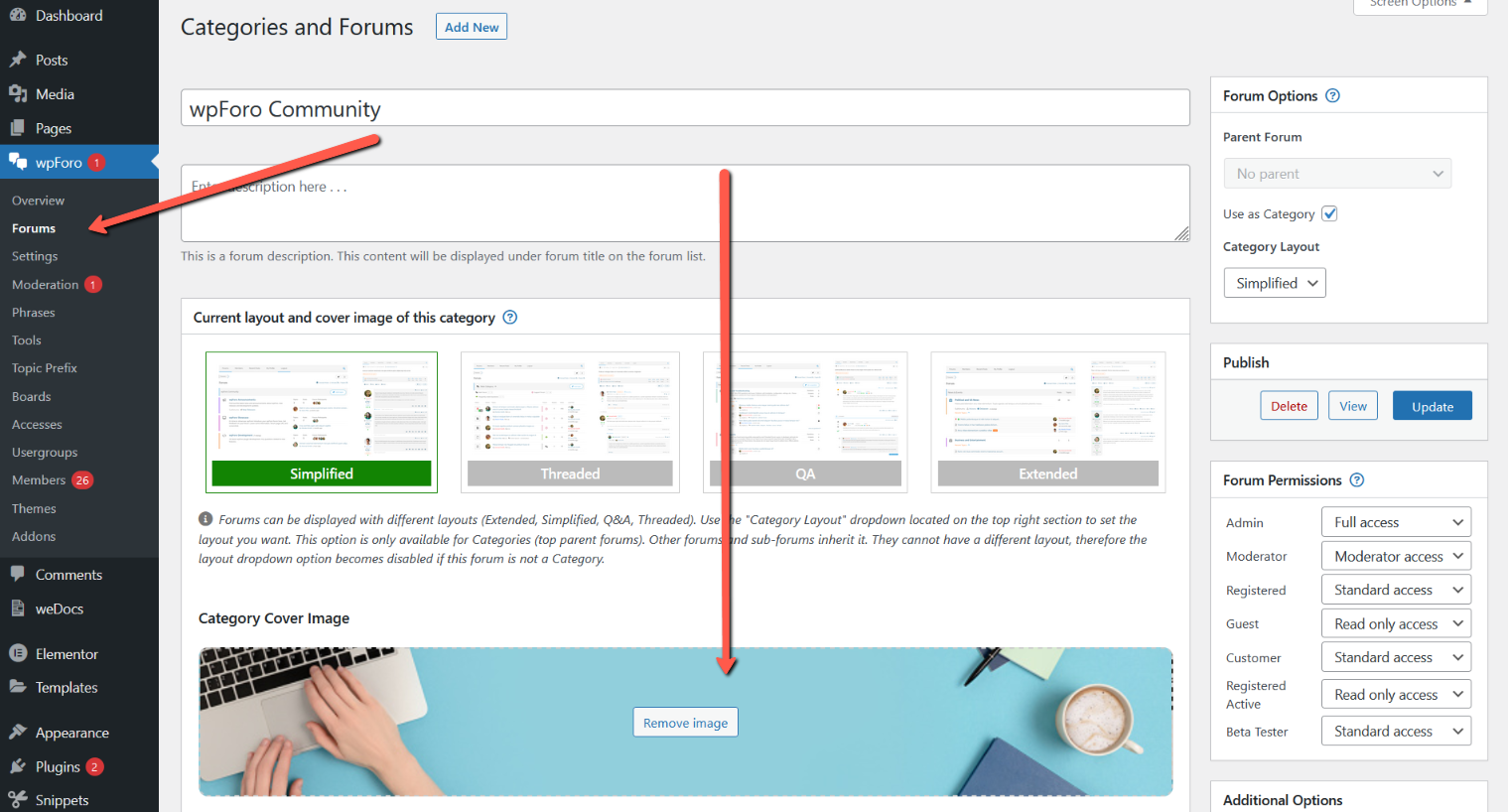
That's called category cover images. You can set the cover image only to the top level forums called categories (blue panels). So please go to Dashboard > wpForo > Forums, edit a top level category and find the cover image setting section.


1 Reply
(@adler11)
Joined: 5 years ago

Estimable Member
Posts: 104

@robert,

Thanks! A very necessary feature! Nicely.