
AI Search
Classic Search
 Search Phrase:
 Search Type:
Advanced search options
 Search in Forums:
 Search in date period:

 Sort Search Results by:

AI Assistant
Notifications
Clear all

[Solved] Beautiful home page of your forum

3 Posts
2 Users
2 Reactions
1,418 Views
Posts: 104
Topic starter
Translate
English
Spanish
French
German
Italian
Portuguese
Russian
Chinese
Japanese
Korean
Arabic
Hindi
Dutch
Polish
Turkish
Vietnamese
Thai
Swedish
Danish
Finnish
Norwegian
Czech
Hungarian
Romanian
Greek
Hebrew
Indonesian
Malay
Ukrainian
Bulgarian
Croatian
Slovak
Slovenian
Serbian
Lithuanian
Latvian
Estonian
(@adler11)
Estimable Member
Joined: 5 years ago
[#23038]

Hi! You have a beautiful design of the forum sections (see the screenshot). I didn't find an opportunity to do the same in my settings. And I would really like to. Tell me how? Thank you in advance!

Screenshot 3

2 Replies
Robert
Posts: 10753
Admin
Translate
English
Spanish
French
German
Italian
Portuguese
Russian
Chinese
Japanese
Korean
Arabic
Hindi
Dutch
Polish
Turkish
Vietnamese
Thai
Swedish
Danish
Finnish
Norwegian
Czech
Hungarian
Romanian
Greek
Hebrew
Indonesian
Malay
Ukrainian
Bulgarian
Croatian
Slovak
Slovenian
Serbian
Lithuanian
Latvian
Estonian
(@robert)
Support Team
Joined: 3 months ago

@adler11,

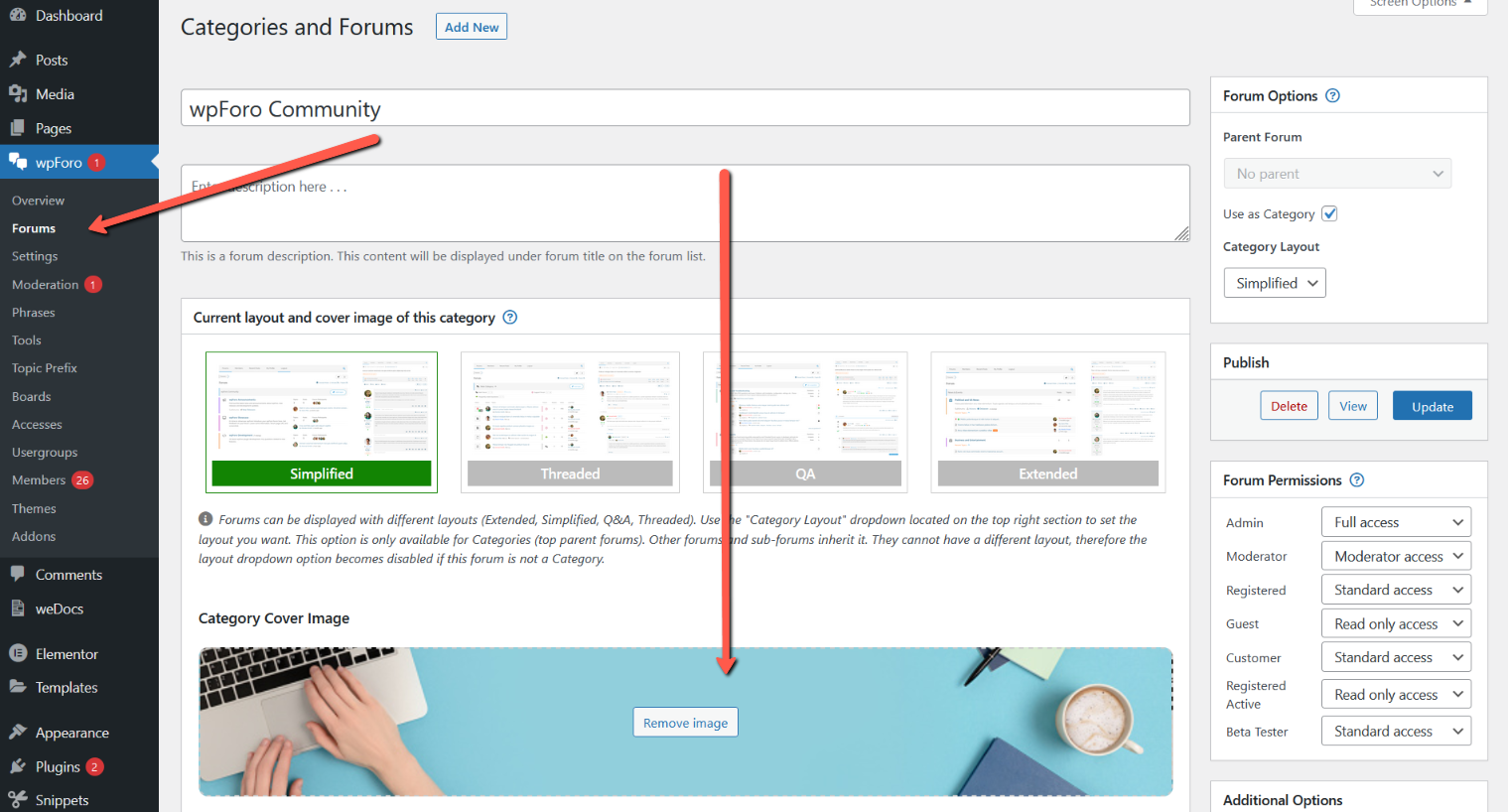
That's called category cover images. You can set the cover image only to the top level forums called categories (blue panels). So please go to Dashboard > wpForo > Forums, edit a top level category and find the cover image setting section.


1 Reply
(@adler11)
Joined: 5 years ago

Estimable Member
Posts: 104
Translate
English
Spanish
French
German
Italian
Portuguese
Russian
Chinese
Japanese
Korean
Arabic
Hindi
Dutch
Polish
Turkish
Vietnamese
Thai
Swedish
Danish
Finnish
Norwegian
Czech
Hungarian
Romanian
Greek
Hebrew
Indonesian
Malay
Ukrainian
Bulgarian
Croatian
Slovak
Slovenian
Serbian
Lithuanian
Latvian
Estonian

@robert,

Thanks! A very necessary feature! Nicely.


Share:
