
AI Search
Classic Search
 Search Phrase:
 Search Type:
Advanced search options
 Search in Forums:
 Search in date period:

 Sort Search Results by:

AI Assistant
Notifications
Clear all

[Closed] Blog Cross Posting

2 Posts
2 Users
0 Reactions
2,101 Views
Posts: 18
Topic starter
Translate
English
Spanish
French
German
Italian
Portuguese
Russian
Chinese
Japanese
Korean
Arabic
Hindi
Dutch
Polish
Turkish
Vietnamese
Thai
Swedish
Danish
Finnish
Norwegian
Czech
Hungarian
Romanian
Greek
Hebrew
Indonesian
Malay
Ukrainian
Bulgarian
Croatian
Slovak
Slovenian
Serbian
Lithuanian
Latvian
Estonian
(@superfly)
Eminent Member
Joined: 7 years ago
[#8807]

I purchased the blog cross posting addon. But how do I 'connect' it to work?

I have hundreds of blog posts and I want to create forums for some of the popular blog posts, but there is no instruction on how to set it up?


1 Reply

Sofy
Posts: 5776
 Sofy
Admin
Translate
English
Spanish
French
German
Italian
Portuguese
Russian
Chinese
Japanese
Korean
Arabic
Hindi
Dutch
Polish
Turkish
Vietnamese
Thai
Swedish
Danish
Finnish
Norwegian
Czech
Hungarian
Romanian
Greek
Hebrew
Indonesian
Malay
Ukrainian
Bulgarian
Croatian
Slovak
Slovenian
Serbian
Lithuanian
Latvian
Estonian
(@sofy)
Support Team
Joined: 8 years ago

Hi @superfly,

You can TURN ON the current post to forum cross-posting by selecting the target forum in this drop-down menu. Once this post is submitted/ updated it'll be automatically posted or updated in the selected forum as a topic with the same title and content. Please see the screenshot below:
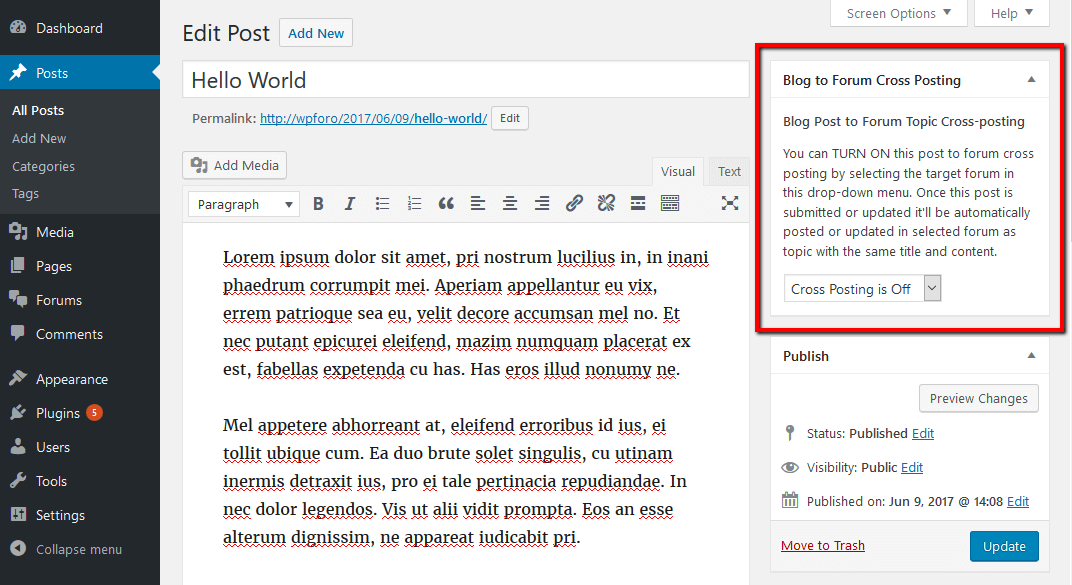
For further support please open a new support topic on gVectors.com forum. Here we support issues related to wpForo plugin core. 


Share: