
AI Search
Classic Search
 Search Phrase:
 Search Type:
Advanced search options
 Search in Forums:
 Search in date period:

 Sort Search Results by:

AI Assistant
Notifications
Clear all

[Solved] File attachment button doesn't work

6 Posts
2 Users
1 Reactions
2,569 Views
Posts: 4
Topic starter
Translate
English
Spanish
French
German
Italian
Portuguese
Russian
Chinese
Japanese
Korean
Arabic
Hindi
Dutch
Polish
Turkish
Vietnamese
Thai
Swedish
Danish
Finnish
Norwegian
Czech
Hungarian
Romanian
Greek
Hebrew
Indonesian
Malay
Ukrainian
Bulgarian
Croatian
Slovak
Slovenian
Serbian
Lithuanian
Latvian
Estonian
(@desox7x)
Active Member
Joined: 5 years ago
[#16338]

Hi wForo team. I've been working on a forum implementation using your plugin. But for some reason when I try to upload a file (an image for example), gives me this error "Can't upload file"... I really don't know what to do, I tried everything I saw on the internet.

https://dpworldacademy.com/community/ This is the forum. 

Please help.


5 Replies
Robert
Posts: 10741
Admin
Translate
English
Spanish
French
German
Italian
Portuguese
Russian
Chinese
Japanese
Korean
Arabic
Hindi
Dutch
Polish
Turkish
Vietnamese
Thai
Swedish
Danish
Finnish
Norwegian
Czech
Hungarian
Romanian
Greek
Hebrew
Indonesian
Malay
Ukrainian
Bulgarian
Croatian
Slovak
Slovenian
Serbian
Lithuanian
Latvian
Estonian
(@robert)
Support Team
Joined: 3 months ago

@desox7x,

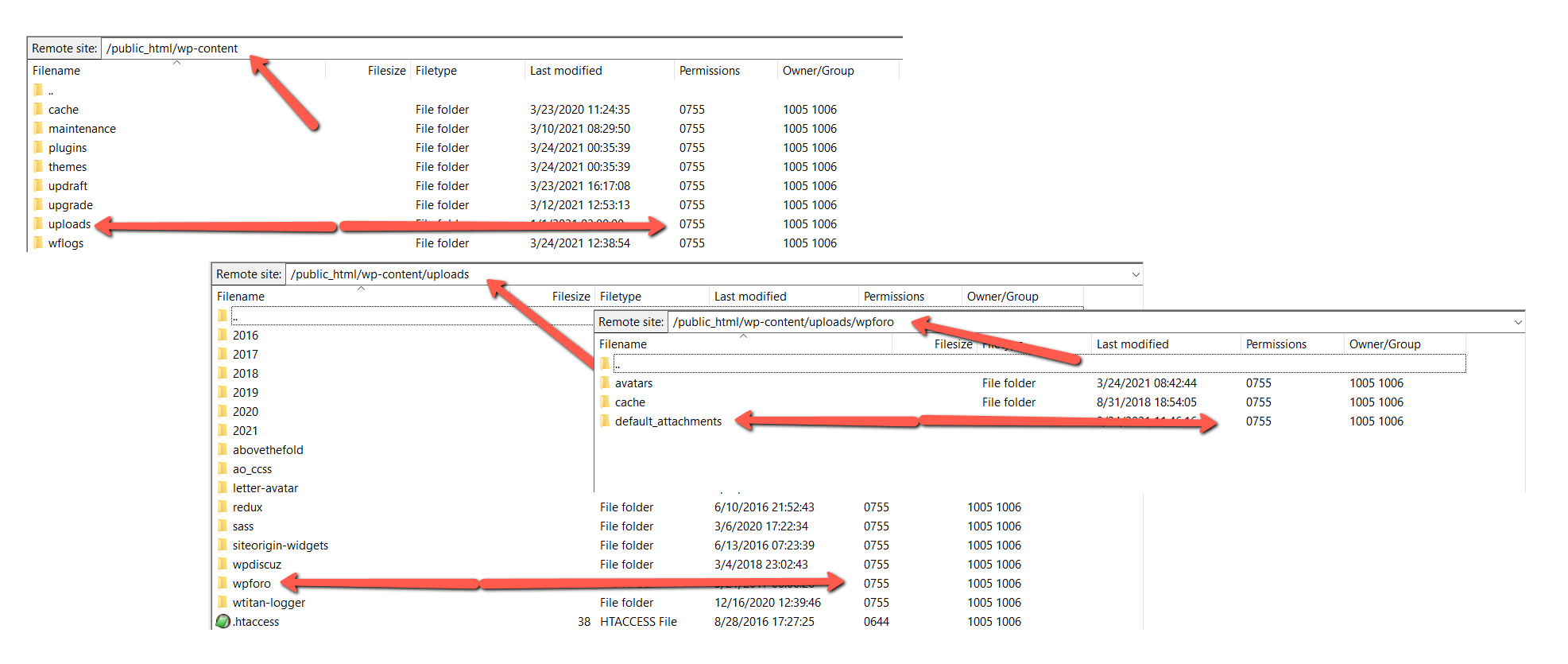
Something is wrong with your file system, Either the folder permissions are incorrect or the attachments' directory doesn't exist. Please use some FTP client (e.g. FileZilla) and take a screenshot of these directories:

  • /wp-content/
  • /wp-content/upload/
  • /wp-content/uploads/wpforo/

Make sure the permission and owner columns are in the screenshot, so I can see them, it should look like this:


Posts: 4
Topic starter
Translate
English
Spanish
French
German
Italian
Portuguese
Russian
Chinese
Japanese
Korean
Arabic
Hindi
Dutch
Polish
Turkish
Vietnamese
Thai
Swedish
Danish
Finnish
Norwegian
Czech
Hungarian
Romanian
Greek
Hebrew
Indonesian
Malay
Ukrainian
Bulgarian
Croatian
Slovak
Slovenian
Serbian
Lithuanian
Latvian
Estonian
(@desox7x)
Active Member
Joined: 5 years ago

Hmm... for some reason I don't have the wpForo folder in Uploads. Maybe because I couldn't upload files? Should I create that folder?

P1

1 Reply
(@desox7x)
Joined: 5 years ago

Active Member
Posts: 4
Translate
English
Spanish
French
German
Italian
Portuguese
Russian
Chinese
Japanese
Korean
Arabic
Hindi
Dutch
Polish
Turkish
Vietnamese
Thai
Swedish
Danish
Finnish
Norwegian
Czech
Hungarian
Romanian
Greek
Hebrew
Indonesian
Malay
Ukrainian
Bulgarian
Croatian
Slovak
Slovenian
Serbian
Lithuanian
Latvian
Estonian

This is the uploads folder.

 P2

Robert
Posts: 10741
Admin
Translate
English
Spanish
French
German
Italian
Portuguese
Russian
Chinese
Japanese
Korean
Arabic
Hindi
Dutch
Polish
Turkish
Vietnamese
Thai
Swedish
Danish
Finnish
Norwegian
Czech
Hungarian
Romanian
Greek
Hebrew
Indonesian
Malay
Ukrainian
Bulgarian
Croatian
Slovak
Slovenian
Serbian
Lithuanian
Latvian
Estonian
(@robert)
Support Team
Joined: 3 months ago

@desox7x,

The reason is your incorrect ownership of files and permissions. All files and folders have permissions and owners, If the owner is higher than the WordPress file owner then WordPress plugins cannot create folders. It seems the WordPress files was uploaded and installed by root account or by some FTP account which have near to root account privileges. Now, WordPress files cannot create other files and folders. In any case lets try to create these folders manually and set 777 permission for all them:

  • /wp-content/uploads/wpforo/
  • /wp-content/uploads/wpforo/attachments/
  • /wp-content/uploads/wpforo/default_attachments/
  • /wp-content/uploads/wpforo/avatars/


Posts: 4
Topic starter
Translate
English
Spanish
French
German
Italian
Portuguese
Russian
Chinese
Japanese
Korean
Arabic
Hindi
Dutch
Polish
Turkish
Vietnamese
Thai
Swedish
Danish
Finnish
Norwegian
Czech
Hungarian
Romanian
Greek
Hebrew
Indonesian
Malay
Ukrainian
Bulgarian
Croatian
Slovak
Slovenian
Serbian
Lithuanian
Latvian
Estonian
(@desox7x)
Active Member
Joined: 5 years ago

That solved my problem! Thanks for your help Robert! 


Share: