
AI Assistant
Notifications
Clear all

[Solved] Mark all read cookies

26 Posts
4 Users
7 Reactions
5,375 Views
Robert
Posts: 10708
Admin
Translate
English
Spanish
French
German
Italian
Portuguese
Russian
Chinese
Japanese
Korean
Arabic
Hindi
Dutch
Polish
Turkish
Vietnamese
Thai
Swedish
Danish
Finnish
Norwegian
Czech
Hungarian
Romanian
Greek
Hebrew
Indonesian
Malay
Ukrainian
Bulgarian
Croatian
Slovak
Slovenian
Serbian
Lithuanian
Latvian
Estonian
(@robert)
Support Team
Joined: 2 months ago

Maybe you could find some error logs. PHP can't set cookies if there is an error output in buffer. Maybe you have some error or even line-break in some PHP file. This is really hard to debug.

3 Replies
(@anonymous20)
Joined: 10 years ago

Noble Member
Posts: 1593
Translate
English
Spanish
French
German
Italian
Portuguese
Russian
Chinese
Japanese
Korean
Arabic
Hindi
Dutch
Polish
Turkish
Vietnamese
Thai
Swedish
Danish
Finnish
Norwegian
Czech
Hungarian
Romanian
Greek
Hebrew
Indonesian
Malay
Ukrainian
Bulgarian
Croatian
Slovak
Slovenian
Serbian
Lithuanian
Latvian
Estonian
Posted by: Robert

Maybe you could find some error logs. PHP can't set cookies if there is an error output in buffer. Maybe you have some error or even line-break in some PHP file. This is really hard to debug.

Robert,

1. UNinstalling wpforo (totally) and install a virgin wpForo works just fine in the very same site. Yesterday it took me hours to do that and restore things back.

2. Other cookies are set ok (firewall cookies and others).

3. There are no other errors or anything.

mcutings will help me today to _maybe_ find something.


Robert
Admin
(@robert)
Joined: 2 months ago

Support Team
Posts: 10708
Robert
Translate
English
Spanish
French
German
Italian
Portuguese
Russian
Chinese
Japanese
Korean
Arabic
Hindi
Dutch
Polish
Turkish
Vietnamese
Thai
Swedish
Danish
Finnish
Norwegian
Czech
Hungarian
Romanian
Greek
Hebrew
Indonesian
Malay
Ukrainian
Bulgarian
Croatian
Slovak
Slovenian
Serbian
Lithuanian
Latvian
Estonian

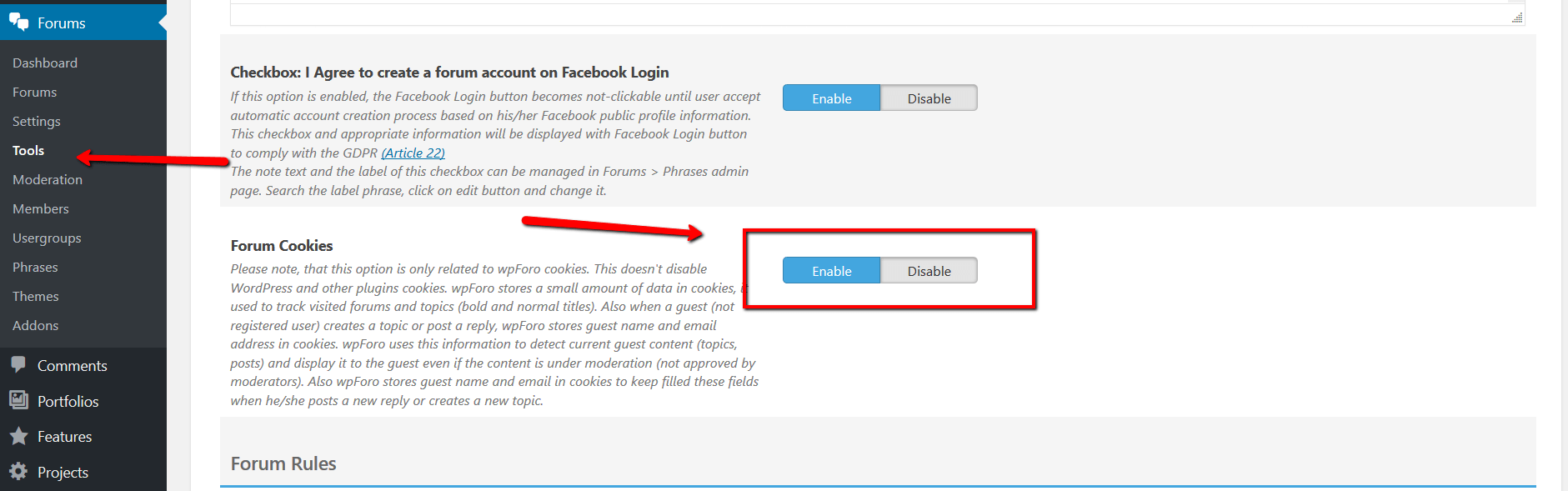
Also, make sure wpForo Cookies are enabled in Forums > Tools > Privacy & Rules admin page:


(@anonymous20)
Joined: 10 years ago

Noble Member
Posts: 1593
Robert
Translate
English
Spanish
French
German
Italian
Portuguese
Russian
Chinese
Japanese
Korean
Arabic
Hindi
Dutch
Polish
Turkish
Vietnamese
Thai
Swedish
Danish
Finnish
Norwegian
Czech
Hungarian
Romanian
Greek
Hebrew
Indonesian
Malay
Ukrainian
Bulgarian
Croatian
Slovak
Slovenian
Serbian
Lithuanian
Latvian
Estonian
Posted by: Robert

Also, make sure wpForo Cookies are enabled in Forums > Tools > Privacy & Rules admin page:

I'll be damned

that was it. I had this Disabled (or it was like that when installed/updated, i don't know).

Finally. Thanks again Robert.


Posts: 1593
Topic starter
Translate
English
Spanish
French
German
Italian
Portuguese
Russian
Chinese
Japanese
Korean
Arabic
Hindi
Dutch
Polish
Turkish
Vietnamese
Thai
Swedish
Danish
Finnish
Norwegian
Czech
Hungarian
Romanian
Greek
Hebrew
Indonesian
Malay
Ukrainian
Bulgarian
Croatian
Slovak
Slovenian
Serbian
Lithuanian
Latvian
Estonian
(@anonymous20)
Noble Member
Joined: 10 years ago

Once again @Robert helped here, no matter how busy he is, no matter how vage the issue is.

Always helping, for free (time is NOT free).

Thanks Robert and the rest of the team, you really deserve a lot. wpForo plugin also.

I wish you all the best in business and life.


1 Reply
Robert
Admin
(@robert)
Joined: 2 months ago

Support Team
Posts: 10708
Translate
English
Spanish
French
German
Italian
Portuguese
Russian
Chinese
Japanese
Korean
Arabic
Hindi
Dutch
Polish
Turkish
Vietnamese
Thai
Swedish
Danish
Finnish
Norwegian
Czech
Hungarian
Romanian
Greek
Hebrew
Indonesian
Malay
Ukrainian
Bulgarian
Croatian
Slovak
Slovenian
Serbian
Lithuanian
Latvian
Estonian

Thank you Anonymous20,

You're welcome. I'm glad to know the problem is solved.


Page 3 / 3
Share:
