
AI Search
Classic Search
 Search Phrase:
 Search Type:
Advanced search options
 Search in Forums:
 Search in date period:

 Sort Search Results by:

AI Assistant
Notifications
Clear all

[Closed] New category not showing on my forum?

6 Posts
2 Users
2 Reactions
1,913 Views
Posts: 13
Topic starter
Translate
English
Spanish
French
German
Italian
Portuguese
Russian
Chinese
Japanese
Korean
Arabic
Hindi
Dutch
Polish
Turkish
Vietnamese
Thai
Swedish
Danish
Finnish
Norwegian
Czech
Hungarian
Romanian
Greek
Hebrew
Indonesian
Malay
Ukrainian
Bulgarian
Croatian
Slovak
Slovenian
Serbian
Lithuanian
Latvian
Estonian
(@abbelabben)
Eminent Member
Joined: 8 years ago
[#8371]

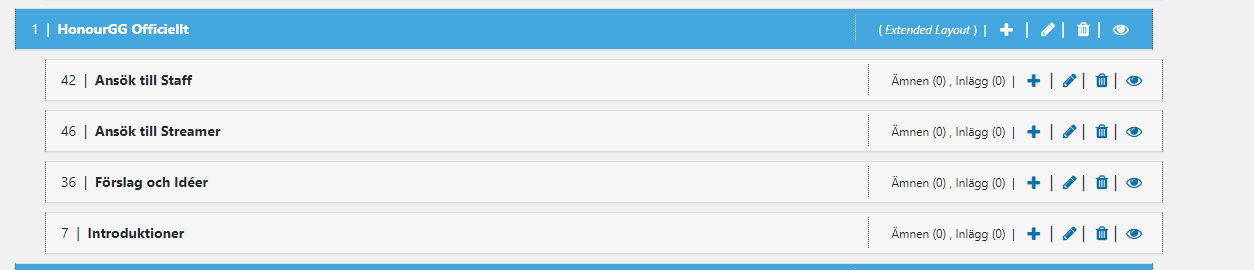
New forum category not showing up on my forum even thought I have added one? Is there a limit of how many categories I can create?

This is how it looks in my settingsbut on the forums it looks like this:
http://www.honourgg.com/forum/


And yes, I have saved the settings.


5 Replies

Sofy
Posts: 5774
 Sofy
Admin
Translate
English
Spanish
French
German
Italian
Portuguese
Russian
Chinese
Japanese
Korean
Arabic
Hindi
Dutch
Polish
Turkish
Vietnamese
Thai
Swedish
Danish
Finnish
Norwegian
Czech
Hungarian
Romanian
Greek
Hebrew
Indonesian
Malay
Ukrainian
Bulgarian
Croatian
Slovak
Slovenian
Serbian
Lithuanian
Latvian
Estonian
(@sofy)
Support Team
Joined: 8 years ago

Hi @abbelabben,

Do you mean the second forum is missing on the frontend? Please navigate to Dashboard > Forums > Dashboard admin page, click on [Delete All Caches] button and press CTRL+F5 on the frontend. 


4 Replies
(@abbelabben)
Joined: 8 years ago

Eminent Member
Posts: 13
Translate
English
Spanish
French
German
Italian
Portuguese
Russian
Chinese
Japanese
Korean
Arabic
Hindi
Dutch
Polish
Turkish
Vietnamese
Thai
Swedish
Danish
Finnish
Norwegian
Czech
Hungarian
Romanian
Greek
Hebrew
Indonesian
Malay
Ukrainian
Bulgarian
Croatian
Slovak
Slovenian
Serbian
Lithuanian
Latvian
Estonian

I mean that the category "Ansök till Streamer" under the section "HonourGG Officiellt" isn't showing up even thought I have added it there.

And the remove cache and CTRL + F5 on the website didn't work. 


Sofy
 Sofy
Admin
(@sofy)
Joined: 8 years ago

Support Team
Posts: 5774
Sofy
Translate
English
Spanish
French
German
Italian
Portuguese
Russian
Chinese
Japanese
Korean
Arabic
Hindi
Dutch
Polish
Turkish
Vietnamese
Thai
Swedish
Danish
Finnish
Norwegian
Czech
Hungarian
Romanian
Greek
Hebrew
Indonesian
Malay
Ukrainian
Bulgarian
Croatian
Slovak
Slovenian
Serbian
Lithuanian
Latvian
Estonian

Please navigate to Dashboard > Forums > Settings > Features admin page, make sure the HTML Cache is disabled. 

HTML cache

(@abbelabben)
Joined: 8 years ago

Eminent Member
Posts: 13
Sofy
Translate
English
Spanish
French
German
Italian
Portuguese
Russian
Chinese
Japanese
Korean
Arabic
Hindi
Dutch
Polish
Turkish
Vietnamese
Thai
Swedish
Danish
Finnish
Norwegian
Czech
Hungarian
Romanian
Greek
Hebrew
Indonesian
Malay
Ukrainian
Bulgarian
Croatian
Slovak
Slovenian
Serbian
Lithuanian
Latvian
Estonian

It is disabled. But Object cache is enabled.


Sofy
 Sofy
Admin
(@sofy)
Joined: 8 years ago

Support Team
Posts: 5774
Sofy
Sofy
Translate
English
Spanish
French
German
Italian
Portuguese
Russian
Chinese
Japanese
Korean
Arabic
Hindi
Dutch
Polish
Turkish
Vietnamese
Thai
Swedish
Danish
Finnish
Norwegian
Czech
Hungarian
Romanian
Greek
Hebrew
Indonesian
Malay
Ukrainian
Bulgarian
Croatian
Slovak
Slovenian
Serbian
Lithuanian
Latvian
Estonian

@abbelabben,

We don't find such an issue on our test websites. Could you please send admin login details to info[at]gvectors.com email address to allows us to check it. 


Share: