

Hi all,
I'm learning with wpForo, never used this plugin before
I made a fresh install of it on an already existing WP blog and I please need your help with that.
The bar where the login / register / member buttons are supposed to be is empty in the new wPForo install I made here http://www.travestissime.com/community/
I check the forum already but could not find my answer
I read this topic https://wpforo.com/community/wpforo-integration/login-404-erorr-and-register-erorr/paged/2/ but I have no customs URL so the problem does not come from that.
Any idea ?
Mafan




Hi @mafan,
Please navigate to Appearance > Menus admin page, then select " wpForo Navigation" and set/check the wpForo Menu location:
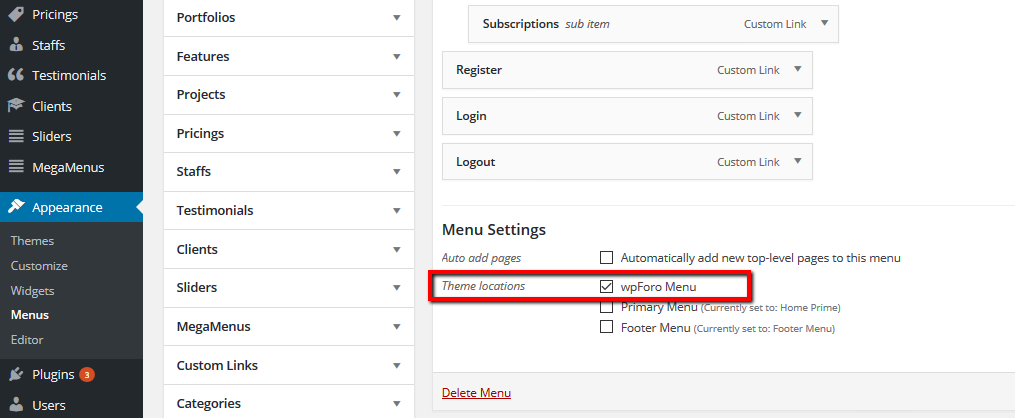
I read this topic https://wpforo.com/community/wpforo-integration/login-404-erorr-and-register-erorr/paged/2/ but I have no customs URL so the problem does not come from that.
Please use this option only if you have set other pages for authorization. If you don't have other pages for authorization please remove all URL's you've filled in those fields.
Thanks for your answer !
I tick that box but the wpForo menu did not appear, it did not solve the issue.
Yet, when I switch and decide to show the wpForo menu in the header and the main menu in navigation wpForo , then the wpForo menu appears and the main menu disappear.
Any idea ?
Mafan


Hi,
thanks again for your help.
So now, login, register button shows, which is great.
The video is too fast yet the full tutorial is here : https://marcodiversi.com/blog/wordpress-forum-plugin/
Mafan