

Hi,
when answering to someones post via the answerting button, in the text editor the user is directly addressed like this: @username.
In the text editor it looks like in the attached screenshot "addressed.jpg".
How can I deactivate @username or change it to the nickname, when answerting to someones post?
This is important for us because of reasons of anonymity.
Thanks and best regards,
Christian




Hi @aufkarrierekurs,
How can I deactivate @username or change it to the nickname, when answerting to someones post?
The wpForo mentioning feature uses the nicename, not the username.
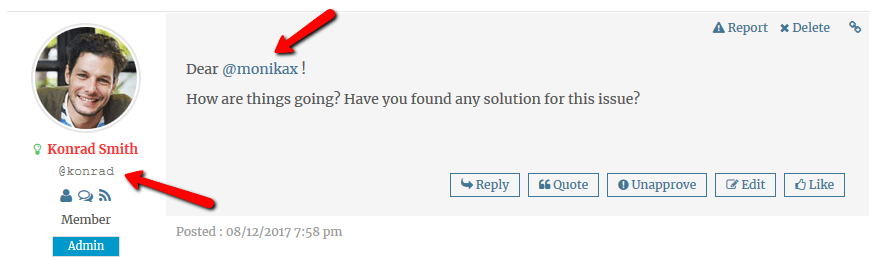
WordPress and wpForo have three different names for Users:
- Username (Login) – Being used for forum authorization (login, sign-in) action
- Display Name – Other users and guests see in user profile details and next to user posts (post author name).
- Nicename – Unique name which is used in WordPress and wpForo core to generate user Profile URL. In other words this is the user slug. For example example.com/community/profile/martin59/.
After a regular user registration process, Username, Display Name and Nicename are set the same. For example If you register a user with “Martin59” Username your user names look like this:
- Username – Martin59
- Display Name – Martin59
- Nicename – martin59
wpForo has “Display Name” and “Nicename” fields in Forum > My Profile > Account font-end page. Using these options you should change the Display Name and Nicename to something like this:
- Username – Martin59
- Display Name – Martin P.
- Nicename – martinos
Currently, there is no option to deactivate the auto mentioning feature. But we'll take into consideration to add such feature ion future updates.
Hi,
one further question: Is it possible to show the Nicename next to user posts instead of the Username? Or to hide the Username and only show the Nicename?
Thanks and best regards,
Christian
