AI Search
Classic Search
 Search Phrase:
 Search Type:
Advanced search options
 Search in Forums:
 Search in date period:

 Sort Search Results by:

AI Assistant
Notifications
Clear all

[Closed] Simplified layout auto expand all post

4 Posts
3 Users
2 Reactions
3,476 Views
Posts: 3
Topic starter
Translate
English
Spanish
French
German
Italian
Portuguese
Russian
Chinese
Japanese
Korean
Arabic
Hindi
Dutch
Polish
Turkish
Vietnamese
Thai
Swedish
Danish
Finnish
Norwegian
Czech
Hungarian
Romanian
Greek
Hebrew
Indonesian
Malay
Ukrainian
Bulgarian
Croatian
Slovak
Slovenian
Serbian
Lithuanian
Latvian
Estonian
(@pronetmediainc)
Active Member
Joined: 7 years ago
[#7384]

Is there a way to force all Post and Replies to be expanded automatically without the need to click the down arrow to expand them?

Kyle


3 Replies

Sofy
Posts: 5778
 Sofy
Admin
Translate
English
Spanish
French
German
Italian
Portuguese
Russian
Chinese
Japanese
Korean
Arabic
Hindi
Dutch
Polish
Turkish
Vietnamese
Thai
Swedish
Danish
Finnish
Norwegian
Czech
Hungarian
Romanian
Greek
Hebrew
Indonesian
Malay
Ukrainian
Bulgarian
Croatian
Slovak
Slovenian
Serbian
Lithuanian
Latvian
Estonian
(@sofy)
Support Team
Joined: 8 years ago

Hi @pronetmediainc,

Please read wpForo Documentation related to wpForo Forum Layouts: 

https://wpforo.com/docs/root/categories-and-forums/forum-layouts/  

You're probably using the Extended Layout. The Simplified layout doesn't have an arrow under the Post and Replies. 

If you use the Extended layout  follow these steps:

  1. Navigate to Dashboard >  Forums > Settings > Forums admin page, set the "Expanded" value for the  "Extended Layout - Recent topics" option.
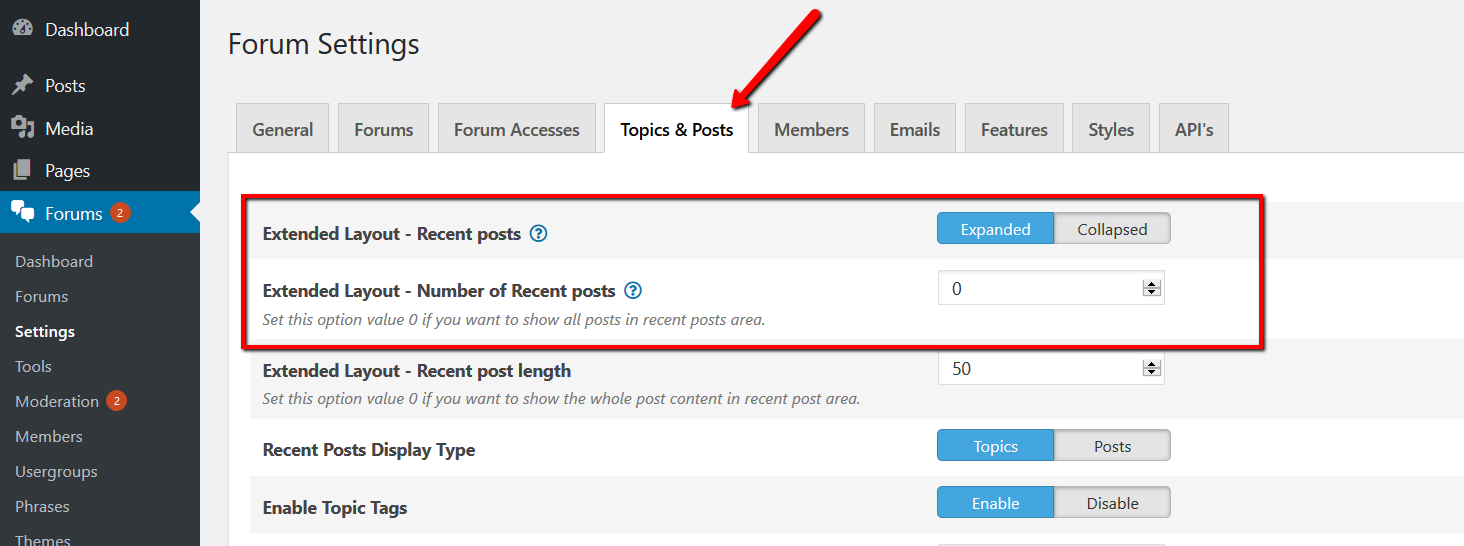
  2. Navigate to Dashboard >  Forums > Settings >Topics & Posts admin page, set the "Expanded" value for the "Extended Layout - Recent posts" option

2 Replies
(@pronetmediainc)
Joined: 7 years ago

Active Member
Posts: 3
Translate
English
Spanish
French
German
Italian
Portuguese
Russian
Chinese
Japanese
Korean
Arabic
Hindi
Dutch
Polish
Turkish
Vietnamese
Thai
Swedish
Danish
Finnish
Norwegian
Czech
Hungarian
Romanian
Greek
Hebrew
Indonesian
Malay
Ukrainian
Bulgarian
Croatian
Slovak
Slovenian
Serbian
Lithuanian
Latvian
Estonian

Yes you were right it is set to Extended. So my question then is still the same how to force all the post/replies to be visible.

I have included a picture of the look for the discussion forum I am trying to achieve.

Thank you,

Kyle

Simple Discussion Layout

Robert
Admin
(@robert)
Joined: 3 months ago

Support Team
Posts: 10762
Sofy
Translate
English
Spanish
French
German
Italian
Portuguese
Russian
Chinese
Japanese
Korean
Arabic
Hindi
Dutch
Polish
Turkish
Vietnamese
Thai
Swedish
Danish
Finnish
Norwegian
Czech
Hungarian
Romanian
Greek
Hebrew
Indonesian
Malay
Ukrainian
Bulgarian
Croatian
Slovak
Slovenian
Serbian
Lithuanian
Latvian
Estonian
Posted by: pronetmediainc

Yes you were right it is set to Extended. So my question then is still the same how to force all the post/replies to be visible.

I have included a picture of the look for the discussion forum I am trying to achieve.

Thank you,

Kyle

Simple Discussion Layout

Just set "0" to according options (Forums > Settings > Topics & Posts ) and make sure it's set "Expended":


Share: