
AI Search
Classic Search
 Search Phrase:
 Search Type:
Advanced search options
 Search in Forums:
 Search in date period:

 Sort Search Results by:

Filter by custom fields

Topic prefix

AI Assistant
Notifications
Clear all

[Solved] Threaded layout "Add Topic" editor related question

4 Posts
2 Users
1 Reactions
2,048 Views
Posts: 14
Topic starter
Translate
English
Spanish
French
German
Italian
Portuguese
Russian
Chinese
Japanese
Korean
Arabic
Hindi
Dutch
Polish
Turkish
Vietnamese
Thai
Swedish
Danish
Finnish
Norwegian
Czech
Hungarian
Romanian
Greek
Hebrew
Indonesian
Malay
Ukrainian
Bulgarian
Croatian
Slovak
Slovenian
Serbian
Lithuanian
Latvian
Estonian
(@findbmx)
Eminent Member
Joined: 5 years ago
[#18558]

Hi,

On "Threaded layout" there is a button reads "Add Topic". when clicked, an editor appears which seems different compare to other wpforo editors.

- It's language is primary set to LTR while other editors are relative to wordpress language (I'm running an RTL site). and since it's an iframe i cant change the direction of the editor using css and users need to change the direction using the "" button all the time.

- I tried adding new buttons to Tinymce through function.php, which worked on any other wpforo editors but this one. (link)

The page I need help with
wpForo Version
1.9.9
WordPress Version
5.8

3 Replies
Chris
Posts: 3610
Translate
English
Spanish
French
German
Italian
Portuguese
Russian
Chinese
Japanese
Korean
Arabic
Hindi
Dutch
Polish
Turkish
Vietnamese
Thai
Swedish
Danish
Finnish
Norwegian
Czech
Hungarian
Romanian
Greek
Hebrew
Indonesian
Malay
Ukrainian
Bulgarian
Croatian
Slovak
Slovenian
Serbian
Lithuanian
Latvian
Estonian
(@chris)
Famed Member
Joined: 5 years ago

Hi @findbmx,

The issue would be solved at the new update release, but we have a code which you can use to make the changes before the new update release.

Before inserting the code below, Please remove all changes you have done to solve the issue and only after that do the following`

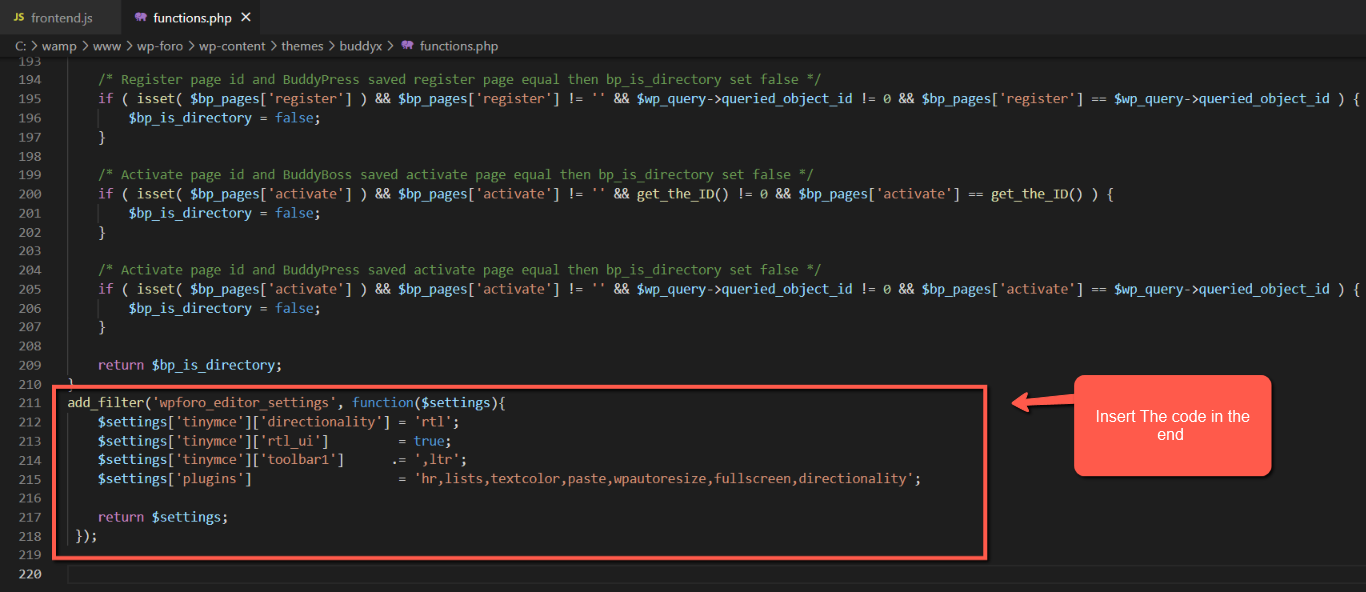
1. Insert the code below in your active theme function.php file.

add_filter('wpforo_editor_settings', function($settings){
	$settings['tinymce']['directionality'] = 'rtl';
	$settings['tinymce']['rtl_ui']         = true;
	$settings['tinymce']['toolbar1']      .= ',ltr';
	$settings['plugins']                   = 'hr,lists,textcolor,paste,wpautoresize,fullscreen,directionality';
 
	return $settings;
 });

Check the screenshot below:
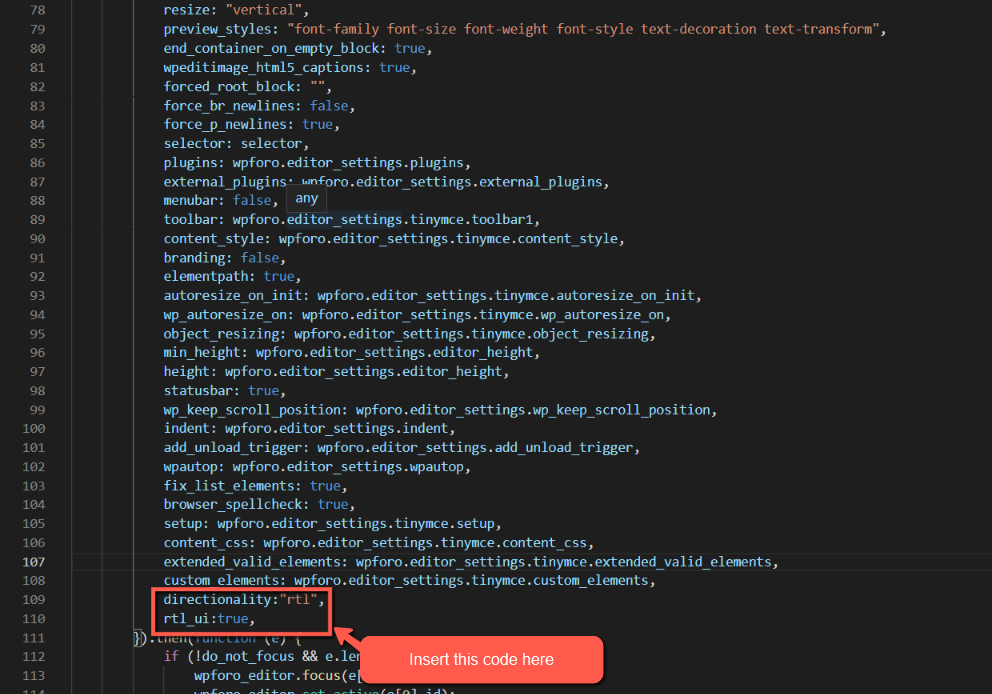
2. Go to \wp-content\plugins\wpforo\wpf-assets\js in frontend.js files and insert the code below, under this Code custom_elements: wpforo.editor_settings.tinymce.custom_elements,

directionality:"rtl",
            rtl_ui:true,

Check the screenshot below:


Posts: 14
Topic starter
Translate
English
Spanish
French
German
Italian
Portuguese
Russian
Chinese
Japanese
Korean
Arabic
Hindi
Dutch
Polish
Turkish
Vietnamese
Thai
Swedish
Danish
Finnish
Norwegian
Czech
Hungarian
Romanian
Greek
Hebrew
Indonesian
Malay
Ukrainian
Bulgarian
Croatian
Slovak
Slovenian
Serbian
Lithuanian
Latvian
Estonian
(@findbmx)
Eminent Member
Joined: 5 years ago

Thank You Chris,

I gave wpforo a 5star on wordpress forum. link

At first when I edited those files as you said, nothing happened, so I guessed maybe it's a plugin conflict. I deactivated Tinymce Advanced, and it worked. then I reactivated the plugin to see if the problem will repeat, but the problem had been already solved. So I'm not sure if it was a conflict or sth.


1 Reply
Chris
(@chris)
Joined: 5 years ago

Famed Member
Posts: 3610
Translate
English
Spanish
French
German
Italian
Portuguese
Russian
Chinese
Japanese
Korean
Arabic
Hindi
Dutch
Polish
Turkish
Vietnamese
Thai
Swedish
Danish
Finnish
Norwegian
Czech
Hungarian
Romanian
Greek
Hebrew
Indonesian
Malay
Ukrainian
Bulgarian
Croatian
Slovak
Slovenian
Serbian
Lithuanian
Latvian
Estonian

@findbmx,

That was not a conflict, it was from the cache.

And Thank you for taking the time to leave us a 5 star rating - it's much appreciated!


Share: