Notifications
Clear all

Limited Support

Our support team is currently on holiday from December 25, 2025 to January 7, 2026, and replies may be delayed during this period.

We appreciate your patience and understanding while our team is away. Thank you for being part of the wpForo community!

Merry Christmas and Happy Holidays! 🎄

wpForo 1.x.x [Closed] Simplified layout auto expand all post

4 Posts
3 Users
2 Reactions
3,250 Views
Posts: 3
Topic starter
(@pronetmediainc)
Active Member
Joined: 7 years ago

Is there a way to force all Post and Replies to be expanded automatically without the need to click the down arrow to expand them?

Kyle


3 Replies

Sofy
Posts: 5648
 Sofy
Admin
(@sofy)
Support Team
Joined: 8 years ago

Hi @pronetmediainc,

Please read wpForo Documentation related to wpForo Forum Layouts: 

https://wpforo.com/docs/root/categories-and-forums/forum-layouts/  

You're probably using the Extended Layout. The Simplified layout doesn't have an arrow under the Post and Replies. 

If you use the Extended layout  follow these steps:

  1. Navigate to Dashboard >  Forums > Settings > Forums admin page, set the "Expanded" value for the  "Extended Layout - Recent topics" option.
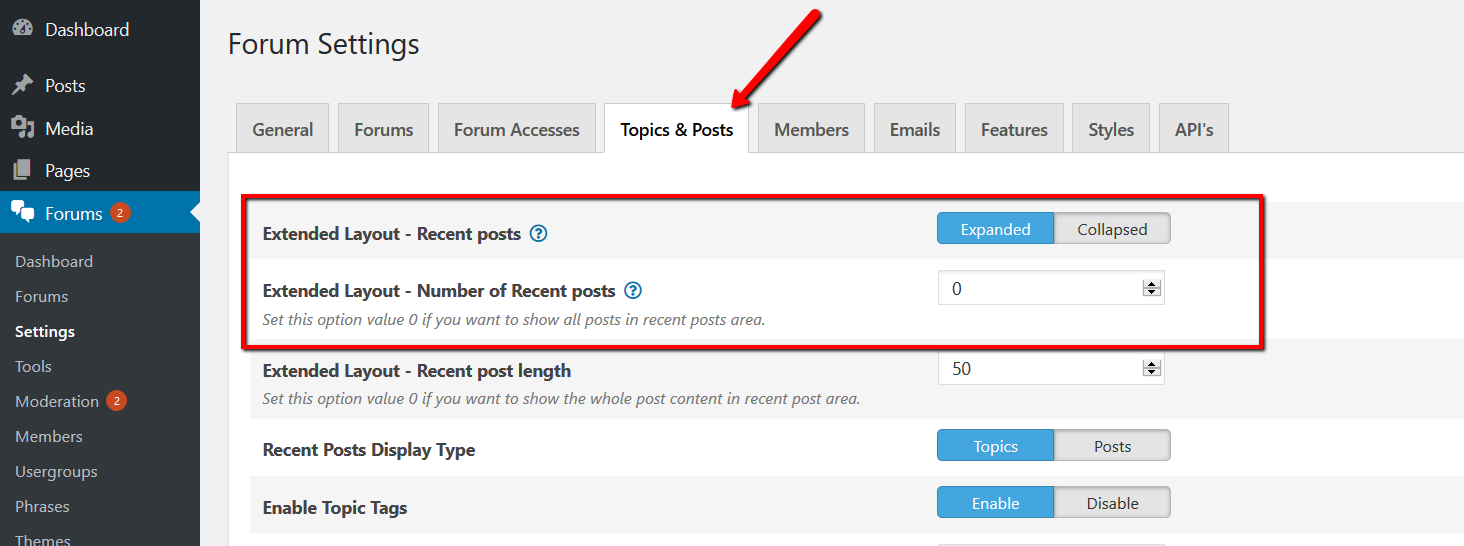
  2. Navigate to Dashboard >  Forums > Settings >Topics & Posts admin page, set the "Expanded" value for the "Extended Layout - Recent posts" option

2 Replies
(@pronetmediainc)
Joined: 7 years ago

Active Member
Posts: 3

Yes you were right it is set to Extended. So my question then is still the same how to force all the post/replies to be visible.

I have included a picture of the look for the discussion forum I am trying to achieve.

Thank you,

Kyle


Robert
Admin
(@robert)
Joined: 10 years ago

Support Team
Posts: 10606
Posted by: pronetmediainc

Yes you were right it is set to Extended. So my question then is still the same how to force all the post/replies to be visible.

I have included a picture of the look for the discussion forum I am trying to achieve.

Thank you,

Kyle

Just set "0" to according options (Forums > Settings > Topics & Posts ) and make sure it's set "Expended":