AI Search
Classic Search
 Search Phrase:
 Search Type:
Advanced search options
 Search in Forums:
 Search in date period:

 Sort Search Results by:

AI Assistant
Notifications
Clear all

[Closed] wpForo Registration Page Help

12 Posts
3 Users
0 Reactions
1,945 Views
Posts: 13
Topic starter
Translate
English
Spanish
French
German
Italian
Portuguese
Russian
Chinese
Japanese
Korean
Arabic
Hindi
Dutch
Polish
Turkish
Vietnamese
Thai
Swedish
Danish
Finnish
Norwegian
Czech
Hungarian
Romanian
Greek
Hebrew
Indonesian
Malay
Ukrainian
Bulgarian
Croatian
Slovak
Slovenian
Serbian
Lithuanian
Latvian
Estonian
(@thewildrambler)
Active Member
Joined: 5 years ago
[#15788]

We have custom fields created using Advanced Custom Fields that are attached to the user profiles. They cannot be removed/deleted as they are used for a variety of reasons on the site. We need to know how to prevent those fields from being output on the User Registration page for the forum registration. Simply hiding them with CSS is doable, but since they are required fields it would cause validation errors. We simply need to know how to have them not output on the forum registration page.


Thanks for any help!

 Screenshot 3 LI

11 Replies
Robert
Posts: 10746
Admin
Translate
English
Spanish
French
German
Italian
Portuguese
Russian
Chinese
Japanese
Korean
Arabic
Hindi
Dutch
Polish
Turkish
Vietnamese
Thai
Swedish
Danish
Finnish
Norwegian
Czech
Hungarian
Romanian
Greek
Hebrew
Indonesian
Malay
Ukrainian
Bulgarian
Croatian
Slovak
Slovenian
Serbian
Lithuanian
Latvian
Estonian
(@robert)
Support Team
Joined: 3 months ago

Hi @thewildrambler,

Please leave a direct URL to the registration page, so we could debug the CSS and provide a code to hide it.


6 Replies
(@thewildrambler)
Joined: 5 years ago

Active Member
Posts: 13
Translate
English
Spanish
French
German
Italian
Portuguese
Russian
Chinese
Japanese
Korean
Arabic
Hindi
Dutch
Polish
Turkish
Vietnamese
Thai
Swedish
Danish
Finnish
Norwegian
Czech
Hungarian
Romanian
Greek
Hebrew
Indonesian
Malay
Ukrainian
Bulgarian
Croatian
Slovak
Slovenian
Serbian
Lithuanian
Latvian
Estonian

@robert

https://cervicide.com/forum/?foro=signup

Thanks


Sofy
 Sofy
Admin
(@sofy)
Joined: 8 years ago

Support Team
Posts: 5774
Robert
Translate
English
Spanish
French
German
Italian
Portuguese
Russian
Chinese
Japanese
Korean
Arabic
Hindi
Dutch
Polish
Turkish
Vietnamese
Thai
Swedish
Danish
Finnish
Norwegian
Czech
Hungarian
Romanian
Greek
Hebrew
Indonesian
Malay
Ukrainian
Bulgarian
Croatian
Slovak
Slovenian
Serbian
Lithuanian
Latvian
Estonian

@thewildrambler,

Use the CSS code below:

.acf-user-register-fields.acf-fields.-clear, div#acf-form-data + h2 {
      display: none !important;
}


Put the code in the "Custom CSS code" textarea, located in the Dashboard > Forums > Settings > Styles Tab.  

Please don't forget to delete all caches and press Ctrl+F5 (twice) on the frontend before checking to reload the updated CSS file.


(@thewildrambler)
Joined: 5 years ago

Active Member
Posts: 13
Robert
Translate
English
Spanish
French
German
Italian
Portuguese
Russian
Chinese
Japanese
Korean
Arabic
Hindi
Dutch
Polish
Turkish
Vietnamese
Thai
Swedish
Danish
Finnish
Norwegian
Czech
Hungarian
Romanian
Greek
Hebrew
Indonesian
Malay
Ukrainian
Bulgarian
Croatian
Slovak
Slovenian
Serbian
Lithuanian
Latvian
Estonian

@sofy

So the CSS code has fixed the registration text and removed the user fields that weren't needed however the registration button is not working.


When I go to test the registration the register button won't proceed through the next process and send the confirmation email.


(@thewildrambler)
Joined: 5 years ago

Active Member
Posts: 13
Sofy
Robert
Translate
English
Spanish
French
German
Italian
Portuguese
Russian
Chinese
Japanese
Korean
Arabic
Hindi
Dutch
Polish
Turkish
Vietnamese
Thai
Swedish
Danish
Finnish
Norwegian
Czech
Hungarian
Romanian
Greek
Hebrew
Indonesian
Malay
Ukrainian
Bulgarian
Croatian
Slovak
Slovenian
Serbian
Lithuanian
Latvian
Estonian

@sofy or @robert

I'm still having an issue with the registration button not working properly. I was able to remove the unwanted fields that were connected through wordpress however the registration button still isn't allowing new members to register.


I'm being forced to make new members register through wordpress which then grants them access to the forum but I want to allow new members to register directly through the forum. 


Any help is greatly appreciated!


Robert
Admin
(@robert)
Joined: 3 months ago

Support Team
Posts: 10746
Sofy
Robert
Translate
English
Spanish
French
German
Italian
Portuguese
Russian
Chinese
Japanese
Korean
Arabic
Hindi
Dutch
Polish
Turkish
Vietnamese
Thai
Swedish
Danish
Finnish
Norwegian
Czech
Hungarian
Romanian
Greek
Hebrew
Indonesian
Malay
Ukrainian
Bulgarian
Croatian
Slovak
Slovenian
Serbian
Lithuanian
Latvian
Estonian

@thewildrambler ,

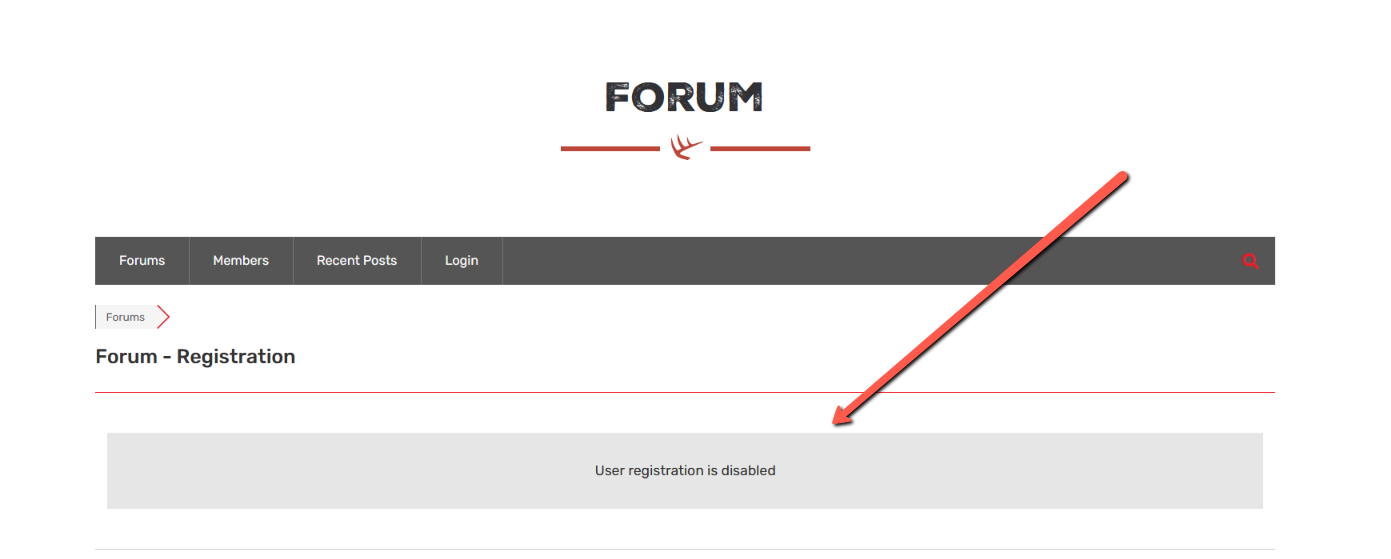
Why have you disabled the user registration?

Please go to Dashboard > Forums > Settings > Features Tab and enable the "Enable User Registration"


(@thewildrambler)
Joined: 5 years ago

Active Member
Posts: 13
Sofy
Robert
Translate
English
Spanish
French
German
Italian
Portuguese
Russian
Chinese
Japanese
Korean
Arabic
Hindi
Dutch
Polish
Turkish
Vietnamese
Thai
Swedish
Danish
Finnish
Norwegian
Czech
Hungarian
Romanian
Greek
Hebrew
Indonesian
Malay
Ukrainian
Bulgarian
Croatian
Slovak
Slovenian
Serbian
Lithuanian
Latvian
Estonian

@robert Hi Robert, I went ahead and turned on the user registration.


Posts: 13
Topic starter
Translate
English
Spanish
French
German
Italian
Portuguese
Russian
Chinese
Japanese
Korean
Arabic
Hindi
Dutch
Polish
Turkish
Vietnamese
Thai
Swedish
Danish
Finnish
Norwegian
Czech
Hungarian
Romanian
Greek
Hebrew
Indonesian
Malay
Ukrainian
Bulgarian
Croatian
Slovak
Slovenian
Serbian
Lithuanian
Latvian
Estonian
(@thewildrambler)
Active Member
Joined: 5 years ago

Hello @robert or @sofy, I went ahead and turned the registration back on for our forum. We are currently to take any new registrants with this format until the issue is fixed any advice or recommendations is greatly appreciated!


1 Reply
Robert
Admin
(@robert)
Joined: 3 months ago

Support Team
Posts: 10746
Translate
English
Spanish
French
German
Italian
Portuguese
Russian
Chinese
Japanese
Korean
Arabic
Hindi
Dutch
Polish
Turkish
Vietnamese
Thai
Swedish
Danish
Finnish
Norwegian
Czech
Hungarian
Romanian
Greek
Hebrew
Indonesian
Malay
Ukrainian
Bulgarian
Croatian
Slovak
Slovenian
Serbian
Lithuanian
Latvian
Estonian

@thewildrambler,

There is no any issue with wpForo. If the registration is turned on the registration page works fine, what else you're looking for? Could you please explain the problem?


Posts: 13
Topic starter
Translate
English
Spanish
French
German
Italian
Portuguese
Russian
Chinese
Japanese
Korean
Arabic
Hindi
Dutch
Polish
Turkish
Vietnamese
Thai
Swedish
Danish
Finnish
Norwegian
Czech
Hungarian
Romanian
Greek
Hebrew
Indonesian
Malay
Ukrainian
Bulgarian
Croatian
Slovak
Slovenian
Serbian
Lithuanian
Latvian
Estonian
(@thewildrambler)
Active Member
Joined: 5 years ago

@robert The problem I am having is after filling out a "test" user profile. I am unable to complete the registration process. The register button does nothing, it doesn't proceed or register me as a user.


1 Reply
Robert
Admin
(@robert)
Joined: 3 months ago

Support Team
Posts: 10746
Translate
English
Spanish
French
German
Italian
Portuguese
Russian
Chinese
Japanese
Korean
Arabic
Hindi
Dutch
Polish
Turkish
Vietnamese
Thai
Swedish
Danish
Finnish
Norwegian
Czech
Hungarian
Romanian
Greek
Hebrew
Indonesian
Malay
Ukrainian
Bulgarian
Croatian
Slovak
Slovenian
Serbian
Lithuanian
Latvian
Estonian

@thewildrambler,

There is no way to debug this, because this is not wpForo error. The registration form is affected by some script or code located in other plugins or in the WordPress theme. The only way is deactivating all other plugins and checking. If the problem is solved, you can activate the deactivated plugins one by one and check the issue after each plugin, so you can find the conflict maker.

In case this is not a plugin conflict, you should duplicate your website and play with the theme, change it to some default theme and check it.


Share: