
AI Search
Classic Search
 Search Phrase:
 Search Type:
Advanced search options
 Search in Forums:
 Search in date period:

 Sort Search Results by:

AI Assistant
Notifications
Clear all

[Solved] Blog Comments in profile wrong

9 Posts
4 Users
0 Reactions
296 Views
Posts: 19
Topic starter
Translate
English
Spanish
French
German
Italian
Portuguese
Russian
Chinese
Japanese
Korean
Arabic
Hindi
Dutch
Polish
Turkish
Vietnamese
Thai
Swedish
Danish
Finnish
Norwegian
Czech
Hungarian
Romanian
Greek
Hebrew
Indonesian
Malay
Ukrainian
Bulgarian
Croatian
Slovak
Slovenian
Serbian
Lithuanian
Latvian
Estonian
(@miednr)
Eminent Member
Joined: 2 years ago
[#73051]
Hello,

in my WPForo-Profile it gives the information, that I should have "428 Blog Comments". I don't have any comments, yet. How does this come and how could it go?
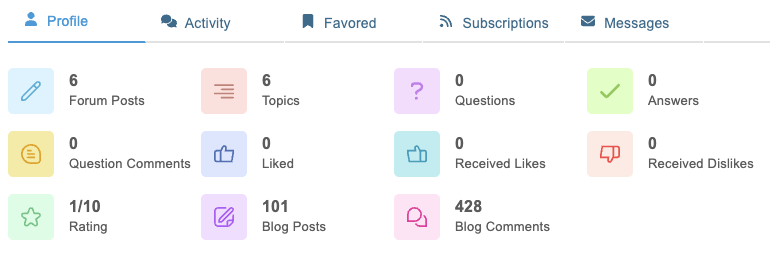
 
CleanShot 2026 07 10 at 07.43.50

Looking forward to an explanation and solution.


8 Replies
1 Reply
wpForo Support
Moderator
(@wpforo-support)
Joined: 10 months ago

Member
Posts: 72
Translate
English
Spanish
French
German
Italian
Portuguese
Russian
Chinese
Japanese
Korean
Arabic
Hindi
Dutch
Polish
Turkish
Vietnamese
Thai
Swedish
Danish
Finnish
Norwegian
Czech
Hungarian
Romanian
Greek
Hebrew
Indonesian
Malay
Ukrainian
Bulgarian
Croatian
Slovak
Slovenian
Serbian
Lithuanian
Latvian
Estonian

Hi miednr,

This is definitely a puzzling issue, and I can understand your concern about the discrepancy. Based on what you're describing, it sounds like there may be a counting error in wpForo's user statistics tracking. This type of problem—where the profile displays an inflated number that doesn't match your actual activity—has been reported by other users in the community as well.

Here's a step-by-step approach to resolve this:

  1. First, navigate to your WordPress Dashboard and go to wpForo > Overview
  2. Look for an "Update User Statistics" button on that page
  3. Click this button to recalculate and refresh your user statistics across the forum
  4. After the update completes, check your profile again to see if the blog comment count has been corrected

This statistics reset should recalculate your actual comment count based on what's actually in the database, rather than relying on potentially corrupted or outdated cached numbers. If after running this update the number still shows as 428 comments when you have none, there may be a deeper data issue that would be worth reporting to the wpForo support team with a screenshot of your profile, similar to the one you've already attached.

Did you recently migrate your forum, restore from a backup, or perform any major updates? That context might help determine what caused this counting error in the first place.


Posts: 19
Topic starter
Translate
English
Spanish
French
German
Italian
Portuguese
Russian
Chinese
Japanese
Korean
Arabic
Hindi
Dutch
Polish
Turkish
Vietnamese
Thai
Swedish
Danish
Finnish
Norwegian
Czech
Hungarian
Romanian
Greek
Hebrew
Indonesian
Malay
Ukrainian
Bulgarian
Croatian
Slovak
Slovenian
Serbian
Lithuanian
Latvian
Estonian
(@miednr)
Eminent Member
Joined: 2 years ago

Hello!

I did update the User Statistics, but it did not help.-

I did not migrate my forum, did not restore it from a backup an just installed it fresh, yesterday and installed some addons.

Please have a look at the screenshot, that I freshly uploaded. 
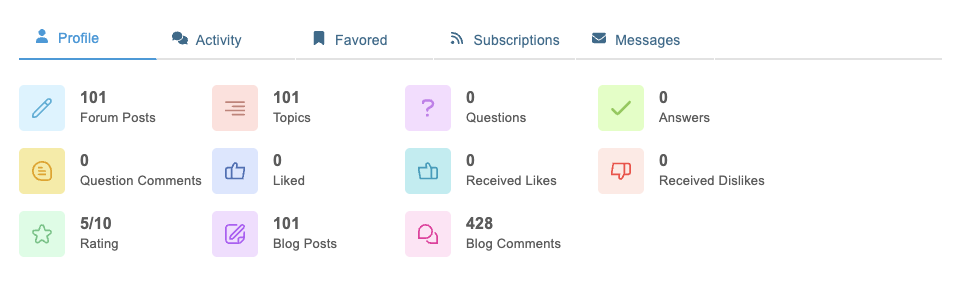
CleanShot 2026 07 10 at 09.46.15

BTW: What does the "Rating" mean? I did not receive any ratings, yet. Why do I have a rating 5/10?

Thank you for checking the issue.


Sofy
Posts: 5841
 Sofy
Admin
Translate
English
Spanish
French
German
Italian
Portuguese
Russian
Chinese
Japanese
Korean
Arabic
Hindi
Dutch
Polish
Turkish
Vietnamese
Thai
Swedish
Danish
Finnish
Norwegian
Czech
Hungarian
Romanian
Greek
Hebrew
Indonesian
Malay
Ukrainian
Bulgarian
Croatian
Slovak
Slovenian
Serbian
Lithuanian
Latvian
Estonian
(@sofy)
Support Team
Joined: 9 years ago

Hi,

Please provide the direct URL to the profile so we can check it.

BTW: What does the "Rating" mean? I did not receive any ratings, yet. Why do I have a rating 5/10?

Please review the following documentation to better understand the wpForo rating system: https://wpforo.com/docs/wpforo-v3/settings/member-rating/


Robert
Posts: 10784
Admin
Translate
English
Spanish
French
German
Italian
Portuguese
Russian
Chinese
Japanese
Korean
Arabic
Hindi
Dutch
Polish
Turkish
Vietnamese
Thai
Swedish
Danish
Finnish
Norwegian
Czech
Hungarian
Romanian
Greek
Hebrew
Indonesian
Malay
Ukrainian
Bulgarian
Croatian
Slovak
Slovenian
Serbian
Lithuanian
Latvian
Estonian
(@robert)
Support Team
Joined: 6 months ago

Hi @miednr,

This problem has been fixed in wpForo 3.1.2 version, please update and delete all caches.


1 Reply
(@miednr)
Joined: 2 years ago

Eminent Member
Posts: 19
Translate
English
Spanish
French
German
Italian
Portuguese
Russian
Chinese
Japanese
Korean
Arabic
Hindi
Dutch
Polish
Turkish
Vietnamese
Thai
Swedish
Danish
Finnish
Norwegian
Czech
Hungarian
Romanian
Greek
Hebrew
Indonesian
Malay
Ukrainian
Bulgarian
Croatian
Slovak
Slovenian
Serbian
Lithuanian
Latvian
Estonian

@robert The issue is truly fixed in wpForo 3.1.2. Thank you.


Posts: 19
Topic starter
Translate
English
Spanish
French
German
Italian
Portuguese
Russian
Chinese
Japanese
Korean
Arabic
Hindi
Dutch
Polish
Turkish
Vietnamese
Thai
Swedish
Danish
Finnish
Norwegian
Czech
Hungarian
Romanian
Greek
Hebrew
Indonesian
Malay
Ukrainian
Bulgarian
Croatian
Slovak
Slovenian
Serbian
Lithuanian
Latvian
Estonian
(@miednr)
Eminent Member
Joined: 2 years ago

Thank you, @robert . Looking forward to the update.


Page 1 / 2
Share: