AI Search
Classic Search
 Search Phrase:
 Search Type:
Advanced search options
 Search in Forums:
 Search in date period:

 Sort Search Results by:

AI Assistant
Notifications
Clear all

[Closed] How can I block the change of user names and Nicknames in the Account Page?

8 Posts
2 Users
0 Reactions
2,263 Views
Posts: 4
Topic starter
Translate
English
Spanish
French
German
Italian
Portuguese
Russian
Chinese
Japanese
Korean
Arabic
Hindi
Dutch
Polish
Turkish
Vietnamese
Thai
Swedish
Danish
Finnish
Norwegian
Czech
Hungarian
Romanian
Greek
Hebrew
Indonesian
Malay
Ukrainian
Bulgarian
Croatian
Slovak
Slovenian
Serbian
Lithuanian
Latvian
Estonian
(@latzo)
Active Member
Joined: 7 years ago
[#7327]
I do not want members to be able to rename themselves in my forum. How do I turn this off?
 

7 Replies

Sofy
Posts: 5774
 Sofy
Admin
Translate
English
Spanish
French
German
Italian
Portuguese
Russian
Chinese
Japanese
Korean
Arabic
Hindi
Dutch
Polish
Turkish
Vietnamese
Thai
Swedish
Danish
Finnish
Norwegian
Czech
Hungarian
Romanian
Greek
Hebrew
Indonesian
Malay
Ukrainian
Bulgarian
Croatian
Slovak
Slovenian
Serbian
Lithuanian
Latvian
Estonian
(@sofy)
Support Team
Joined: 8 years ago

Hi Latzo,

I suggest you hide the fields using CSS code. You need to put the code in Dashboard > Forums > Settings > Styles > "Custom CSS Code:" textarea. 

.wpf-field.wpf-field-type-text.wpf-field-name-display_name.wpf-field-required, .wpf-field.wpf-field-type-text.wpf-field-name-user_nicename.wpf-field-required {
display: none;
}

1 Reply
(@latzo)
Joined: 7 years ago

Active Member
Posts: 4
Translate
English
Spanish
French
German
Italian
Portuguese
Russian
Chinese
Japanese
Korean
Arabic
Hindi
Dutch
Polish
Turkish
Vietnamese
Thai
Swedish
Danish
Finnish
Norwegian
Czech
Hungarian
Romanian
Greek
Hebrew
Indonesian
Malay
Ukrainian
Bulgarian
Croatian
Slovak
Slovenian
Serbian
Lithuanian
Latvian
Estonian

Thx for the answer.. but when i put this Code in Dashboard > Forums > Settings > Styles > "Custom CSS Code:" nothing happens in the Account Page


Sofy
Posts: 5774
 Sofy
Admin
Translate
English
Spanish
French
German
Italian
Portuguese
Russian
Chinese
Japanese
Korean
Arabic
Hindi
Dutch
Polish
Turkish
Vietnamese
Thai
Swedish
Danish
Finnish
Norwegian
Czech
Hungarian
Romanian
Greek
Hebrew
Indonesian
Malay
Ukrainian
Bulgarian
Croatian
Slovak
Slovenian
Serbian
Lithuanian
Latvian
Estonian
(@sofy)
Support Team
Joined: 8 years ago

Hi Latzo,

Please Navigate to Dashboard > Forums > Dashboard admin page click on [Delete User Cache] then [Delete All Caches] buttons and do CTRL+F5 on the frontend. 

If you use some other cache plugins, please delete the plugins caches too.


1 Reply
(@latzo)
Joined: 7 years ago

Active Member
Posts: 4
Translate
English
Spanish
French
German
Italian
Portuguese
Russian
Chinese
Japanese
Korean
Arabic
Hindi
Dutch
Polish
Turkish
Vietnamese
Thai
Swedish
Danish
Finnish
Norwegian
Czech
Hungarian
Romanian
Greek
Hebrew
Indonesian
Malay
Ukrainian
Bulgarian
Croatian
Slovak
Slovenian
Serbian
Lithuanian
Latvian
Estonian

Thank you very much, it worked..

Can you tell me where to find the names in CSS for Example 

.wpf-field-name-display_name

What would be the CSS Name for the secondary usergroup and so on?

Sofy
Posts: 5774
 Sofy
Admin
Translate
English
Spanish
French
German
Italian
Portuguese
Russian
Chinese
Japanese
Korean
Arabic
Hindi
Dutch
Polish
Turkish
Vietnamese
Thai
Swedish
Danish
Finnish
Norwegian
Czech
Hungarian
Romanian
Greek
Hebrew
Indonesian
Malay
Ukrainian
Bulgarian
Croatian
Slovak
Slovenian
Serbian
Lithuanian
Latvian
Estonian
(@sofy)
Support Team
Joined: 8 years ago

Hi Latzo,

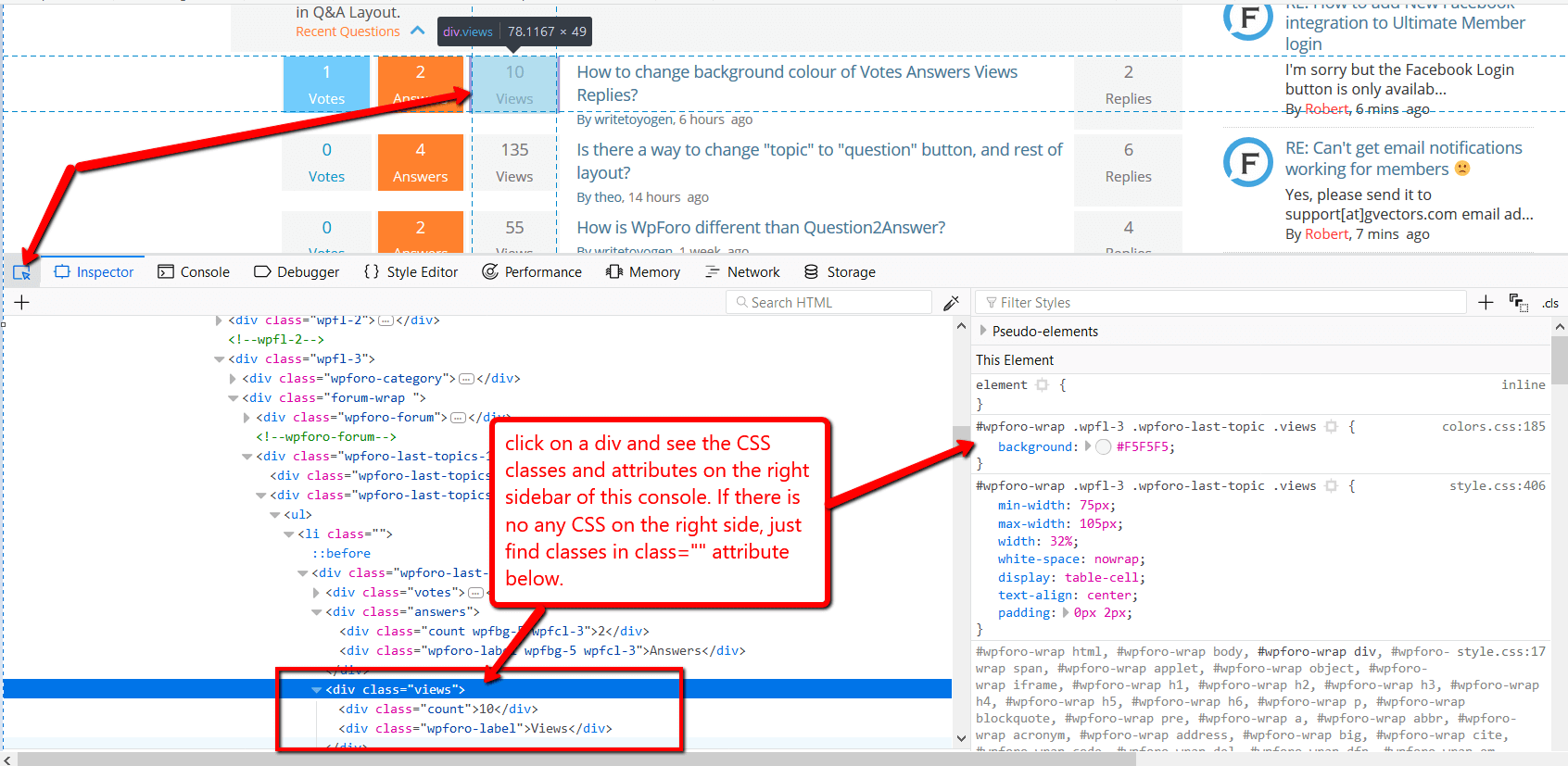
You can find all classes by pressing F12 on the browser and opening Chrome or Firefox Console:


1 Reply
(@latzo)
Joined: 7 years ago

Active Member
Posts: 4
Translate
English
Spanish
French
German
Italian
Portuguese
Russian
Chinese
Japanese
Korean
Arabic
Hindi
Dutch
Polish
Turkish
Vietnamese
Thai
Swedish
Danish
Finnish
Norwegian
Czech
Hungarian
Romanian
Greek
Hebrew
Indonesian
Malay
Ukrainian
Bulgarian
Croatian
Slovak
Slovenian
Serbian
Lithuanian
Latvian
Estonian

@Sofy

Thanks for the instruction screenshot.. i managed to remove the field "Title" at my own.. but i think because the secondary group is a chackbox, i cant hide it with your code.. do you have another hint for me?


Sofy
Posts: 5774
 Sofy
Admin
Translate
English
Spanish
French
German
Italian
Portuguese
Russian
Chinese
Japanese
Korean
Arabic
Hindi
Dutch
Polish
Turkish
Vietnamese
Thai
Swedish
Danish
Finnish
Norwegian
Czech
Hungarian
Romanian
Greek
Hebrew
Indonesian
Malay
Ukrainian
Bulgarian
Croatian
Slovak
Slovenian
Serbian
Lithuanian
Latvian
Estonian
(@sofy)
Support Team
Joined: 8 years ago

Hi Latzo,

Please note: only admins are allowed to change Usergroups. these fields are not available for regular users. 

Also please let us know have you used the "wpForo – User Custom Fields"? 


Share: