
AI Search
Classic Search
 Search Phrase:
 Search Type:
Advanced search options
 Search in Forums:
 Search in date period:

 Sort Search Results by:

AI Assistant
Notifications
Clear all

[Closed] How do I add the plugin

9 Posts
3 Users
3 Reactions
1,956 Views
Posts: 8
Topic starter
Translate
English
Spanish
French
German
Italian
Portuguese
Russian
Chinese
Japanese
Korean
Arabic
Hindi
Dutch
Polish
Turkish
Vietnamese
Thai
Swedish
Danish
Finnish
Norwegian
Czech
Hungarian
Romanian
Greek
Hebrew
Indonesian
Malay
Ukrainian
Bulgarian
Croatian
Slovak
Slovenian
Serbian
Lithuanian
Latvian
Estonian
(@dudueini)
Active Member
Joined: 5 years ago
[#18418]

How do I add the plugin (video preferably)

I do not understand these sections

  • Once the plugin is active, you’ll find Emoticons Button on bottom right side of topic/post editor.
  • Navigate to WordPress Dashboard > Forums > Settings > Addons > Emoticons Tab to manage emoticons groups.
  • It’ll ask you to activate with license key you got via email or in your account page, just insert the key and activate it.


8 Replies
Chris
Posts: 3610
Translate
English
Spanish
French
German
Italian
Portuguese
Russian
Chinese
Japanese
Korean
Arabic
Hindi
Dutch
Polish
Turkish
Vietnamese
Thai
Swedish
Danish
Finnish
Norwegian
Czech
Hungarian
Romanian
Greek
Hebrew
Indonesian
Malay
Ukrainian
Bulgarian
Croatian
Slovak
Slovenian
Serbian
Lithuanian
Latvian
Estonian
(@chris)
Famed Member
Joined: 5 years ago

Hi @dudueini,

Read this documentation about the add-on, it will help you to install and activate it: https://gvectors.com/product/wpforo-emoticons/  


1 Reply
(@dudueini)
Joined: 5 years ago

Active Member
Posts: 8
Translate
English
Spanish
French
German
Italian
Portuguese
Russian
Chinese
Japanese
Korean
Arabic
Hindi
Dutch
Polish
Turkish
Vietnamese
Thai
Swedish
Danish
Finnish
Norwegian
Czech
Hungarian
Romanian
Greek
Hebrew
Indonesian
Malay
Ukrainian
Bulgarian
Croatian
Slovak
Slovenian
Serbian
Lithuanian
Latvian
Estonian

@chris


  • Downloaded addon zip file from gVectors Shop account page  'OK
  • Navigate to Dashboard > Plugins > Add New and upload addon ZIP file, then activate it.  OK

I do not understand these sections  ,  (I need an explanation in the picture)

  • Once the plugin is active, you’ll find Emoticons Button on bottom right side of topic/post editor.
  • Navigate to WordPress Dashboard > Forums > Settings > Addons > Emoticons Tab to manage emoticons groups.
  • It’ll ask you to activate with license key you got via email or in your account page, just insert the key and activate it.


Posts: 8
Topic starter
Translate
English
Spanish
French
German
Italian
Portuguese
Russian
Chinese
Japanese
Korean
Arabic
Hindi
Dutch
Polish
Turkish
Vietnamese
Thai
Swedish
Danish
Finnish
Norwegian
Czech
Hungarian
Romanian
Greek
Hebrew
Indonesian
Malay
Ukrainian
Bulgarian
Croatian
Slovak
Slovenian
Serbian
Lithuanian
Latvian
Estonian
(@dudueini)
Active Member
Joined: 5 years ago

I added a picture, I got this far

 ERR1

Chris
Posts: 3610
Translate
English
Spanish
French
German
Italian
Portuguese
Russian
Chinese
Japanese
Korean
Arabic
Hindi
Dutch
Polish
Turkish
Vietnamese
Thai
Swedish
Danish
Finnish
Norwegian
Czech
Hungarian
Romanian
Greek
Hebrew
Indonesian
Malay
Ukrainian
Bulgarian
Croatian
Slovak
Slovenian
Serbian
Lithuanian
Latvian
Estonian
(@chris)
Famed Member
Joined: 5 years ago
Posted by: @dudueini

Once the plugin is active, you’ll find Emoticons Button on bottom right side of topic/post editor.


Posted by: @dudueini

Navigate to WordPress Dashboard > Forums > Settings > Addons > Emoticons Tab to manage emoticons groups
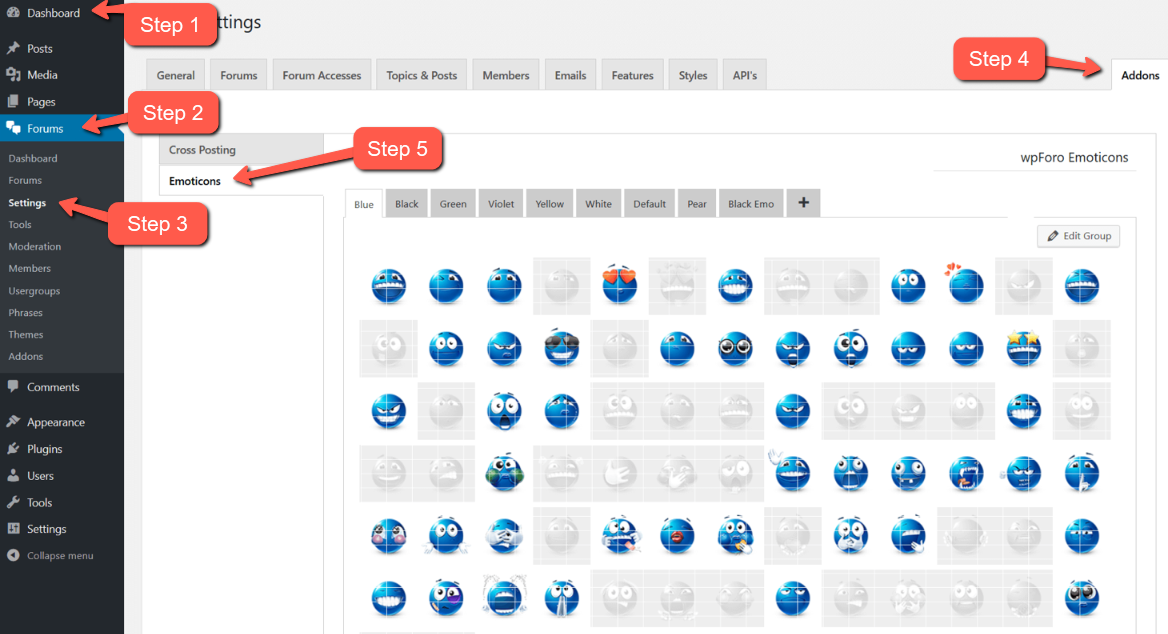
 

Posted by: @dudueini

It’ll ask you to activate with license key you got via email or in your account page, just insert the key and activate it
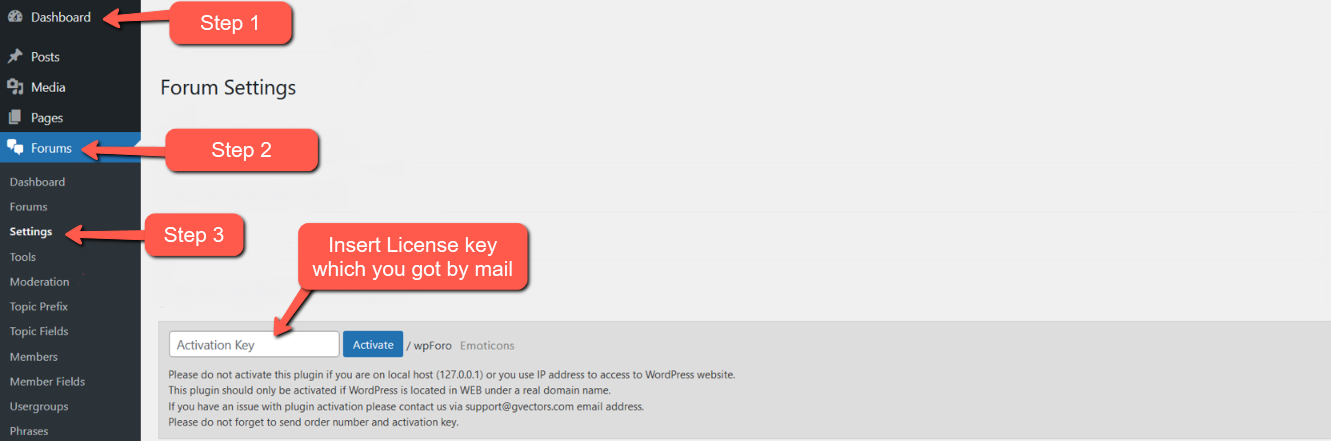


2 Replies
(@dudueini)
Joined: 5 years ago

Active Member
Posts: 8
Translate
English
Spanish
French
German
Italian
Portuguese
Russian
Chinese
Japanese
Korean
Arabic
Hindi
Dutch
Polish
Turkish
Vietnamese
Thai
Swedish
Danish
Finnish
Norwegian
Czech
Hungarian
Romanian
Greek
Hebrew
Indonesian
Malay
Ukrainian
Bulgarian
Croatian
Slovak
Slovenian
Serbian
Lithuanian
Latvian
Estonian

So far I have succeeded. But I do not see the 😊 I do not understand what my mistake. I only needed wpDiscuz comments.

ERR22

Robert
Admin
(@robert)
Joined: 2 months ago

Support Team
Posts: 10736
Chris
Translate
English
Spanish
French
German
Italian
Portuguese
Russian
Chinese
Japanese
Korean
Arabic
Hindi
Dutch
Polish
Turkish
Vietnamese
Thai
Swedish
Danish
Finnish
Norwegian
Czech
Hungarian
Romanian
Greek
Hebrew
Indonesian
Malay
Ukrainian
Bulgarian
Croatian
Slovak
Slovenian
Serbian
Lithuanian
Latvian
Estonian

@dudueini,

hmm... You've purchased wpForo plugin, why are you looking the emoticons addon in wpDiscuz plugin?? wpDiscuz is a different plugin, it has its own addons. You should purchase wpDiscuz Emoticons plugin, it's different and it doens't have the same emoticons as they are in the wpForo Emoticons addon:


Posts: 8
Topic starter
Translate
English
Spanish
French
German
Italian
Portuguese
Russian
Chinese
Japanese
Korean
Arabic
Hindi
Dutch
Polish
Turkish
Vietnamese
Thai
Swedish
Danish
Finnish
Norwegian
Czech
Hungarian
Romanian
Greek
Hebrew
Indonesian
Malay
Ukrainian
Bulgarian
Croatian
Slovak
Slovenian
Serbian
Lithuanian
Latvian
Estonian
(@dudueini)
Active Member
Joined: 5 years ago

Thank you for the answer! . How to undo the previous plugin.

Or, can I replace the three plugins?


1 Reply
Chris
(@chris)
Joined: 5 years ago

Famed Member
Posts: 3610
Translate
English
Spanish
French
German
Italian
Portuguese
Russian
Chinese
Japanese
Korean
Arabic
Hindi
Dutch
Polish
Turkish
Vietnamese
Thai
Swedish
Danish
Finnish
Norwegian
Czech
Hungarian
Romanian
Greek
Hebrew
Indonesian
Malay
Ukrainian
Bulgarian
Croatian
Slovak
Slovenian
Serbian
Lithuanian
Latvian
Estonian

@dudueini,

Please contact us via support[at]gvectors.com email address


Share:
