

AI Search
Classic Search
 Search Phrase:
 Search Type:
Advanced search options
 Search in Forums:
 Search in date period:

 Sort Search Results by:

Filter by custom fields

Topic prefix

AI Assistant
Notifications
Clear all

[Closed] How to change the red color of the "Posted By"

11 Posts
3 Users
2 Reactions
6,045 Views
Robert
Posts: 10716
Admin
Translate
English
Spanish
French
German
Italian
Portuguese
Russian
Chinese
Japanese
Korean
Arabic
Hindi
Dutch
Polish
Turkish
Vietnamese
Thai
Swedish
Danish
Finnish
Norwegian
Czech
Hungarian
Romanian
Greek
Hebrew
Indonesian
Malay
Ukrainian
Bulgarian
Croatian
Slovak
Slovenian
Serbian
Lithuanian
Latvian
Estonian
(@robert)
Support Team
Joined: 2 months ago

I am trying to change the colors of the usergroups.

What exactly you mean? The Username Link color or the Usergroup label background color?

Could you please leave your forum URL?

I don't have a /wp-content/plugins/wpforo/wpf-includes/wpf-hooks.php file to change the code...

That's impossible. it seems you don't use wpForo, you use other forum plugin. wpForo has no chance to be loaded without this file.


Posts: 5
Translate
English
Spanish
French
German
Italian
Portuguese
Russian
Chinese
Japanese
Korean
Arabic
Hindi
Dutch
Polish
Turkish
Vietnamese
Thai
Swedish
Danish
Finnish
Norwegian
Czech
Hungarian
Romanian
Greek
Hebrew
Indonesian
Malay
Ukrainian
Bulgarian
Croatian
Slovak
Slovenian
Serbian
Lithuanian
Latvian
Estonian
(@movietvforums)
Active Member
Joined: 8 years ago

I'm trying to change the username link color.  The url is movietvforums.com.  As you can see, the moderator is a glaring red, and I don't want the registered users to be green.  I changed the colors in settings > styles and as you suggested above, but no luck.


Robert
Posts: 10716
Admin
Translate
English
Spanish
French
German
Italian
Portuguese
Russian
Chinese
Japanese
Korean
Arabic
Hindi
Dutch
Polish
Turkish
Vietnamese
Thai
Swedish
Danish
Finnish
Norwegian
Czech
Hungarian
Romanian
Greek
Hebrew
Indonesian
Malay
Ukrainian
Bulgarian
Croatian
Slovak
Slovenian
Serbian
Lithuanian
Latvian
Estonian
(@robert)
Support Team
Joined: 2 months ago

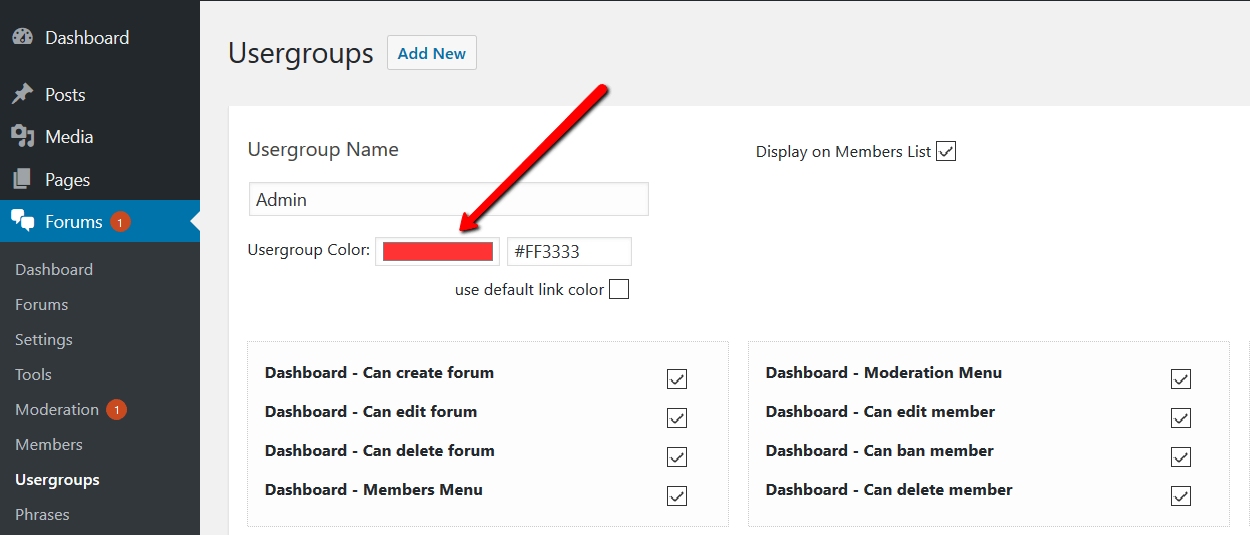
Please remove all css codes you've inserted. Makse sure all custom CSS codes related to this issue is removed and caches are deleted, then navigate to Dashboard > Forums > Usergroup admin page, edit the usergroup you want to change and set new color:

Posts: 5
Translate
English
Spanish
French
German
Italian
Portuguese
Russian
Chinese
Japanese
Korean
Arabic
Hindi
Dutch
Polish
Turkish
Vietnamese
Thai
Swedish
Danish
Finnish
Norwegian
Czech
Hungarian
Romanian
Greek
Hebrew
Indonesian
Malay
Ukrainian
Bulgarian
Croatian
Slovak
Slovenian
Serbian
Lithuanian
Latvian
Estonian
(@movietvforums)
Active Member
Joined: 8 years ago

I'm afraid that didn't work.  The reason I added the css code was because the color wasn't changing when I initially changed it in the usergroup.  Nevertheless, I deleted the css code, cleared the caches, and tried to set the colors again in the usergroup.  Still no change.  Please help.  I really hate that red.


Robert
Posts: 10716
Admin
Translate
English
Spanish
French
German
Italian
Portuguese
Russian
Chinese
Japanese
Korean
Arabic
Hindi
Dutch
Polish
Turkish
Vietnamese
Thai
Swedish
Danish
Finnish
Norwegian
Czech
Hungarian
Romanian
Greek
Hebrew
Indonesian
Malay
Ukrainian
Bulgarian
Croatian
Slovak
Slovenian
Serbian
Lithuanian
Latvian
Estonian
(@robert)
Support Team
Joined: 2 months ago

It works fine, you should make sure all caches are deleted and the colors.css is reset.

Please change it again, navigate to Dashboard > Forums > Dashboard admin page, click on [Delete User Cache], then delete website cache and press Ctrl+F5 twice on forum front-end.


1 Reply
(@movietvforums)
Joined: 8 years ago

Active Member
Posts: 5
Translate
English
Spanish
French
German
Italian
Portuguese
Russian
Chinese
Japanese
Korean
Arabic
Hindi
Dutch
Polish
Turkish
Vietnamese
Thai
Swedish
Danish
Finnish
Norwegian
Czech
Hungarian
Romanian
Greek
Hebrew
Indonesian
Malay
Ukrainian
Bulgarian
Croatian
Slovak
Slovenian
Serbian
Lithuanian
Latvian
Estonian

It worked!  I didn't realize there was a user cache.  I was just deleting the website cache.  Thank you so much!

By the way, I do have that wpf-hooks.php file.  My cpanel file manager doesn't display the bottom two files in wpf-includes, and it didn't come up in a search.  I found them by zooming way out.  Sorry about the confusion.


Page 2 / 2
Share: