AI Assistant
Notifications
Clear all

[Solved] Updating to wpForo 2.x — Losing All Unread Post Data

5 Posts
4 Users
0 Reactions
1,743 Views
Posts: 48
Topic starter
Translate
English
Spanish
French
German
Italian
Portuguese
Russian
Chinese
Japanese
Korean
Arabic
Hindi
Dutch
Polish
Turkish
Vietnamese
Thai
Swedish
Danish
Finnish
Norwegian
Czech
Hungarian
Romanian
Greek
Hebrew
Indonesian
Malay
Ukrainian
Bulgarian
Croatian
Slovak
Slovenian
Serbian
Lithuanian
Latvian
Estonian
(@curtisb)
Trusted Member
Joined: 8 years ago
[#23008]

I just updated my wpForo forum and all addons to the 2.x version(s). When doing so, I updated to the new theme with 2.x and kept the same "Threaded" layouts for all of my forums.

After doing the updates, it appears that all of my users — including myself — are showing all posts as being unread with the little "new" icon. I know for a fact before I upgraded, I had read all recent posts. But, even my user account is showing all posts as unread.

Is this a byproduct of upgrading to wpForo 2?

Or is there possibly a way to restore all of this "unread" post "memory." I would hate for all of my paid members to have to click on all of the posts manually (for those that don't know about the "mark all as read" feature).

Thanks for any help on this!


4 Replies
Chris
Posts: 3610
Translate
English
Spanish
French
German
Italian
Portuguese
Russian
Chinese
Japanese
Korean
Arabic
Hindi
Dutch
Polish
Turkish
Vietnamese
Thai
Swedish
Danish
Finnish
Norwegian
Czech
Hungarian
Romanian
Greek
Hebrew
Indonesian
Malay
Ukrainian
Bulgarian
Croatian
Slovak
Slovenian
Serbian
Lithuanian
Latvian
Estonian
(@chris)
Famed Member
Joined: 5 years ago

Hi @curtisb,

You can make an Admin note for the users, and inform them about the mark all read option.


2 Replies
(@heydemar)
Joined: 9 years ago

Active Member
Posts: 5
Translate
English
Spanish
French
German
Italian
Portuguese
Russian
Chinese
Japanese
Korean
Arabic
Hindi
Dutch
Polish
Turkish
Vietnamese
Thai
Swedish
Danish
Finnish
Norwegian
Czech
Hungarian
Romanian
Greek
Hebrew
Indonesian
Malay
Ukrainian
Bulgarian
Croatian
Slovak
Slovenian
Serbian
Lithuanian
Latvian
Estonian

@chris this is the Solution?

And where can I find this Option about mark all read option


Chris
(@chris)
Joined: 5 years ago

Famed Member
Posts: 3610
Chris
Translate
English
Spanish
French
German
Italian
Portuguese
Russian
Chinese
Japanese
Korean
Arabic
Hindi
Dutch
Polish
Turkish
Vietnamese
Thai
Swedish
Danish
Finnish
Norwegian
Czech
Hungarian
Romanian
Greek
Hebrew
Indonesian
Malay
Ukrainian
Bulgarian
Croatian
Slovak
Slovenian
Serbian
Lithuanian
Latvian
Estonian

@heydemar,

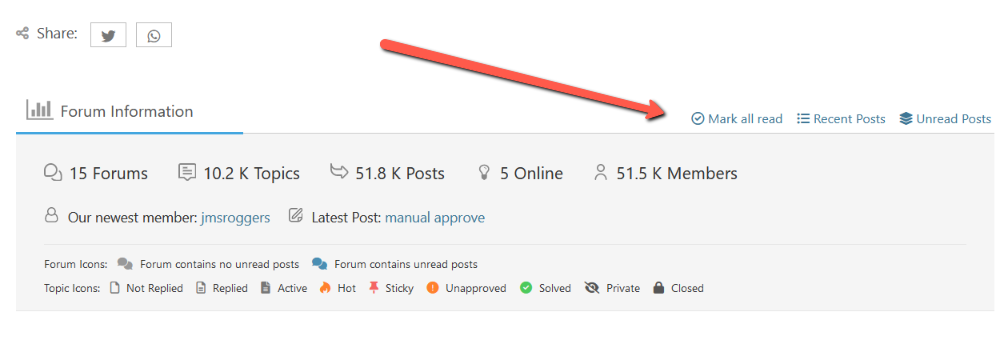
from Forum Information/Forum Statistics Tab(Bottom of the forum)


Robert
Posts: 10708
Admin
Translate
English
Spanish
French
German
Italian
Portuguese
Russian
Chinese
Japanese
Korean
Arabic
Hindi
Dutch
Polish
Turkish
Vietnamese
Thai
Swedish
Danish
Finnish
Norwegian
Czech
Hungarian
Romanian
Greek
Hebrew
Indonesian
Malay
Ukrainian
Bulgarian
Croatian
Slovak
Slovenian
Serbian
Lithuanian
Latvian
Estonian
(@robert)
Support Team
Joined: 2 months ago

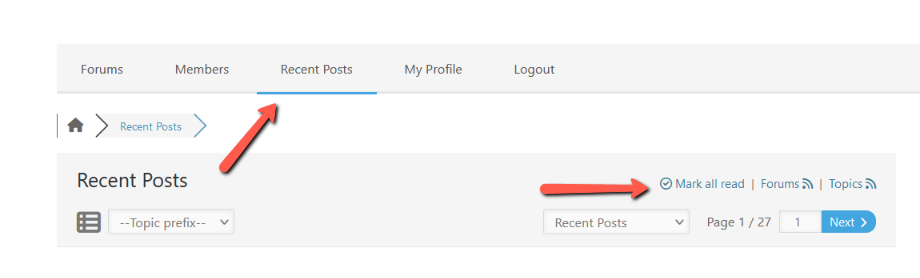
Please use the [Mark All Read] buttons.

The [Mark All Read] buttons are located on the forum footer and in recent posts page:

Share: