AI Search
Classic Search
 Search Phrase:
 Search Type:
Advanced search options
 Search in Forums:
 Search in date period:

 Sort Search Results by:

AI Assistant
Notifications
Clear all

[Solved] User profile

4 Posts
2 Users
1 Reactions
2,300 Views
Posts: 73
Topic starter
Translate
English
Spanish
French
German
Italian
Portuguese
Russian
Chinese
Japanese
Korean
Arabic
Hindi
Dutch
Polish
Turkish
Vietnamese
Thai
Swedish
Danish
Finnish
Norwegian
Czech
Hungarian
Romanian
Greek
Hebrew
Indonesian
Malay
Ukrainian
Bulgarian
Croatian
Slovak
Slovenian
Serbian
Lithuanian
Latvian
Estonian
(@srtalop)
Estimable Member
Joined: 7 years ago
[#7593]

Hi team,

Is it possible to hide from the user´s profile the "questions and answers" as we are not planning to use the question template? Thanks in advance.

2019 01 24 11h51 42

3 Replies
Sofy
Posts: 5776
 Sofy
Admin
Translate
English
Spanish
French
German
Italian
Portuguese
Russian
Chinese
Japanese
Korean
Arabic
Hindi
Dutch
Polish
Turkish
Vietnamese
Thai
Swedish
Danish
Finnish
Norwegian
Czech
Hungarian
Romanian
Greek
Hebrew
Indonesian
Malay
Ukrainian
Bulgarian
Croatian
Slovak
Slovenian
Serbian
Lithuanian
Latvian
Estonian
(@sofy)
Support Team
Joined: 8 years ago

Hi @srtalop,

Please navigate to Dashboard > Forums > Settings > Styles admin page, put the following code in "Custom CSS Code" textarea, save it, delete all caches, do CTRL+ F5 on frontend:

.wpf-statbox.wpfbg-9:nth-child(4) {
display: none !important;
}

.wpf-statbox.wpfbg-9:nth-child(3) {
display: none !important;
}

Posts: 73
Topic starter
Translate
English
Spanish
French
German
Italian
Portuguese
Russian
Chinese
Japanese
Korean
Arabic
Hindi
Dutch
Polish
Turkish
Vietnamese
Thai
Swedish
Danish
Finnish
Norwegian
Czech
Hungarian
Romanian
Greek
Hebrew
Indonesian
Malay
Ukrainian
Bulgarian
Croatian
Slovak
Slovenian
Serbian
Lithuanian
Latvian
Estonian
(@srtalop)
Estimable Member
Joined: 7 years ago

Hi, the "answers" tile was hidden, but not the "questions" one. Thanks.

2019 01 28 08h07 58

Sofy
Posts: 5776
 Sofy
Admin
Translate
English
Spanish
French
German
Italian
Portuguese
Russian
Chinese
Japanese
Korean
Arabic
Hindi
Dutch
Polish
Turkish
Vietnamese
Thai
Swedish
Danish
Finnish
Norwegian
Czech
Hungarian
Romanian
Greek
Hebrew
Indonesian
Malay
Ukrainian
Bulgarian
Croatian
Slovak
Slovenian
Serbian
Lithuanian
Latvian
Estonian
(@sofy)
Support Team
Joined: 8 years ago

Hi srtalop,

The same principle for each item. In this case, CSS code to hide this item is:

.wpf-statbox.wpfbg-9:nth-child(5){
display: none !important;
}

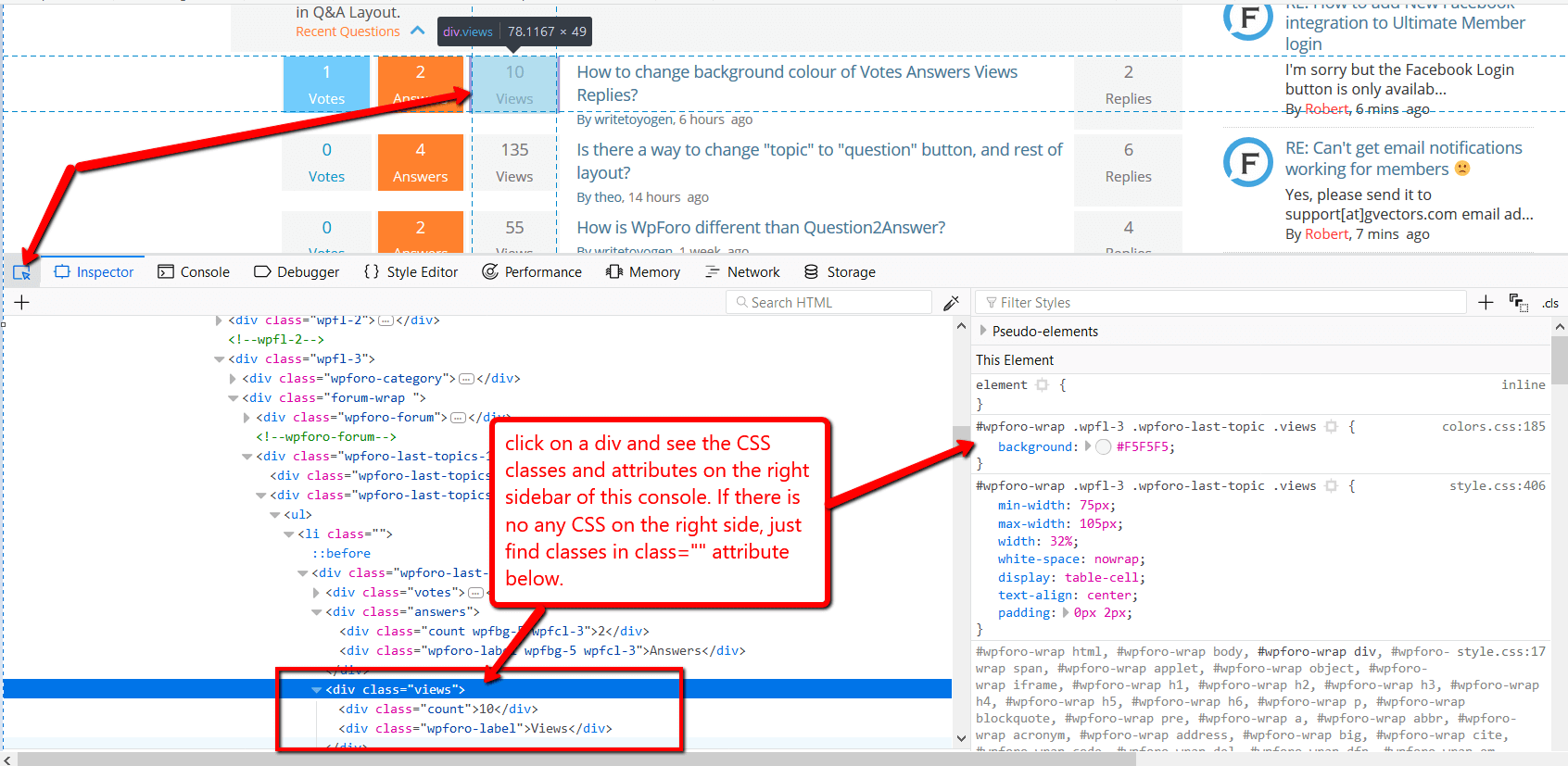
You can find all classes by pressing F12 on the browser and opening Chrome or Firefox Console:


Share: