
AI Search
Classic Search
Notifications
Clear all

Oct 13, 2026 2:20 pm
Hello,
In the mobile version, post titles are not displayed at full width when in search mode—please see the screenshot or this link: https://netz-familie.ch/netzfamilie-community/?wpfs=Grosseltern
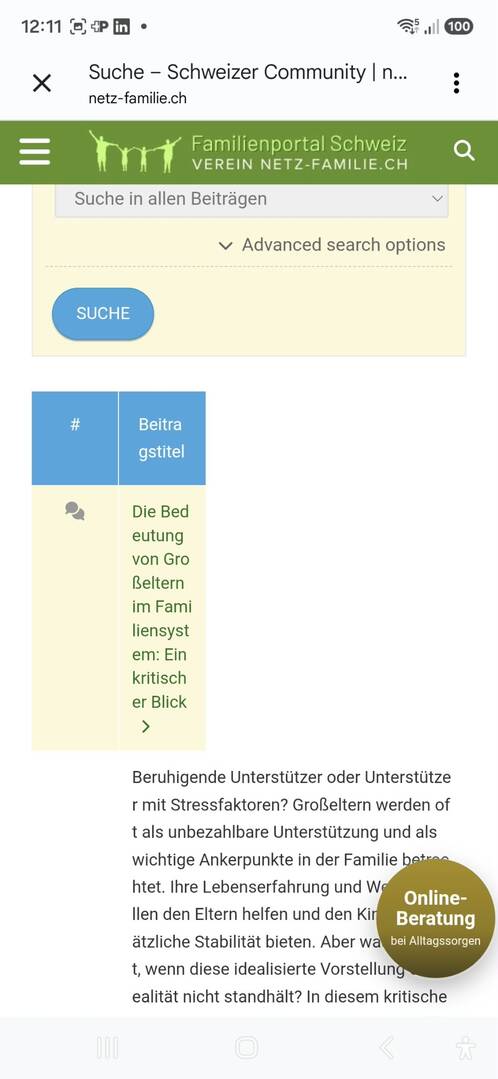
Thanks,
Steven
2 Replies



Oct 13, 2026 2:34 pm
Hi,
Please use this cSS code:
@media screen and (max-width: 800px) {
    #wpforo #wpforo-wrap .wpforo-search-wrap .wpforo-search-content td.wpf-shead-result,
    #wpforo #wpforo-wrap .wpforo-search-wrap .wpforo-search-content td.wpf-spost-result,
    #wpforo #wpforo-wrap .wpforo-search-wrap .wpforo-search-content td.wpf-shead-forum,
    #wpforo #wpforo-wrap .wpforo-search-wrap .wpforo-search-content td.wpf-spost-forum,
    #wpforo #wpforo-wrap .wpforo-search-wrap .wpforo-search-content td.wpf-shead-user,
    #wpforo #wpforo-wrap .wpforo-search-wrap .wpforo-search-content td.wpf-spost-user,
    #wpforo #wpforo-wrap .wpforo-search-wrap .wpforo-search-content td.wpf-shead-date,
    #wpforo #wpforo-wrap .wpforo-search-wrap .wpforo-search-content td.wpf-spost-date,
    #wpforo #wpforo-wrap .wpforo-search-wrap .wpforo-search-content td.wpf-shead-icon,
    #wpforo #wpforo-wrap .wpforo-search-wrap .wpforo-search-content td.wpf-spost-icon {
        display: none !important;
    }
}
Insert the code in the "Custom CSS Code" testarea.
Clear all kinds of caches and check again.
Also, please try in incognito mode if you're checking on mobile devices. Because mobile browsers have a hard cache, you'll not be able to see the change immediately.
Oct 15, 2026 10:54 am
Thanks Sofy, it works fine!