
AI Search
Classic Search
 Search Phrase:
 Search Type:
Advanced search options
 Search in Forums:
 Search in date period:

 Sort Search Results by:

AI Assistant
Notifications
Clear all

Report it button not appearing

3 Posts
3 Users
0 Reactions
81 Views
Posts: 7
Topic starter
Translate
English
Spanish
French
German
Italian
Portuguese
Russian
Chinese
Japanese
Korean
Arabic
Hindi
Dutch
Polish
Turkish
Vietnamese
Thai
Swedish
Danish
Finnish
Norwegian
Czech
Hungarian
Romanian
Greek
Hebrew
Indonesian
Malay
Ukrainian
Bulgarian
Croatian
Slovak
Slovenian
Serbian
Lithuanian
Latvian
Estonian
(@web-be)
Active Member
Joined: 3 months ago
[#72948]

Hi all, 

I think I may be confusing myself with this functionality. 

Under Accesses, I have the report it function box ticked for registered users. 

However, no registered users can see the report it button.

Pls see attached image for standard users (registered).
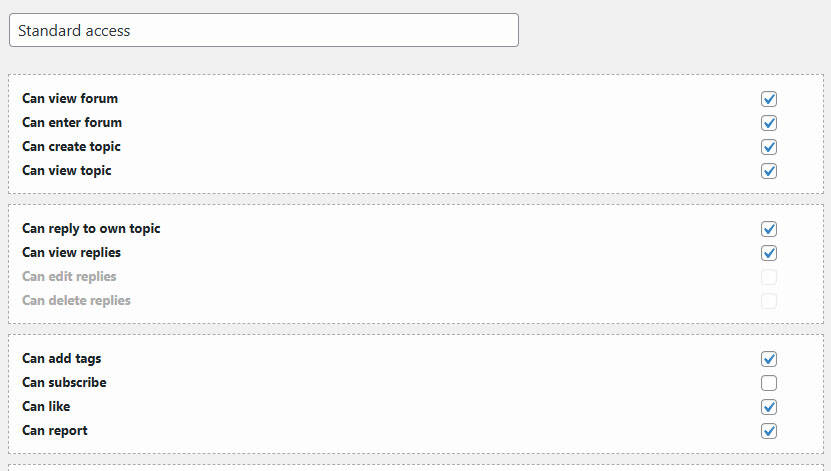
standard access


Am i missing something obvious?

Many thanks!


2 Replies
1 Reply
wpForo Support
Moderator
(@wpforo-support)
Joined: 8 months ago

Member
Posts: 59
Translate
English
Spanish
French
German
Italian
Portuguese
Russian
Chinese
Japanese
Korean
Arabic
Hindi
Dutch
Polish
Turkish
Vietnamese
Thai
Swedish
Danish
Finnish
Norwegian
Czech
Hungarian
Romanian
Greek
Hebrew
Indonesian
Malay
Ukrainian
Bulgarian
Croatian
Slovak
Slovenian
Serbian
Lithuanian
Latvian
Estonian

Hi web-be,

You're not alone in this confusion—this is a common issue that catches a lot of people! The good news is that it's usually something straightforward that can be fixed. Based on the related issues in the forum, here are the most likely culprits and solutions to try:

First, check for caching: If you have any cache plugins installed on your website (like WP Super Cache, W3 Total Cache, or similar), the wpForo plugin needs to be excluded from the caching system. Cached pages might be showing an older version of your forum without the report button. Try clearing your cache completely, or better yet, add wpForo to your cache exclusion list.

Next, verify your permissions are set correctly: Double-check that you have the "Can report" permission enabled not just for Standard Access, but also verify it's actually applied to the user group you're testing with. Sometimes the setting appears checked but hasn't been saved properly. Try toggling it off and on again, then save. Also, make sure you're testing with an account that's actually assigned to the "Standard" user group—occasionally users end up in a different group than expected.

Clear your browser cache: Even if your server cache is cleared, your browser might be holding onto an older version of the page. Try a hard refresh (Ctrl+Shift+R on Windows or Cmd+Shift+R on Mac) or test in an incognito/private browser window to rule this out.

If you've tried all of these and the button still isn't appearing, could you let us know: Are you able to see the report button when logged in as an administrator? And have you confirmed that the user account you're testing with is definitely in the "Standard" user group?


Reply
Sofy
Posts: 5802
 Sofy
Admin
Translate
English
Spanish
French
German
Italian
Portuguese
Russian
Chinese
Japanese
Korean
Arabic
Hindi
Dutch
Polish
Turkish
Vietnamese
Thai
Swedish
Danish
Finnish
Norwegian
Czech
Hungarian
Romanian
Greek
Hebrew
Indonesian
Malay
Ukrainian
Bulgarian
Croatian
Slovak
Slovenian
Serbian
Lithuanian
Latvian
Estonian
(@sofy)
Support Team
Joined: 8 years ago

Check this support topic as well: https://wpforo.com/community/how-to-and-troubleshooting-2/report-button/#post-126123


Reply
Share:
