
AI Search
Classic Search
 Search Phrase:
 Search Type:
Advanced search options
 Search in Forums:
 Search in date period:

 Sort Search Results by:

AI Assistant
Notifications
Clear all

[Solved] Version 3.0.6, missing icons and forum menu has many extra links.

4 Posts
2 Users
1 Reactions
140 Views
memphisguru
Posts: 25
Topic starter
Translate
English
Spanish
French
German
Italian
Portuguese
Russian
Chinese
Japanese
Korean
Arabic
Hindi
Dutch
Polish
Turkish
Vietnamese
Thai
Swedish
Danish
Finnish
Norwegian
Czech
Hungarian
Romanian
Greek
Hebrew
Indonesian
Malay
Ukrainian
Bulgarian
Croatian
Slovak
Slovenian
Serbian
Lithuanian
Latvian
Estonian
(@memphisguru)
Eminent Member
Joined: 8 years ago
[#72922]

Sometime after wpforo updated to 3.x I have display issues. I just now tried clearing all caches (server and forum) and changed to the new 2026 theme.

Here is a screenshot, I've circled some of the icon issues in red, and the changed forum menu in green.

What could be causing these? I haven't enabled any of the AI features yet. Forum is at

https://thebeachcats.com/forums
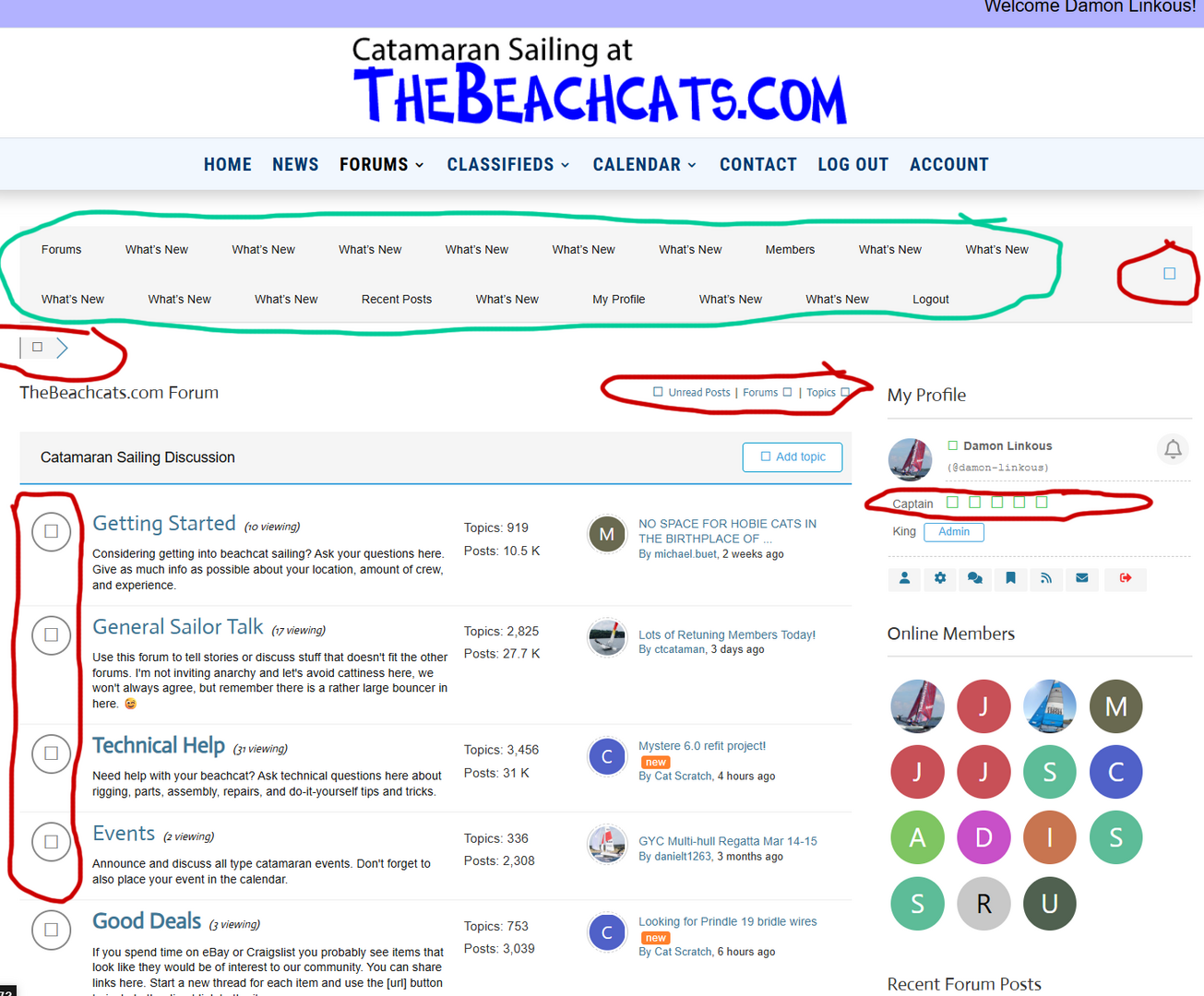
 

forum menu and icon issue


3 Replies
Sofy
Posts: 5777
 Sofy
Admin
Translate
English
Spanish
French
German
Italian
Portuguese
Russian
Chinese
Japanese
Korean
Arabic
Hindi
Dutch
Polish
Turkish
Vietnamese
Thai
Swedish
Danish
Finnish
Norwegian
Czech
Hungarian
Romanian
Greek
Hebrew
Indonesian
Malay
Ukrainian
Bulgarian
Croatian
Slovak
Slovenian
Serbian
Lithuanian
Latvian
Estonian
(@sofy)
Support Team
Joined: 8 years ago

Hi,

For the issue regarding the menu section, please follow this support topic:
https://wpforo.com/community/how-to-and-troubleshooting-2/doubled-menu-items/

Regarding the issue with the icons, please use the following CSS code:

 
#wpforo .fa-solid, #wpforo .fas {
    font-family: "Font Awesome 7 Free";
}
 

Insert the CSS code into the Custom CSS textarea.


Reply
2 Replies
memphisguru
(@memphisguru)
Joined: 8 years ago

Eminent Member
Posts: 25
Translate
English
Spanish
French
German
Italian
Portuguese
Russian
Chinese
Japanese
Korean
Arabic
Hindi
Dutch
Polish
Turkish
Vietnamese
Thai
Swedish
Danish
Finnish
Norwegian
Czech
Hungarian
Romanian
Greek
Hebrew
Indonesian
Malay
Ukrainian
Bulgarian
Croatian
Slovak
Slovenian
Serbian
Lithuanian
Latvian
Estonian

@sofy Adding that CSS did fix the problem. Is there a reason this is necessary? It seems that the WPForo 2026 theme should include that?


Reply
Sofy
 Sofy
Admin
(@sofy)
Joined: 8 years ago

Support Team
Posts: 5777
Sofy
Translate
English
Spanish
French
German
Italian
Portuguese
Russian
Chinese
Japanese
Korean
Arabic
Hindi
Dutch
Polish
Turkish
Vietnamese
Thai
Swedish
Danish
Finnish
Norwegian
Czech
Hungarian
Romanian
Greek
Hebrew
Indonesian
Malay
Ukrainian
Bulgarian
Croatian
Slovak
Slovenian
Serbian
Lithuanian
Latvian
Estonian
 
This appears to be a CSS conflict with your theme or another plugin. You can either keep the custom code or identify the source of the conflict and contact the plugin/theme support for assistance.

Reply
Share:
