AI Search
Classic Search
 Search Phrase:
 Search Type:
Advanced search options
 Search in Forums:
 Search in date period:

 Sort Search Results by:

AI Assistant
Notifications
Clear all

[Closed] Insert image in post?

5 Posts
3 Users
0 Reactions
59.7 K Views
Posts: 2
Topic starter
Translate
English
Spanish
French
German
Italian
Portuguese
Russian
Chinese
Japanese
Korean
Arabic
Hindi
Dutch
Polish
Turkish
Vietnamese
Thai
Swedish
Danish
Finnish
Norwegian
Czech
Hungarian
Romanian
Greek
Hebrew
Indonesian
Malay
Ukrainian
Bulgarian
Croatian
Slovak
Slovenian
Serbian
Lithuanian
Latvian
Estonian
(@wbickle)
New Member
Joined: 8 years ago
[#6301]

Is there a way to allow users to insert images within posts, rather than simply attaching them?

TIA.

Bill


4 Replies

Sofy
Posts: 5774
 Sofy
Admin
Translate
English
Spanish
French
German
Italian
Portuguese
Russian
Chinese
Japanese
Korean
Arabic
Hindi
Dutch
Polish
Turkish
Vietnamese
Thai
Swedish
Danish
Finnish
Norwegian
Czech
Hungarian
Romanian
Greek
Hebrew
Indonesian
Malay
Ukrainian
Bulgarian
Croatian
Slovak
Slovenian
Serbian
Lithuanian
Latvian
Estonian
(@sofy)
Support Team
Joined: 8 years ago

Hi wbickle,

You can use the code explained in this support topic to display the attached image file as an image:
 
For an advanced attachment features you should checkout wpForo Advanced Attachment addon:

1 Reply
(@wbickle)
Joined: 8 years ago

New Member
Posts: 2
Translate
English
Spanish
French
German
Italian
Portuguese
Russian
Chinese
Japanese
Korean
Arabic
Hindi
Dutch
Polish
Turkish
Vietnamese
Thai
Swedish
Danish
Finnish
Norwegian
Czech
Hungarian
Romanian
Greek
Hebrew
Indonesian
Malay
Ukrainian
Bulgarian
Croatian
Slovak
Slovenian
Serbian
Lithuanian
Latvian
Estonian

Purchased the add-on.  Thanks for the prompt response.


AggieAT
Posts: 48
Translate
English
Spanish
French
German
Italian
Portuguese
Russian
Chinese
Japanese
Korean
Arabic
Hindi
Dutch
Polish
Turkish
Vietnamese
Thai
Swedish
Danish
Finnish
Norwegian
Czech
Hungarian
Romanian
Greek
Hebrew
Indonesian
Malay
Ukrainian
Bulgarian
Croatian
Slovak
Slovenian
Serbian
Lithuanian
Latvian
Estonian
(@aggie)
Estimable Member
Joined: 6 years ago

So I purchased the embed add on but it looks like you can only embed pictures that have a url? You cannot upload a picture from your computer? Am I missing something?


1 Reply
Sofy
 Sofy
Admin
(@sofy)
Joined: 8 years ago

Support Team
Posts: 5774
Translate
English
Spanish
French
German
Italian
Portuguese
Russian
Chinese
Japanese
Korean
Arabic
Hindi
Dutch
Polish
Turkish
Vietnamese
Thai
Swedish
Danish
Finnish
Norwegian
Czech
Hungarian
Romanian
Greek
Hebrew
Indonesian
Malay
Ukrainian
Bulgarian
Croatian
Slovak
Slovenian
Serbian
Lithuanian
Latvian
Estonian

@aggieat

Please read wpForo Embeds addon description on the product page.  This addon doesn’t have any relation to video file uploading and attaching.

The wpForo Embeds addon is designed as a core post content replacer. It checks content provider URLs and replaces to content provider view (video, audio players, social network widgets, etc..).

wpForo Embeds is a 3rd party URL (Youtube, Soundcloud, etc.) embed-er addon.

wpForo Advanced Attachments is a file attachment plugin. It allows attaching multiple files, images, videos, audio and all other file types you’ve allowed in settings. 

wpForo Advanced Attachments:

Product:

https://gvectors.com/product/wpforo-advanced-attachments/

Demo:

http://addons.wpforo.com/community/wpforo-advanced-attachments/wpforo-advanced-attachments/

wpForo Embeds:

Products:

https://gvectors.com/product/wpforo-embeds/

Demo:

http://addons.wpforo.com/community/wpforo-embeds/wpforo-embeds/

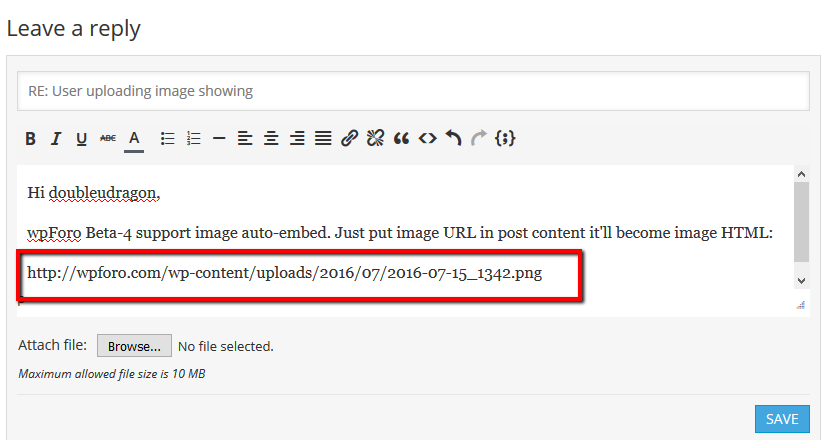
If you copy the full URL to the image, (not the page on which the image is located) insert it into post content. it'll be automatically replaced to an image. This is built-in wpForo feature:


Share: