AI Search
Classic Search
 Search Phrase:
 Search Type:
Advanced search options
 Search in Forums:
 Search in date period:

 Sort Search Results by:

AI Assistant
Notifications
Clear all

"Min number of posts to be able to edit profile" not working as expected

18 Posts
2 Users
0 Reactions
368 Views
Posts: 9
 GWSG
Topic starter
Translate ▼
English
Spanish
French
German
Italian
Portuguese
Russian
Chinese
Japanese
Korean
Arabic
Hindi
Dutch
Polish
Turkish
Vietnamese
Thai
Swedish
Danish
Finnish
Norwegian
Czech
Hungarian
Romanian
Greek
Hebrew
Indonesian
Malay
Ukrainian
Bulgarian
Croatian
Slovak
Slovenian
Serbian
Lithuanian
Latvian
Estonian
(@gwsg)
Active Member
Joined: 1 month ago

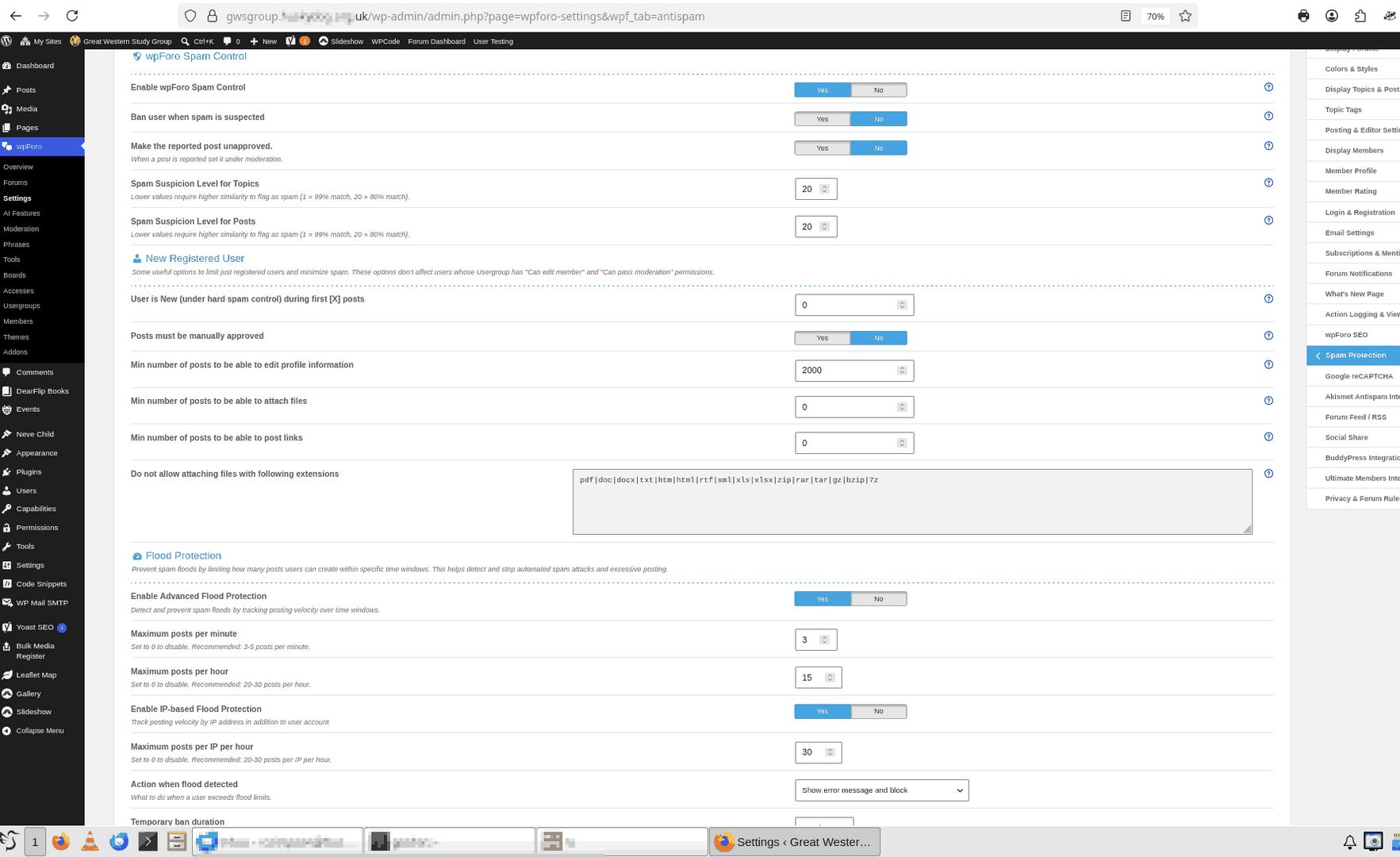
Please find attached a screenshot of the Anti Spam settings.  Are there any other settings screens you would like to see?  I can elevate your user to an Admin or create a separate Admin user for you if you wish.
Spam Settings

Reply
6 Replies
Sofy
 Sofy
Admin
(@sofy)
Joined: 9 years ago

Support Team
Posts: 5904
Translate ▼
English
Spanish
French
German
Italian
Portuguese
Russian
Chinese
Japanese
Korean
Arabic
Hindi
Dutch
Polish
Turkish
Vietnamese
Thai
Swedish
Danish
Finnish
Norwegian
Czech
Hungarian
Romanian
Greek
Hebrew
Indonesian
Malay
Ukrainian
Bulgarian
Croatian
Slovak
Slovenian
Serbian
Lithuanian
Latvian
Estonian

@gwsg

Please temporarily change the user's role to Administrator and let us know.


Reply
 GWSG
(@gwsg)
Joined: 1 month ago

Active Member
Posts: 9
Translate ▼
English
Spanish
French
German
Italian
Portuguese
Russian
Chinese
Japanese
Korean
Arabic
Hindi
Dutch
Polish
Turkish
Vietnamese
Thai
Swedish
Danish
Finnish
Norwegian
Czech
Hungarian
Romanian
Greek
Hebrew
Indonesian
Malay
Ukrainian
Bulgarian
Croatian
Slovak
Slovenian
Serbian
Lithuanian
Latvian
Estonian

@sofy OK, done that.


Reply
Sofy
 Sofy
Admin
(@sofy)
Joined: 9 years ago

Support Team
Posts: 5904
Sofy
Translate ▼
English
Spanish
French
German
Italian
Portuguese
Russian
Chinese
Japanese
Korean
Arabic
Hindi
Dutch
Polish
Turkish
Vietnamese
Thai
Swedish
Danish
Finnish
Norwegian
Czech
Hungarian
Romanian
Greek
Hebrew
Indonesian
Malay
Ukrainian
Bulgarian
Croatian
Slovak
Slovenian
Serbian
Lithuanian
Latvian
Estonian

Thank you, @gwsg.

We've logged in to your website; however, with the access you've provided, we're unable to access the wpForo settings section.

Could you please check the role and permissions of the user account and make sure it has sufficient access to view the wpForo settings pages?

Once the permissions have been updated, please let us know so we can continue the investigation.


Reply
 GWSG
(@gwsg)
Joined: 1 month ago

Active Member
Posts: 9
Sofy
Translate ▼
English
Spanish
French
German
Italian
Portuguese
Russian
Chinese
Japanese
Korean
Arabic
Hindi
Dutch
Polish
Turkish
Vietnamese
Thai
Swedish
Danish
Finnish
Norwegian
Czech
Hungarian
Romanian
Greek
Hebrew
Indonesian
Malay
Ukrainian
Bulgarian
Croatian
Slovak
Slovenian
Serbian
Lithuanian
Latvian
Estonian

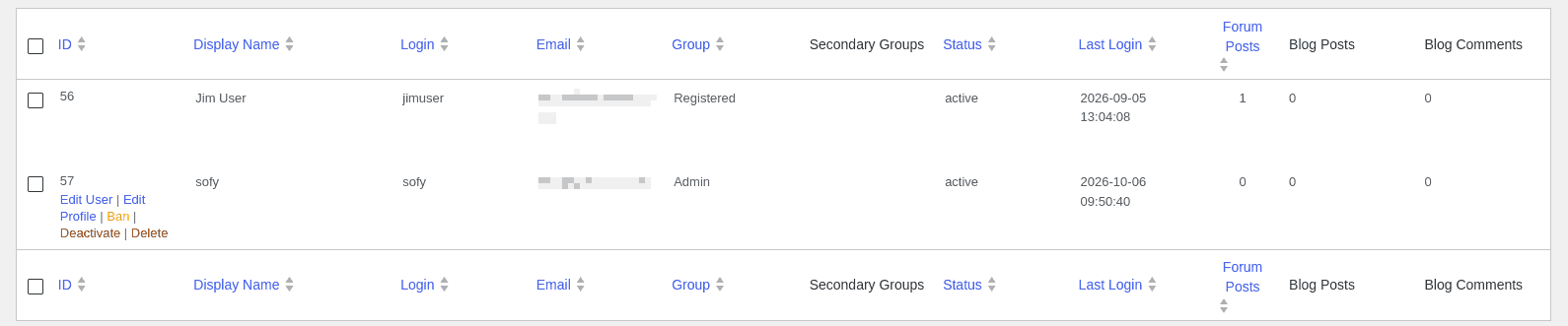
@sofy This is really strange (at least it is to me).  As you can see from the screenshot below, your account is definitely set to be an Admin.  But, I've set another of my accounts to also be an Admin and indeed you are correct that this isn't giving access to the settings page.  Only if I login as a WP Admin do I get this access.

However, on my production (as opposed to test) site, giving a wpForo user membership of the Admin group appears to be sufficient.  I will do some more experiments, but it might be necessary to give you an account on the production site.

Sofy Admin


Reply
 GWSG
(@gwsg)
Joined: 1 month ago

Active Member
Posts: 9
Sofy
Sofy
Translate ▼
English
Spanish
French
German
Italian
Portuguese
Russian
Chinese
Japanese
Korean
Arabic
Hindi
Dutch
Polish
Turkish
Vietnamese
Thai
Swedish
Danish
Finnish
Norwegian
Czech
Hungarian
Romanian
Greek
Hebrew
Indonesian
Malay
Ukrainian
Bulgarian
Croatian
Slovak
Slovenian
Serbian
Lithuanian
Latvian
Estonian

@sofy, OK, I think I've fixed it!  I went to the Overview page and clicked every button that seemed to be related to Caches, Cleaning Up or Synchronising and this seems to have given members of the Admin group their rights back.

I have checked and this has not fixed the underlying "Profiles" problem.

Please can you try to login again.

I'm coming to realise that those "Cache" etc buttons are probably more important than I thought.


Reply
Sofy
 Sofy
Admin
(@sofy)
Joined: 9 years ago

Support Team
Posts: 5904
Sofy
Translate ▼
English
Spanish
French
German
Italian
Portuguese
Russian
Chinese
Japanese
Korean
Arabic
Hindi
Dutch
Polish
Turkish
Vietnamese
Thai
Swedish
Danish
Finnish
Norwegian
Czech
Hungarian
Romanian
Greek
Hebrew
Indonesian
Malay
Ukrainian
Bulgarian
Croatian
Slovak
Slovenian
Serbian
Lithuanian
Latvian
Estonian

Thank you @gwsg,

We'll check and get back to you ASAP.  


Reply
Sofy
Posts: 5904
 Sofy
Admin
Translate ▼
English
Spanish
French
German
Italian
Portuguese
Russian
Chinese
Japanese
Korean
Arabic
Hindi
Dutch
Polish
Turkish
Vietnamese
Thai
Swedish
Danish
Finnish
Norwegian
Czech
Hungarian
Romanian
Greek
Hebrew
Indonesian
Malay
Ukrainian
Bulgarian
Croatian
Slovak
Slovenian
Serbian
Lithuanian
Latvian
Estonian
(@sofy)
Support Team
Joined: 9 years ago

Hi,

Please find the issue description below.

Newly registered users are being assigned the WordPress Author role. As a result, they have one or more of the following permissions:

if ( user_can( $userid, 'moderate_comments' ) ) {
    return true;
}

if ( user_can( $userid, 'edit_published_posts' ) ) {
    return true;
}

if ( user_can( $userid, 'manage_categories' ) ) {
    return true;
}

It appears that you may have a plugin or custom code that is assigning the Author role to newly registered users or otherwise modifying their WordPress capabilities.
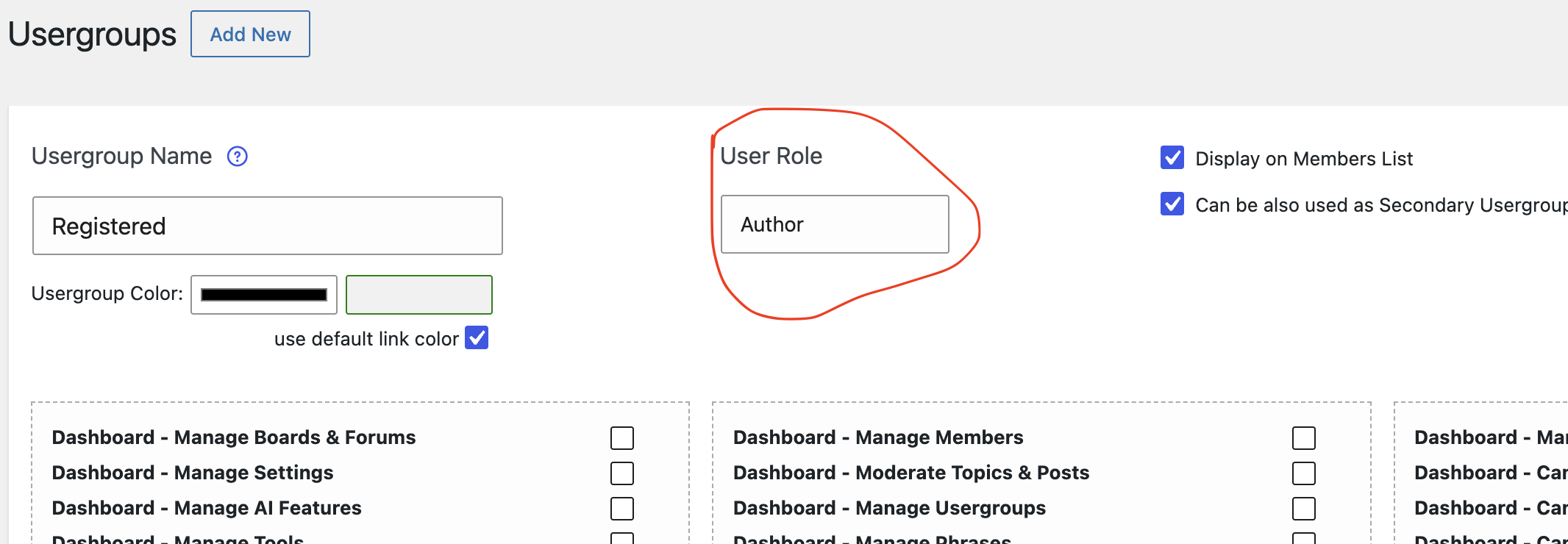
image (1)


Therefore, the issue does not come from wpForo. You will need to check which plugin or custom code is changing the user role/capabilities and make sure that newly registered users are assigned the correct WordPress role with the appropriate permissions.

Reply
2 Replies
 GWSG
(@gwsg)
Joined: 1 month ago

Active Member
Posts: 9
Translate ▼
English
Spanish
French
German
Italian
Portuguese
Russian
Chinese
Japanese
Korean
Arabic
Hindi
Dutch
Polish
Turkish
Vietnamese
Thai
Swedish
Danish
Finnish
Norwegian
Czech
Hungarian
Romanian
Greek
Hebrew
Indonesian
Malay
Ukrainian
Bulgarian
Croatian
Slovak
Slovenian
Serbian
Lithuanian
Latvian
Estonian

@sofy Thank you for coming back to me, but I'm afraid that you have left me even more confused than I was when I started.

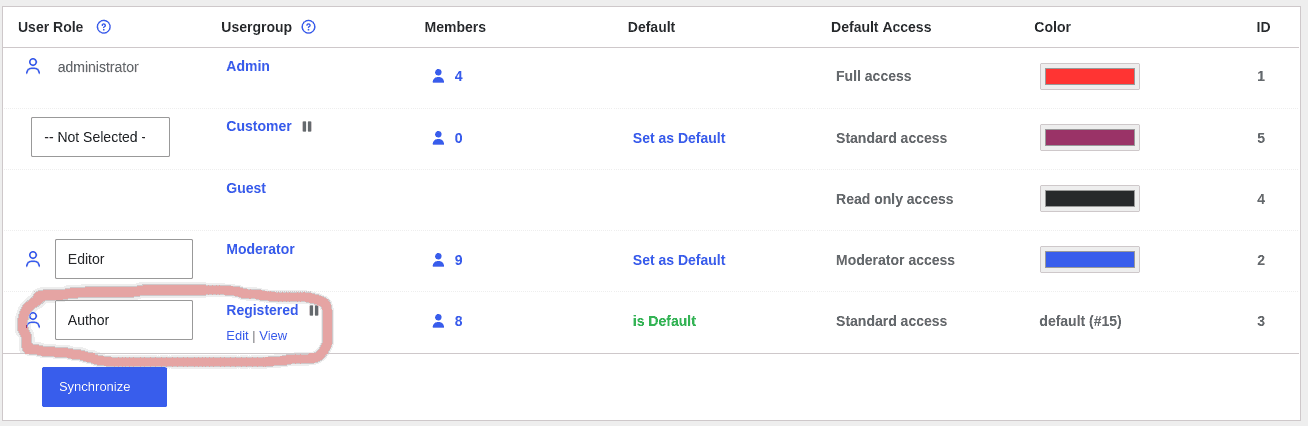
Firstly, I understand that the problem is that forum users are WP Authors?  What WP role should they have instead?  Please look at the screenshot below.  As you can see, it relates User Role "Author" to Usergroup "Registered".  Can you explain how this is wrong?  I don't recall changing this.

User Roles

Secondly, can you explain where you got the code in your blue box from?  Is this copied from somewhere in the code running my site?

You say that "Newly registered users are being assigned the WordPress Author role."  This is correct.  When I add a user to the site I assign them the Author role so that they can write posts but not create or edit pages.  Again, I presumed that this was completely default WP behaviour.

Perhaps the issue is something to do with the procedure I use for adding new users.  As you will have observed, my forum is for a private club.  By default visitors to the WP site don't see the forum at all or even a menu entry for it.  There is however a membership application form.  Someone who is interested fills this in, send it to our membership secretary together with some money.  He then sends their details to me and I give them an Author account on the WP site.  They can then login and get access to the forum together with a number of other WP pages containing members only information.

If the issue really is related to another plugin or some custom code, then I think that the best plan is for me to create a new completely blank VM, install just Linux, WP and wpForo and then experiment with that.  I understood from my friend that he had already done that on his server and seen the same problem, but I don't have access to that so I'll create my own.


Reply
Sofy
 Sofy
Admin
(@sofy)
Joined: 9 years ago

Support Team
Posts: 5904
Sofy
Translate ▼
English
Spanish
French
German
Italian
Portuguese
Russian
Chinese
Japanese
Korean
Arabic
Hindi
Dutch
Polish
Turkish
Vietnamese
Thai
Swedish
Danish
Finnish
Norwegian
Czech
Hungarian
Romanian
Greek
Hebrew
Indonesian
Malay
Ukrainian
Bulgarian
Croatian
Slovak
Slovenian
Serbian
Lithuanian
Latvian
Estonian

@gwsg 

The Author role itself is not necessarily a problem. The issue is that the Author role has certain WordPress capabilities that wpForo checks when determining permissions. For example, the code I mentioned checks whether a user has capabilities such as edit_published_posts or manage_categories.

The code in my previous message is from wpForo's permission-checking logic. It was not copied from your website, and it does not mean that you have added this code yourself.

Regarding your wpForo Usergroup settings, assigning the WordPress Author role to the Registered wpForo usergroup can be correct depending on how you have configured your site. However, because the Author role has additional WordPress capabilities, this can affect how wpForo determines certain permissions.

Your proposed test on a clean WordPress installation with only wpForo installed is actually a good way to determine whether another plugin or custom code on the current site is affecting the user capabilities.

If the same issue occurs on a completely clean installation with only WordPress and wpForo, please let us know and we can investigate it further from the wpForo side.


Reply
Page 2 / 2
Share: