
AI Search
Classic Search
 Search Phrase:
 Search Type:
Advanced search options
 Search in Forums:
 Search in date period:

 Sort Search Results by:

Filter by custom fields

Topic prefix

AI Assistant
Notifications
Clear all

[Closed] Export forum posts with timestamps and user details

2 Posts
2 Users
0 Reactions
4,130 Views
Posts: 1
Topic starter
Translate
English
Spanish
French
German
Italian
Portuguese
Russian
Chinese
Japanese
Korean
Arabic
Hindi
Dutch
Polish
Turkish
Vietnamese
Thai
Swedish
Danish
Finnish
Norwegian
Czech
Hungarian
Romanian
Greek
Hebrew
Indonesian
Malay
Ukrainian
Bulgarian
Croatian
Slovak
Slovenian
Serbian
Lithuanian
Latvian
Estonian
(@creag-munroegmail)
New Member
Joined: 5 years ago
[#17835]

BACKGROUND: I'm organizing a writing contest and want to use the forum as a submission avenue.Registered users can create a post under the topic "this month's contest" for example. They then enter their submission in the text field or upload a word doc etc.

WHAT I NEED HELP WITH: At the end of the month, how can I export all the posts from "this months contest" into a spreadsheet that includes the username of the poster, the contents of the post, and a link to the files (or even just the name).

Thanks for the help!


1 Reply
Chris
Posts: 3610
Translate
English
Spanish
French
German
Italian
Portuguese
Russian
Chinese
Japanese
Korean
Arabic
Hindi
Dutch
Polish
Turkish
Vietnamese
Thai
Swedish
Danish
Finnish
Norwegian
Czech
Hungarian
Romanian
Greek
Hebrew
Indonesian
Malay
Ukrainian
Bulgarian
Croatian
Slovak
Slovenian
Serbian
Lithuanian
Latvian
Estonian
(@chris)
Famed Member
Joined: 5 years ago

Hi @creag-munroegmail,

There is no such an option to export post data, however you can export all the posts from "wp_wpforo_posts" table as an Excel or CSV File using PhpMyAdmin Plugin.
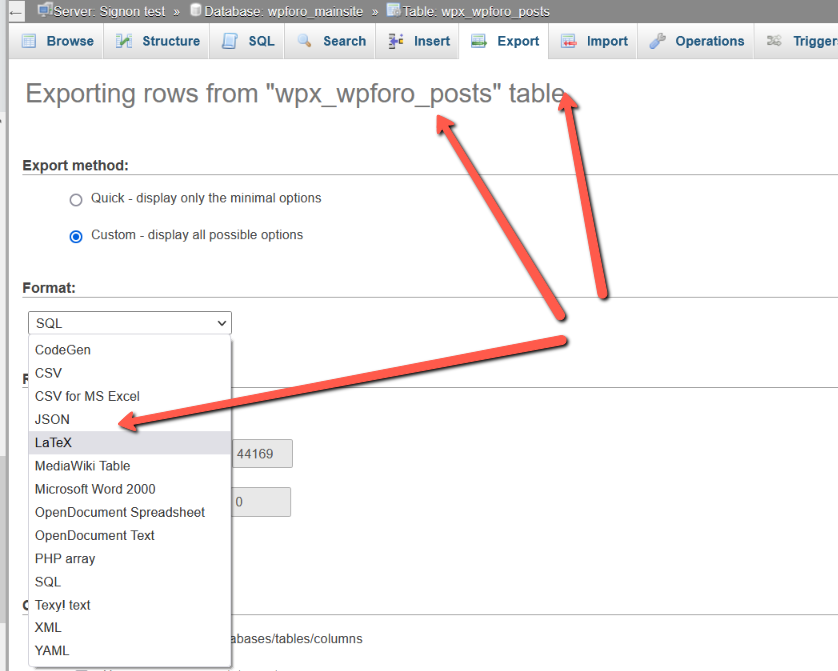
Also, you can contact our custom development team via sales[at]gvectors.com if you need custom exporting features.


Share: