AI Search
Classic Search
 Search Phrase:
 Search Type:
Advanced search options
 Search in Forums:
 Search in date period:

 Sort Search Results by:

Filter by custom fields

Topic prefix

AI Assistant
Notifications
Clear all

[Closed] Member Reputation > fontawesome not responding?

8 Posts
3 Users
0 Reactions
2,185 Views
Homdax
Posts: 21
Topic starter
Translate
English
Spanish
French
German
Italian
Portuguese
Russian
Chinese
Japanese
Korean
Arabic
Hindi
Dutch
Polish
Turkish
Vietnamese
Thai
Swedish
Danish
Finnish
Norwegian
Czech
Hungarian
Romanian
Greek
Hebrew
Indonesian
Malay
Ukrainian
Bulgarian
Croatian
Slovak
Slovenian
Serbian
Lithuanian
Latvian
Estonian
(@homdax)
Eminent Member
Joined: 6 years ago
[#11351]

I am looking to do some changes in the member Reputation section, https://wpforo.com/docs/root/members/member-reputation/  , looking for other icons and graphics instead of default, but https://fontawesome.io/icons/ is not available. I realise this may not be something you can do anything about, but how can I do this in another way?


7 Replies
Posts: 993
Moderator
Translate
English
Spanish
French
German
Italian
Portuguese
Russian
Chinese
Japanese
Korean
Arabic
Hindi
Dutch
Polish
Turkish
Vietnamese
Thai
Swedish
Danish
Finnish
Norwegian
Czech
Hungarian
Romanian
Greek
Hebrew
Indonesian
Malay
Ukrainian
Bulgarian
Croatian
Slovak
Slovenian
Serbian
Lithuanian
Latvian
Estonian
(@martin)
Support Team
Joined: 10 years ago

Hi @homdax,

Please find all fontawesome icons here: https://fontawesome.com/icons?d=gallery&m=free


Homdax
Posts: 21
Topic starter
Translate
English
Spanish
French
German
Italian
Portuguese
Russian
Chinese
Japanese
Korean
Arabic
Hindi
Dutch
Polish
Turkish
Vietnamese
Thai
Swedish
Danish
Finnish
Norwegian
Czech
Hungarian
Romanian
Greek
Hebrew
Indonesian
Malay
Ukrainian
Bulgarian
Croatian
Slovak
Slovenian
Serbian
Lithuanian
Latvian
Estonian
(@homdax)
Eminent Member
Joined: 6 years ago

mm, but that is the same place...? Maybe the link from wpForo plugin  is wrong somehow...


1 Reply
Moderator
(@martin)
Joined: 10 years ago

Support Team
Posts: 993
Translate
English
Spanish
French
German
Italian
Portuguese
Russian
Chinese
Japanese
Korean
Arabic
Hindi
Dutch
Polish
Turkish
Vietnamese
Thai
Swedish
Danish
Finnish
Norwegian
Czech
Hungarian
Romanian
Greek
Hebrew
Indonesian
Malay
Ukrainian
Bulgarian
Croatian
Slovak
Slovenian
Serbian
Lithuanian
Latvian
Estonian

@homdax

This URL opens all Fontawesome icons, what else you are searching for? Just click on some icon, copy the icon class names and put it in your reputation badge settings.


Homdax
Posts: 21
Topic starter
Translate
English
Spanish
French
German
Italian
Portuguese
Russian
Chinese
Japanese
Korean
Arabic
Hindi
Dutch
Polish
Turkish
Vietnamese
Thai
Swedish
Danish
Finnish
Norwegian
Czech
Hungarian
Romanian
Greek
Hebrew
Indonesian
Malay
Ukrainian
Bulgarian
Croatian
Slovak
Slovenian
Serbian
Lithuanian
Latvian
Estonian
(@homdax)
Eminent Member
Joined: 6 years ago

The link from your interface points to www.fontawesome.io . Not www.fontawesome.com


wpforo more
wpforo fontawsome link
 
 
How would I replace that with custom icons made from stuff not available in fontawesome?

2 Replies
Moderator
(@martin)
Joined: 10 years ago

Support Team
Posts: 993
Translate
English
Spanish
French
German
Italian
Portuguese
Russian
Chinese
Japanese
Korean
Arabic
Hindi
Dutch
Polish
Turkish
Vietnamese
Thai
Swedish
Danish
Finnish
Norwegian
Czech
Hungarian
Romanian
Greek
Hebrew
Indonesian
Malay
Ukrainian
Bulgarian
Croatian
Slovak
Slovenian
Serbian
Lithuanian
Latvian
Estonian

@homdax

Icons are not loaded from font-awesome websites, so it doesn't matter what link is in dashboard and what is in real. Fontawesome people have changed own website link, that way it's not the same. Just forget about the site URL and do what you need to do.

First choose an icon you want, for example I choose this one:

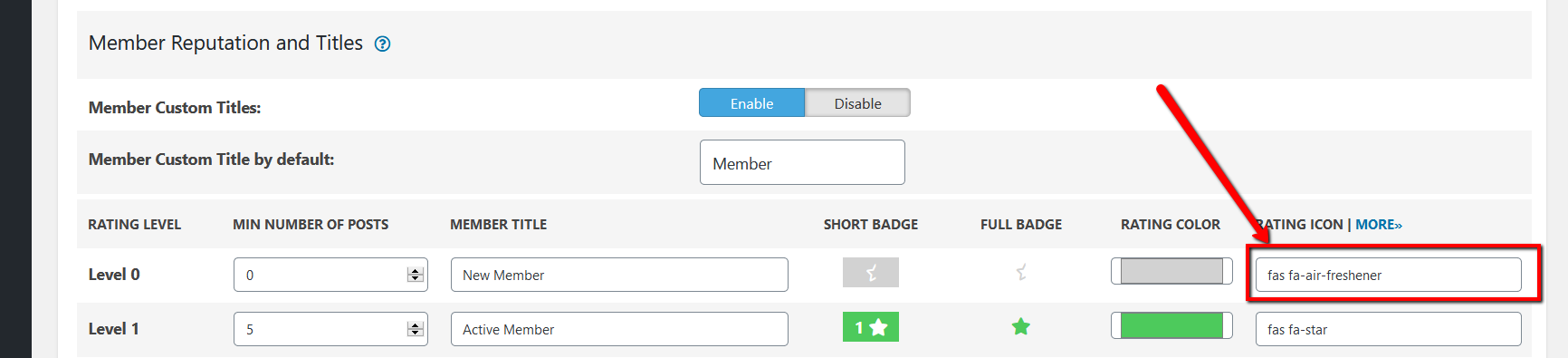
Then click on that icon and open icon data. Copy the class names like I've displayed on screenshot.

When you click on that item, it copies the whole code <i class="fas fa-air-freshener"></i>, you can paste it in the setting field and remove unnecessary red marked parts, so the option value should only be the class names fas fa-air-freshener:

There are hundreds of icons in this lib so you can choose whatever you want. But there is no way to upload custom icon.


Homdax
(@homdax)
Joined: 6 years ago

Eminent Member
Posts: 21
Homdax
Translate
English
Spanish
French
German
Italian
Portuguese
Russian
Chinese
Japanese
Korean
Arabic
Hindi
Dutch
Polish
Turkish
Vietnamese
Thai
Swedish
Danish
Finnish
Norwegian
Czech
Hungarian
Romanian
Greek
Hebrew
Indonesian
Malay
Ukrainian
Bulgarian
Croatian
Slovak
Slovenian
Serbian
Lithuanian
Latvian
Estonian
Posted by: @martin

There are hundreds of icons in this lib so you can choose whatever you want. But there is no way to upload custom icon.

Bummer. Unless you create your own fontawesome library which I read about. Not very awesome. Ah well it's a minor thing.


yojit_cooldude
Posts: 7
Translate
English
Spanish
French
German
Italian
Portuguese
Russian
Chinese
Japanese
Korean
Arabic
Hindi
Dutch
Polish
Turkish
Vietnamese
Thai
Swedish
Danish
Finnish
Norwegian
Czech
Hungarian
Romanian
Greek
Hebrew
Indonesian
Malay
Ukrainian
Bulgarian
Croatian
Slovak
Slovenian
Serbian
Lithuanian
Latvian
Estonian
(@yojit_cooldude)
Active Member
Joined: 5 years ago

My issue is a little different than of the icon issue, but i am looking for quick resposne from the team that is why posting 

Can I get full control of the reputation system as an admin on my forum? What I mean is :-

Rather than providing min number of posts for members to reach higher level. I control which member should be granted what level. 

P.S I know that i can manually grant them a level, but if they again exceed the min number of posts they will level up, but I wish to restrict them at one level.


Share: