

We have two primary usergroups that we use on our site, the Registered usergroup for students, and the Customer usergroup for parents, which gives them access to additional forums. When the wpForo plugin updated, the Registered usergroup became the default usergroup associated with the Subscriber User Role. So, I set up the Customer usergroup to be a secondary usergroup, and when I add parents to the forum, I clicked the checkbox next to Customer. This method had been working fine, but I am discovering today that parents that I have added to the forum recently cannot see the forums just for the Customer usergroup. Even though I click the checkbox next to Customer then click Save (or Update User if I am updating), the check is not being saved.

Thank you @sworden,
Ok, thank you for letting us know. We'll fix this in next version. As an alternative you can change Forum member Secondary Usergroup in the member profile > Account page on forum front-end. Or just navigate to Dashboard > Forums > Members admin page, find the member, click on "edit profile" link and edit Usergroup.
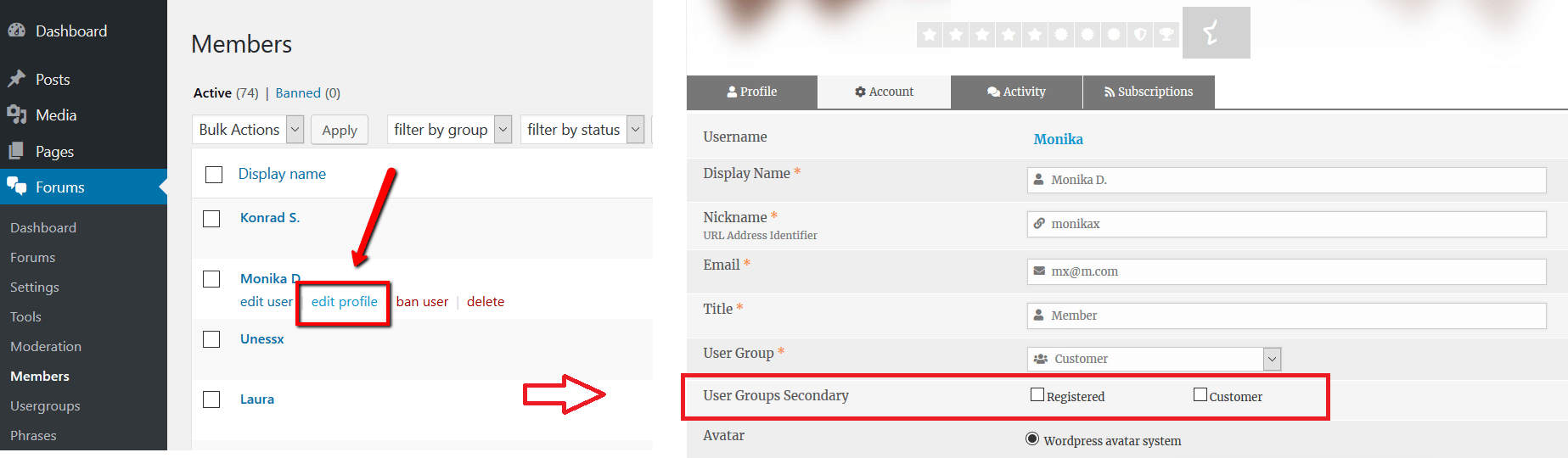
Thanks for the workaround! Is there a way to temporarily change the default usergroup associated with the Subscriber User Role? I tried changing "Customer" to the default, but because I have more than one usergroup associated with the Subscriber User Role, it couldn't sync. But I don't want to change the User Roles for the other usergroups because my other choices (Contributor, Admin, etc.) give them too much power on the site, if that makes sense. Basically, I have hundreds of users that I'm going to have to do your workaround for one by one.
You can create a new Usergroup, say "New Registered". And if necessary you can create a new User Role and synchronize it with "New Registered" Usergroup. There are many plugins which allows you create new User Roles.