
AI Search
Classic Search
 Search Phrase:
 Search Type:
Advanced search options
 Search in Forums:
 Search in date period:

 Sort Search Results by:

AI Assistant
Notifications
Clear all

[Solved] Change the background color from active menu item

6 Posts
2 Users
2 Reactions
89 Views
Posts: 8
Topic starter
Translate
English
Spanish
French
German
Italian
Portuguese
Russian
Chinese
Japanese
Korean
Arabic
Hindi
Dutch
Polish
Turkish
Vietnamese
Thai
Swedish
Danish
Finnish
Norwegian
Czech
Hungarian
Romanian
Greek
Hebrew
Indonesian
Malay
Ukrainian
Bulgarian
Croatian
Slovak
Slovenian
Serbian
Lithuanian
Latvian
Estonian
(@gjhvs)
Active Member
Joined: 1 month ago
[#72973]

Hi,

I want to change a color but I cannot find which item it is I have to adjust on Forum settings, Colors & Styles.

-- attachment is not available --

I want to change the darker grey color from the active item in the menu (see screenshot above). For this example I want the background color for Forum to be blue.

Where and how can I change that?


5 Replies
Posts: 8
Topic starter
Translate
English
Spanish
French
German
Italian
Portuguese
Russian
Chinese
Japanese
Korean
Arabic
Hindi
Dutch
Polish
Turkish
Vietnamese
Thai
Swedish
Danish
Finnish
Norwegian
Czech
Hungarian
Romanian
Greek
Hebrew
Indonesian
Malay
Ukrainian
Bulgarian
Croatian
Slovak
Slovenian
Serbian
Lithuanian
Latvian
Estonian
(@gjhvs)
Active Member
Joined: 1 month ago

Sorry, something went wrong with the attachment. See the screenshot here: 

active menu item

Reply
1 Reply
Sofy
 Sofy
Admin
(@sofy)
Joined: 8 years ago

Support Team
Posts: 5806
Translate
English
Spanish
French
German
Italian
Portuguese
Russian
Chinese
Japanese
Korean
Arabic
Hindi
Dutch
Polish
Turkish
Vietnamese
Thai
Swedish
Danish
Finnish
Norwegian
Czech
Hungarian
Romanian
Greek
Hebrew
Indonesian
Malay
Ukrainian
Bulgarian
Croatian
Slovak
Slovenian
Serbian
Lithuanian
Latvian
Estonian

@gjhvs 

Use the CSS code below: 

#wpforo #wpforo-wrap #wpforo-menu #wpf-menu li.wpforo-active{
      background-color: #680029 !important;
}

Please insert the code in the "Custom CSS Code" testarea. 

Change the red-marked value before using it.


Reply
Posts: 8
Topic starter
Translate
English
Spanish
French
German
Italian
Portuguese
Russian
Chinese
Japanese
Korean
Arabic
Hindi
Dutch
Polish
Turkish
Vietnamese
Thai
Swedish
Danish
Finnish
Norwegian
Czech
Hungarian
Romanian
Greek
Hebrew
Indonesian
Malay
Ukrainian
Bulgarian
Croatian
Slovak
Slovenian
Serbian
Lithuanian
Latvian
Estonian
(@gjhvs)
Active Member
Joined: 1 month ago

Yes, thanks!

And is it also possible to make the text white in that active item so it reads a bit better?
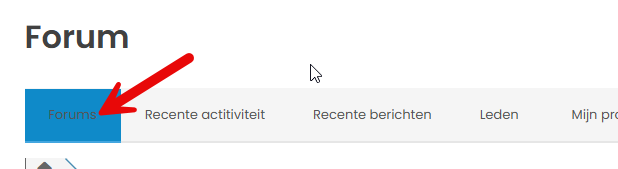
text to white

Reply
2 Replies
Sofy
 Sofy
Admin
(@sofy)
Joined: 8 years ago

Support Team
Posts: 5806
Translate
English
Spanish
French
German
Italian
Portuguese
Russian
Chinese
Japanese
Korean
Arabic
Hindi
Dutch
Polish
Turkish
Vietnamese
Thai
Swedish
Danish
Finnish
Norwegian
Czech
Hungarian
Romanian
Greek
Hebrew
Indonesian
Malay
Ukrainian
Bulgarian
Croatian
Slovak
Slovenian
Serbian
Lithuanian
Latvian
Estonian

@gjhvs 

Sure, please use this CSS code: 

#wpforo #wpforo-wrap #wpforo-menu #wpf-menu li.wpforo-active a{
      color: #680029 !important;
}

Reply
(@gjhvs)
Joined: 1 month ago

Active Member
Posts: 8
Translate
English
Spanish
French
German
Italian
Portuguese
Russian
Chinese
Japanese
Korean
Arabic
Hindi
Dutch
Polish
Turkish
Vietnamese
Thai
Swedish
Danish
Finnish
Norwegian
Czech
Hungarian
Romanian
Greek
Hebrew
Indonesian
Malay
Ukrainian
Bulgarian
Croatian
Slovak
Slovenian
Serbian
Lithuanian
Latvian
Estonian

@sofy Thanks so much! Now the menu is more in style with our site.


Reply
Share:
