

Hello, we’ve recently encountered a problem where a new post looks completely messed up. My colleague thinks it’s due to the HTML code, not the server or anything else. What could be causing this and how can we fix it?
Version: 3.1.4
https://www.directupload.eu/file/d/9367/ojouwii8_png.htm
Unfortunately, I can't send a live link because the forum isn't visible to everyone...





Yes, there was indeed something broken in the post, but how can this be prevented in the future? Because it completely ruined the whole page!
This is not a wpForo-related issue. The problem is caused by broken HTML in the topic/post content submitted by the user.
For example, there may be an HTML tag that was opened but not properly closed, or a bracket/HTML character may be missing (such as < or >). This malformed HTML is causing the issue.
Please check the content of the affected topic/post for any broken or incomplete HTML markup.

I have seen a similar issue. I have found that it mostly happens when users attempt to quote other users on wpForo. On mobile, the viewport doesn't always bring a user to the bottom of the text editor. They do this because they do not even SEE the BBCode at all. And certainly may not know that they need to type after it.
The html gets all messed up, especially on desktop. It is less noticeable on mobile on the output. Then it gets even worse if another user quotes the broken quote.
So this is partially a problem with the users, but how are they supposed to know? I do think ultimately it is a problem that wpForo could correct. Users do not care about BBCode and many have no idea what it really is. I mean when a user sees something like this...
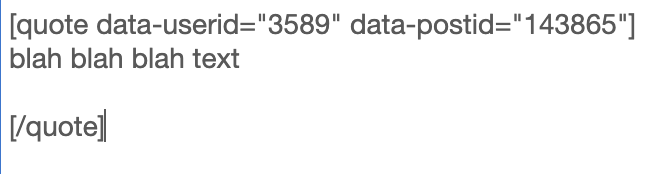
Yes the text copy is important, but userid and postid is completely useless to them and have now idea what BBCode is. I think it would be much cleaner to keep that metadata in the background and not seen and actually show something more along the lines of
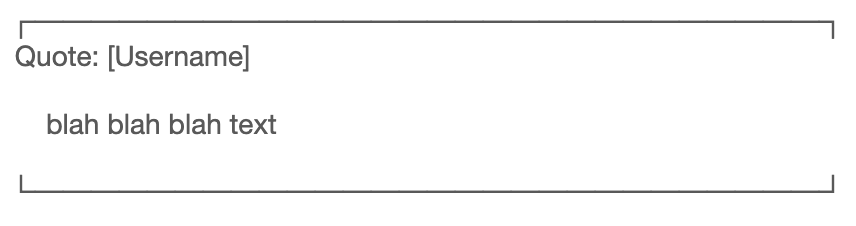
No BBcode visible for the user to accidentally to type in or potentially mess up the html output.
I think this is something wpForo should implement. This was a problem within v2 as well. I am currently developing a small plugin that will hopefully fix this issue, but it would certainly be better if wpForo took care of this instead.
EDIT: I needed to turn the code I was trying to share in to images.