AI Search
Classic Search
 Search Phrase:
 Search Type:
Advanced search options
 Search in Forums:
 Search in date period:

 Sort Search Results by:

Filter by custom fields

Topic prefix

AI Assistant
Notifications
Clear all

[Closed] Colour change of register and login button

7 Posts
2 Users
0 Reactions
3,633 Views
StocksForum
Posts: 135
Topic starter
Translate
English
Spanish
French
German
Italian
Portuguese
Russian
Chinese
Japanese
Korean
Arabic
Hindi
Dutch
Polish
Turkish
Vietnamese
Thai
Swedish
Danish
Finnish
Norwegian
Czech
Hungarian
Romanian
Greek
Hebrew
Indonesian
Malay
Ukrainian
Bulgarian
Croatian
Slovak
Slovenian
Serbian
Lithuanian
Latvian
Estonian
(@stocksforum)
Estimable Member
Joined: 8 years ago
[#8624]

How can I change the colour of these buttons from blue to orange?

I want to keep all other buttons on the forum as they are...
Only the 'Register' and 'Sign In' buttons that I want to edit.

Thanks in advance

1

6 Replies
StocksForum
Posts: 135
Topic starter
Translate
English
Spanish
French
German
Italian
Portuguese
Russian
Chinese
Japanese
Korean
Arabic
Hindi
Dutch
Polish
Turkish
Vietnamese
Thai
Swedish
Danish
Finnish
Norwegian
Czech
Hungarian
Romanian
Greek
Hebrew
Indonesian
Malay
Ukrainian
Bulgarian
Croatian
Slovak
Slovenian
Serbian
Lithuanian
Latvian
Estonian
(@stocksforum)
Estimable Member
Joined: 8 years ago
Sofy
Posts: 5774
 Sofy
Admin
Translate
English
Spanish
French
German
Italian
Portuguese
Russian
Chinese
Japanese
Korean
Arabic
Hindi
Dutch
Polish
Turkish
Vietnamese
Thai
Swedish
Danish
Finnish
Norwegian
Czech
Hungarian
Romanian
Greek
Hebrew
Indonesian
Malay
Ukrainian
Bulgarian
Croatian
Slovak
Slovenian
Serbian
Lithuanian
Latvian
Estonian
(@sofy)
Support Team
Joined: 8 years ago

Hi @stocksforum,

You should use the following CSS codes:

#wpforo #wpforo-wrap .wpforo-register-wrap .wpf-field.wpf-field-type-submit input[type="submit"] {
background-color: #fc7402;
}

#wpforo #wpforo-wrap .wpforo-login-wrap .wpf-field .wpf-field-wrap input[type="submit"] {
background-color: #fc7402;
}

Please don't forget to change the red marked codes before using. 


StocksForum
Posts: 135
Topic starter
Translate
English
Spanish
French
German
Italian
Portuguese
Russian
Chinese
Japanese
Korean
Arabic
Hindi
Dutch
Polish
Turkish
Vietnamese
Thai
Swedish
Danish
Finnish
Norwegian
Czech
Hungarian
Romanian
Greek
Hebrew
Indonesian
Malay
Ukrainian
Bulgarian
Croatian
Slovak
Slovenian
Serbian
Lithuanian
Latvian
Estonian
(@stocksforum)
Estimable Member
Joined: 8 years ago

Thanks, that worked...but it still has a blue border around the button...how can I make it orange as instead?

Also to make the word 'Sign In and 'Register' be bold?
I realise it's something (font-weight: bold;) but not sure the rest.

And the word 'Register' to be in font size 16px.


Sofy
Posts: 5774
 Sofy
Admin
Translate
English
Spanish
French
German
Italian
Portuguese
Russian
Chinese
Japanese
Korean
Arabic
Hindi
Dutch
Polish
Turkish
Vietnamese
Thai
Swedish
Danish
Finnish
Norwegian
Czech
Hungarian
Romanian
Greek
Hebrew
Indonesian
Malay
Ukrainian
Bulgarian
Croatian
Slovak
Slovenian
Serbian
Lithuanian
Latvian
Estonian
(@sofy)
Support Team
Joined: 8 years ago

Dear @stocksforum,

I'm really sorry but this requires custom CSS coding and it depends on different dynamic conditions, this is not a stable color and doesn't have a simple solution. Please note, that we don't provide support for style customization, we may help in 1-2 simple questions related to colors and background but not more. We can not help you customize all components of forum style, these are custom requirements and should be done by forum owners. We only help with general questions and issues.

Thank you for your understanding.

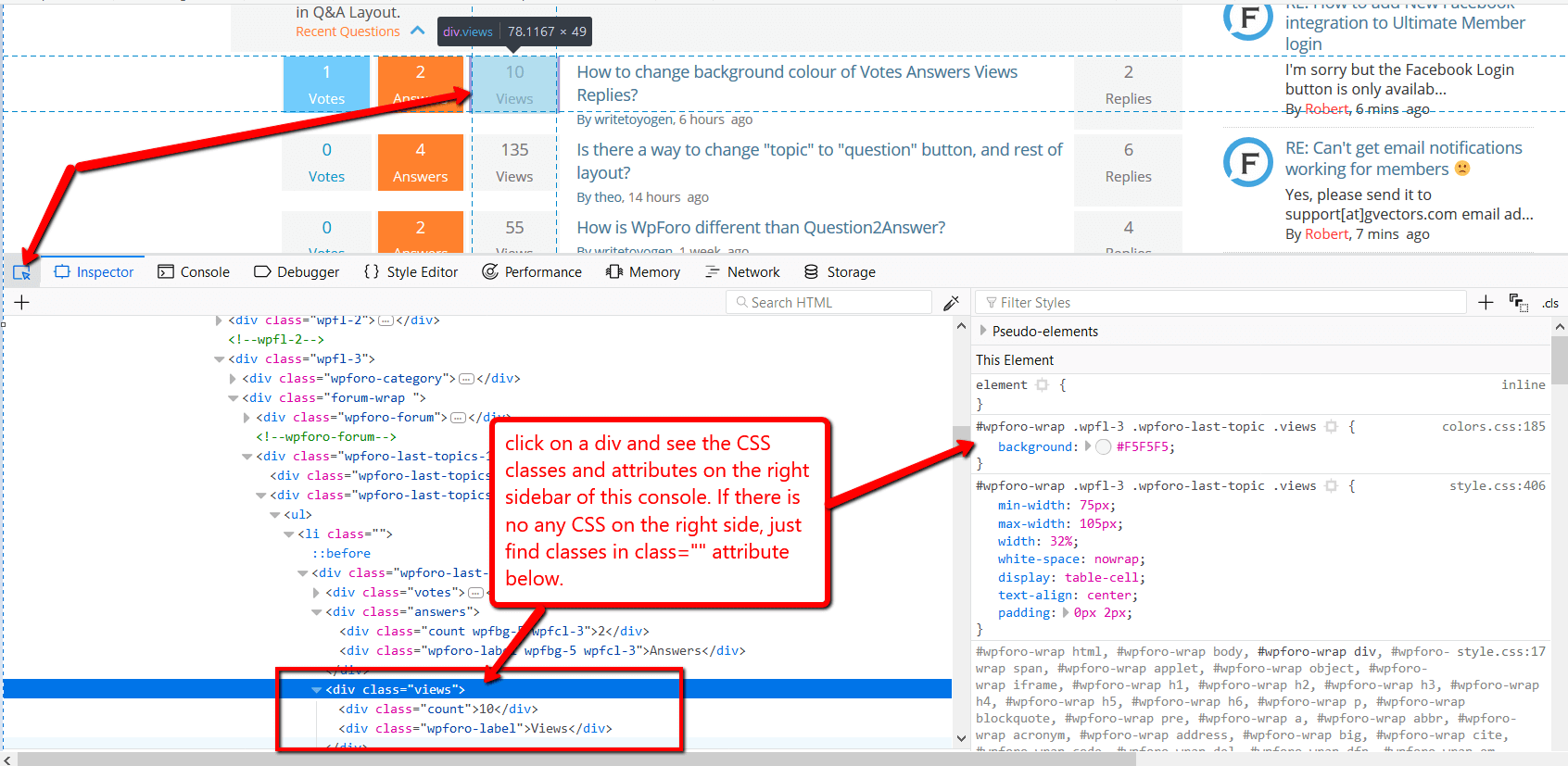
You can find all classes by pressing F12 on the browser and opening Chrome or Firefox Console:


2 Replies
StocksForum
(@stocksforum)
Joined: 8 years ago

Estimable Member
Posts: 135
Translate
English
Spanish
French
German
Italian
Portuguese
Russian
Chinese
Japanese
Korean
Arabic
Hindi
Dutch
Polish
Turkish
Vietnamese
Thai
Swedish
Danish
Finnish
Norwegian
Czech
Hungarian
Romanian
Greek
Hebrew
Indonesian
Malay
Ukrainian
Bulgarian
Croatian
Slovak
Slovenian
Serbian
Lithuanian
Latvian
Estonian

Ok thanks, understand. I'll look for alternative options.

How can I make the word 'Sign In' and 'Register' be bold?
I realise it's something (font-weight: bold;) but not sure the rest.

And the word 'Register' to be in font size 16px, instead of 14px.


Sofy
 Sofy
Admin
(@sofy)
Joined: 8 years ago

Support Team
Posts: 5774
Sofy
Translate
English
Spanish
French
German
Italian
Portuguese
Russian
Chinese
Japanese
Korean
Arabic
Hindi
Dutch
Polish
Turkish
Vietnamese
Thai
Swedish
Danish
Finnish
Norwegian
Czech
Hungarian
Romanian
Greek
Hebrew
Indonesian
Malay
Ukrainian
Bulgarian
Croatian
Slovak
Slovenian
Serbian
Lithuanian
Latvian
Estonian

@stocksforum,

How can I make the word 'Sign In' and 'Register' be bold?

yes, you should add the {font-weight: bold;} CSS rule in both codes I've provided here

And the word 'Register' to be in font size 16px, instead of 14px.

Use this CSS code: 

#wpforo #wpforo-wrap .wpforo-register-wrap .wpf-field.wpf-field-type-submit input[type="submit"] {
font-size:16px!important
}

Share: