
AI Search
Classic Search
 Search Phrase:
 Search Type:
Advanced search options
 Search in Forums:
 Search in date period:

 Sort Search Results by:

AI Assistant
Notifications
Clear all

[Closed] Add social network

10 Posts
6 Users
0 Reactions
10.6 K Views
Posts: 12
Topic starter
Translate
English
Spanish
French
German
Italian
Portuguese
Russian
Chinese
Japanese
Korean
Arabic
Hindi
Dutch
Polish
Turkish
Vietnamese
Thai
Swedish
Danish
Finnish
Norwegian
Czech
Hungarian
Romanian
Greek
Hebrew
Indonesian
Malay
Ukrainian
Bulgarian
Croatian
Slovak
Slovenian
Serbian
Lithuanian
Latvian
Estonian
(@zetmouse)
Active Member
Joined: 8 years ago
[#5348]

I'm from Russia.
We have a Russian social network VKONTAKTE (vk.com)
Can I add this to a member profile?


9 Replies
Robert
Posts: 10741
Admin
Translate
English
Spanish
French
German
Italian
Portuguese
Russian
Chinese
Japanese
Korean
Arabic
Hindi
Dutch
Polish
Turkish
Vietnamese
Thai
Swedish
Danish
Finnish
Norwegian
Czech
Hungarian
Romanian
Greek
Hebrew
Indonesian
Malay
Ukrainian
Bulgarian
Croatian
Slovak
Slovenian
Serbian
Lithuanian
Latvian
Estonian
(@robert)
Support Team
Joined: 3 months ago

I think the easiest way to change one of Social Network to VKONTAKTE, for example in phrase system search for ICQ or AOL IM and change the phrase to Vkontakte. This will be displayed as Vkontakte field on forum front.


1 Reply
(@zetmouse)
Joined: 8 years ago

Active Member
Posts: 12
Translate
English
Spanish
French
German
Italian
Portuguese
Russian
Chinese
Japanese
Korean
Arabic
Hindi
Dutch
Polish
Turkish
Vietnamese
Thai
Swedish
Danish
Finnish
Norwegian
Czech
Hungarian
Romanian
Greek
Hebrew
Indonesian
Malay
Ukrainian
Bulgarian
Croatian
Slovak
Slovenian
Serbian
Lithuanian
Latvian
Estonian

And how to replace the icon?


Robert
Posts: 10741
Admin
Translate
English
Spanish
French
German
Italian
Portuguese
Russian
Chinese
Japanese
Korean
Arabic
Hindi
Dutch
Polish
Turkish
Vietnamese
Thai
Swedish
Danish
Finnish
Norwegian
Czech
Hungarian
Romanian
Greek
Hebrew
Indonesian
Malay
Ukrainian
Bulgarian
Croatian
Slovak
Slovenian
Serbian
Lithuanian
Latvian
Estonian
(@robert)
Support Team
Joined: 3 months ago

For example you change AOL IM to Vkantacte.

$field = 'aim';

For example you change ICQ to Vkantacte.

$field = 'icq';

You should add a small code in wpForo Field hook. Navigate to Dashboard > Appearance > Editor and put this code in functions.php file of your active child theme's functions.php file. If it doesn't have child theme put it in current theme functions.php file.

I'd also recommend use WP Editor plugin instead of WordPress native editor. The native editor sometimes doesn't save changes. Just install WP Editor then navigate to the same page and put this code as described above.

function wpforo_change_social_field_icon( $fields ){
//Field name
$field = 'aim';
//Font-Awesome icon class http://fontawesome.io/icons/
$icon = 'fa-vk';
if( !empty($fields) && isset($fields[$field])) $fields[$field]['faIcon'] = $icon;
return $fields;
}
add_filter( 'wpforo_member_after_init_fields', 'wpforo_change_social_field_icon' );
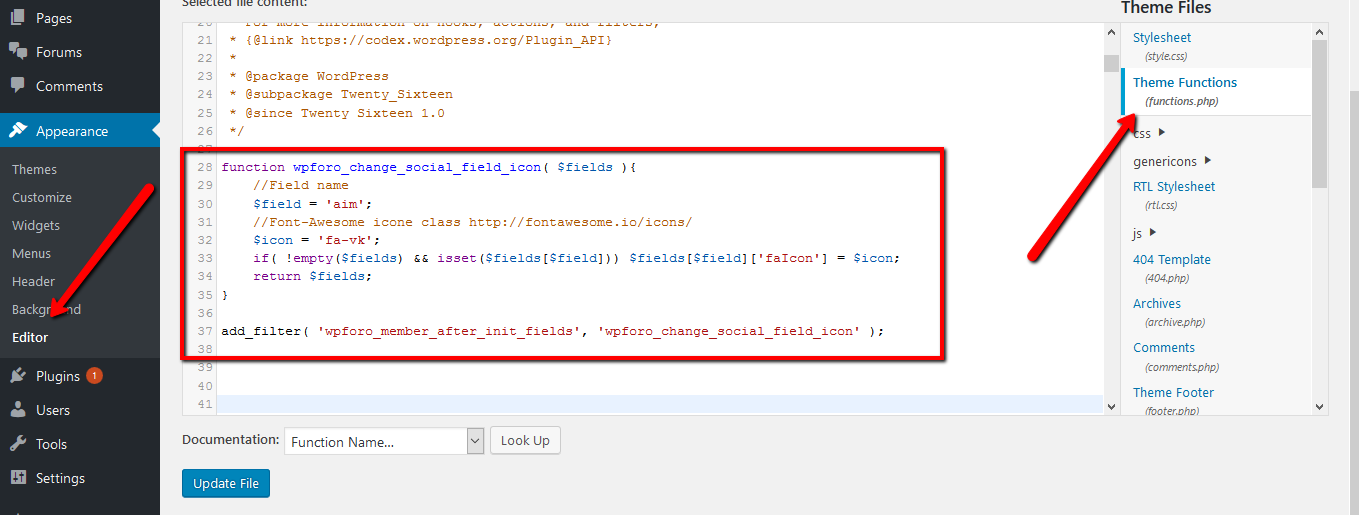


1 Reply
(@zetmouse)
Joined: 8 years ago

Active Member
Posts: 12
Translate
English
Spanish
French
German
Italian
Portuguese
Russian
Chinese
Japanese
Korean
Arabic
Hindi
Dutch
Polish
Turkish
Vietnamese
Thai
Swedish
Danish
Finnish
Norwegian
Czech
Hungarian
Romanian
Greek
Hebrew
Indonesian
Malay
Ukrainian
Bulgarian
Croatian
Slovak
Slovenian
Serbian
Lithuanian
Latvian
Estonian

I did not understand.
Where should I insert the code?
Installed topic News Magazine ( http://themedemo.web-dorado.com/theme-newsmagazine/)

nm

Robert
Posts: 10741
Admin
Translate
English
Spanish
French
German
Italian
Portuguese
Russian
Chinese
Japanese
Korean
Arabic
Hindi
Dutch
Polish
Turkish
Vietnamese
Thai
Swedish
Danish
Finnish
Norwegian
Czech
Hungarian
Romanian
Greek
Hebrew
Indonesian
Malay
Ukrainian
Bulgarian
Croatian
Slovak
Slovenian
Serbian
Lithuanian
Latvian
Estonian
(@robert)
Support Team
Joined: 3 months ago

The functions.php file is not the same for all themes, the content code is different, but all extra codes people insert in functions.php file. Just click on line #4, copy the code and paste there. Then save it and check. If you doubt, just send admin login details to support[at]gvectors.com email address, we'll do that for you.


Posts: 38
Translate
English
Spanish
French
German
Italian
Portuguese
Russian
Chinese
Japanese
Korean
Arabic
Hindi
Dutch
Polish
Turkish
Vietnamese
Thai
Swedish
Danish
Finnish
Norwegian
Czech
Hungarian
Romanian
Greek
Hebrew
Indonesian
Malay
Ukrainian
Bulgarian
Croatian
Slovak
Slovenian
Serbian
Lithuanian
Latvian
Estonian
(@annabwashere)
Trusted Member
Joined: 7 years ago

Do we do this for every social network we need to change?

For example, I am changing AIM for Instagram, ICQ for Flickr and MSN for YouTube.

I have done it for Instagram already, but when filling out the field, it doesn't ask for a URL so the result isn't a link (like the Twitter field).

And how do we remove the other fields we don't need?


Page 1 / 2
Share: