
[Closed] Missing Solved & Sticky buttons in Threaded Forum

Since upgrading to 2.0.6, the threaded posts don't have a solved button and there is no way to remove a sticky. Any help would be appreciated!

Hi @tchambers,
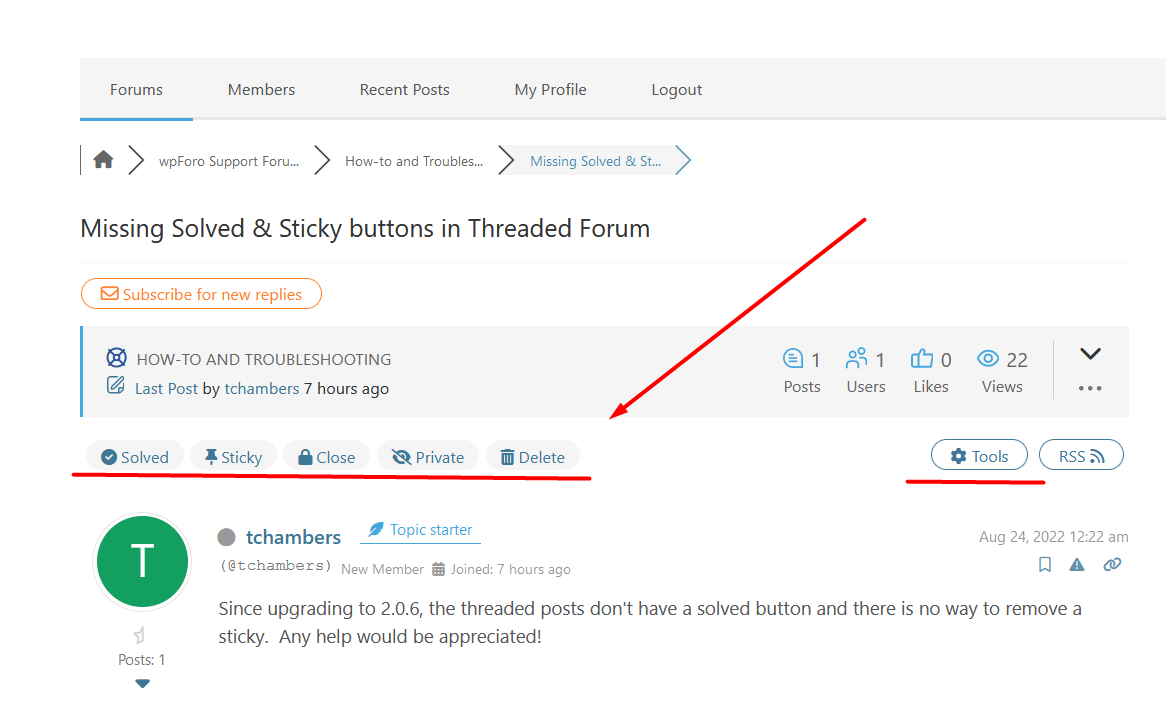
It seems you've done some CSS customization and hidden the top section of your topics. Almost all buttons and tools are located there:
In case you want to say thank you !)
We'd really appreciate and be thankful if you leave a good review on plugin page. This is the best way to say thank you to this project and support team.
@robert I can see the buttons in the colors.css file. Do I need to copy the css file on the server manually? Are there other css files where this would have been hidden?


You see correct CSS, and they work fine, you don't need to copy them. You should find the custom CSS which set display:none to wrapper divs of the topic header.
Where are your custom CSS codes? Start checking to wpForo > Settings > Colors & Styles admin page, then the top admin bar > customize > additional css textarea. In other words, just find the css you've used to customize wpForo template.
In case you want to say thank you !)
We'd really appreciate and be thankful if you leave a good review on plugin page. This is the best way to say thank you to this project and support team.


The toolbar was visible before the upgrade to 2.0.6. Could this be a permissions issue since the toolbar with buttons and tools are not visible when logged out?
insert this CSS Code in wpForo > Settings > Colors & Styles admin page
#wpforo #wpforo-wrap .wpforo-main .wpforo-content .wpforo-post-head {
    display: unset !important;
}
In case you want to say thank you !)
We'd really appreciate and be thankful if you leave a good review on plugin page. This is the best way to say thank you to this project and support team.


@robert @Chris I reverted back to the 1.7.1 theme and both the toolbar and solved and sticky are visible.

@robert Is it possible to re-install wpforo and not lose the forum data?
yes, open plugin's admin page, press Deactivate Button, then Delete.
Please NOTE: DO NOT PRESS UNINSTALL.
In case you want to say thank you !)
We'd really appreciate and be thankful if you leave a good review on plugin page. This is the best way to say thank you to this project and support team.
@chris Unfortunately, this did not resolve the issue with the missing toolbar.

In case you want to say thank you !)
We'd really appreciate and be thankful if you leave a good review on plugin page. This is the best way to say thank you to this project and support team.
@chris Both admin and Standard (registered or subscriber) users have access. I did get the functionality back by rolling back to the 1.7.1 theme
Please send admin login details to support[at]gvectors.com email address. We'll check it within 1-2 days.
In case you want to say thank you !)
We'd really appreciate and be thankful if you leave a good review on plugin page. This is the best way to say thank you to this project and support team.
-
Rich Text Editor not displaying for some users
3 months ago
-
Blog Comments in profile wrong
3 months ago
-
Bug in the recent posts widget
3 months ago
-
Register problem
5 months ago
-
Report button
5 months ago
- 19 Forums
- 14.3 K Topics
- 71.7 K Posts
- 51 Online
- 6,466 Members